Manual for AT-40

Manual for AT-40

Brand: Generic

Category: Home Appliances

Document Type: Manual

Language: EN
Uploaded: Nov. 21, 2025, 6:02 p.m.

Warranty Information

Refer to your supplier for warranty information.

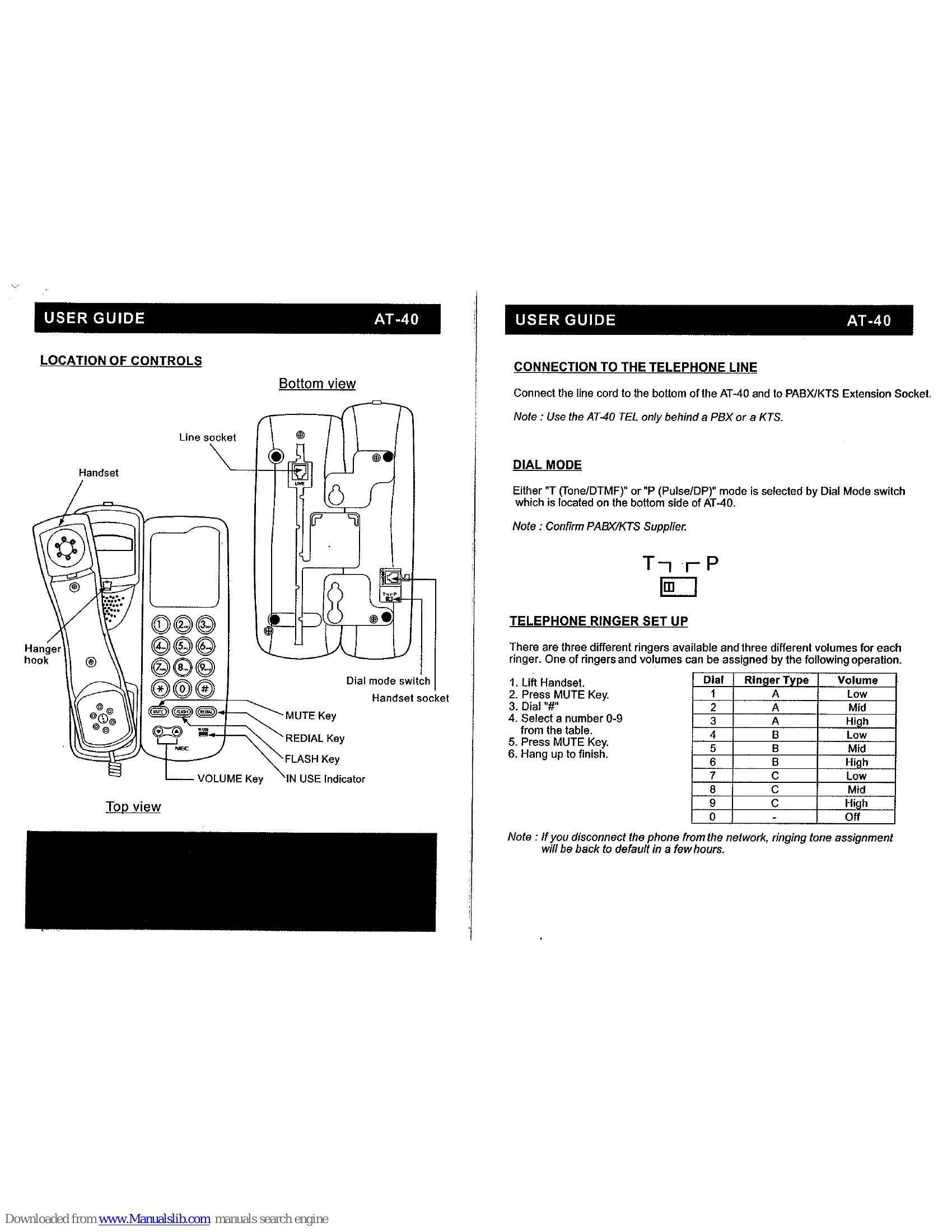
Location of Controls

  • Handset: For speaking and listening.
  • Line socket: Connects to the telephone line.
  • Hanger hook: Hangs the handset.
  • Dial mode switch: Selects Tone (DTMF) or Pulse (DP) dialing.
  • MUTE Key: Mutes/unmutes the microphone during a call.
  • FLASH Key: Sends a flash signal, useful for PABX/KTS systems.
  • REDIAL Key: Redials the last dialed number.
  • VOLUME Key: Adjusts handset earpiece volume.
  • IN USE Indicator: Shows when the phone is in use.

Making a Call

  1. Lift handset.
  2. Wait for dial tone and dial the number.
  3. Hang up to terminate.

Volume Control

  • Press to increase volume.
  • Press to decrease volume.

Mute

  • Press MUTE Key to mute.
  • Press MUTE Key again to resume.

Last Number Redial

  1. Lift handset.
  2. Press REDIAL Key.

Telephone Ringer Set Up

  1. Lift handset.
  2. Press MUTE Key.
  3. Dial '#'.
  4. Select a number 0-9 for ringer type and volume from the table.
  5. Press MUTE Key.
  6. Hang up.

Wall Mounting

  1. Use template to mark screw positions.
  2. Drill holes.
  3. Fit screws to wall.
  4. Place phone onto screws and slide to secure.
  5. Adjust hanger hook if wall mounting.

Troubleshooting and error codes

Dial Ringer Type Volume
1 A Low
2 A Mid
3 A High
4 B Low
5 B Mid
6 B High
7 C Low
8 C Mid
9 C High
0 Off
Privacy Policy