Brand: Generic
Category: Digital Camera
Document Type:
Language: EN
Brand: Generic
Category: Digital Camera
Document Type:
Language: EN
Uploaded: Aug. 9, 2025, 11:45 p.m.
No warranty information found in the provided pages.
Overview: Congratulates the user on their new digital camera, highlighting its 6.2 Mega pixel CCD and resolution capabilities.
Package Contents: Lists common and optional accessories included with the camera.
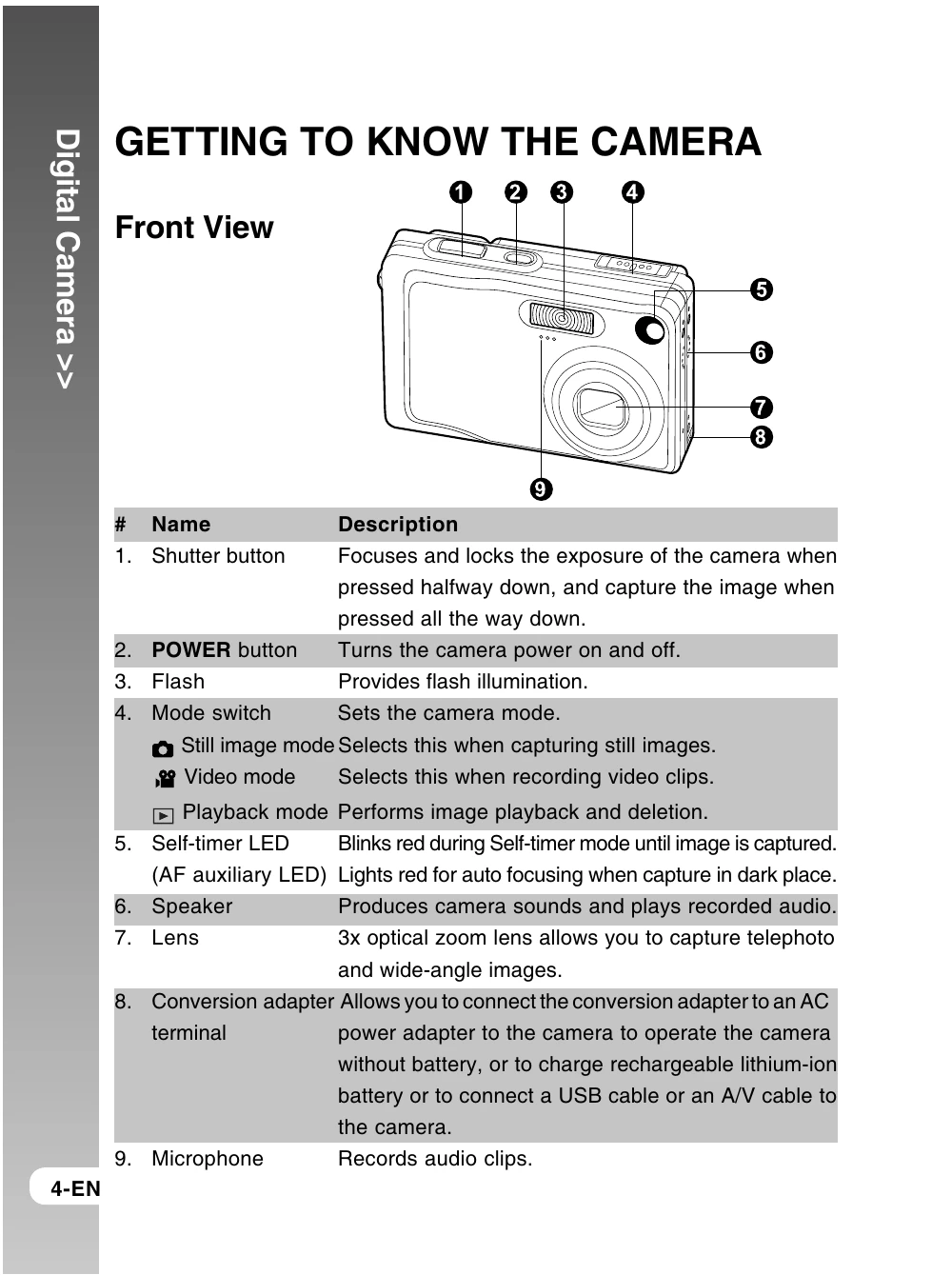
Front View: Identifies and describes the function of components like the shutter button, power button, flash, mode switch, self-timer LED, speaker, lens, conversion adapter, and microphone.
Rear View: Identifies and describes components such as the LCD monitor, display button, status LED, zoom buttons, menu button, erase button, strap holder, SET/Direction button, battery/SD card cover, and tripod socket.
Attaching the Camera Strap: Provides instructions with illustrations.
Inserting and Removing the Battery: Details the process of inserting and removing the battery, including orientation and lock lever usage.
Charging the Battery: Explains how to charge the battery using the AC power adapter, including status LED indications and important notes regarding charging and battery handling.
Inserting and Removing the SD Card: Guides the user on how to insert and remove an SD card, including write-protection and formatting information.
Setting the Date and Time: Provides step-by-step instructions for setting the camera's date and time via the menu system.
Choosing the Language: Explains how to select the menu and message language displayed on the LCD monitor.
Formatting the SD Card or Internal Memory: Details the process for formatting the camera's internal memory or an SD card, including warnings about data loss.
Setting Image Resolution and Quality: Describes how to adjust image resolution and quality settings, explaining their impact on image size and detail.
Still Image Mode: Explains how to compose and capture still images, including autofocus and exposure indication via the focus area frame and status LED.
Recording Voice Memos: Details how to record voice memos up to 30 seconds long, which can accompany still images.
Using the Optical Zoom: Explains how to use the zoom feature to capture images at different magnifications.
Using the Digital Zoom: Describes how to enable and use digital zoom for further magnification, noting potential pixelation.
Setting the Flash: Details the various flash modes (Auto, Red-eye Reduction, Forced Flash, Flash off) and their application in different photography scenarios.
Setting the Focus: Explains the different focus modes: Auto Focus, Macro, and Infinity, and when to use each.
Still Image Menu (Capture): Covers basic settings for still image capture, including Scene Mode, Size, Quality, Sharpness, Saturation, Color, White Balance, Manual WB, ISO, and Metering.
Still Image Menu (Function): Details function settings for still images, such as Capture Mode (Single, Continuous, AEB), Voice Memo, LCD Brightness, Digital Zoom, Preview, Date Print, and Real Time AF.
Video Menu (Capture): Explains basic settings for video recording, including Size, Quality, and Color.
Video Menu (Function): Covers function settings for video, such as Audio, LCD Brightness, and Digital Zoom.
Playback Menu: Outlines settings for image playback, including Slide Show, DPOF, Protect, LCD Bright, Resize, Quality Change, and Copy to Card.
Setup Menu (In Photography Mode): Configures the camera's operating environment, including Beep, Folder Number Reset, Auto OFF, Date/Time, System Reset, Language, and USB settings.
Setup Menu (In Playback Mode): Includes settings relevant to playback, such as Beep, Format, Folder Number Reset, Card Info, System Info, Language, and Video Output.
Installing NTI Photo Suite: Guides users on installing the provided image-editing software.
Provides a detailed list of the camera's technical specifications.
| Troubleshooting Item | Possible Cause | Solution |
|---|---|---|
| The camera does not turn on. | The battery is not inserted properly. | Insert the battery again. |
| The battery is discharged. | Charge the battery. | |
| The LCD monitor is blank. | The LCD monitor is turned off. | Press the Display button. |
| The battery is discharged. | Charge the battery. | |
| Cannot capture an image. | The SD card is full. | Insert a new SD card or delete images. |
| The SD card is not inserted properly. | Insert the SD card again. | |
| The battery is discharged. | Charge the battery. | |
| Images are blurry. | The lens is dirty. | Clean the lens. |
| The focus mode is incorrect. | Set the focus mode to Auto Focus. | |
| Cannot record a video. | The SD card is full. | Insert a new SD card or delete images. |
| The battery is discharged. | Charge the battery. |