Brand: Generic
Category: Digital Camera
Document Type: Manual
Language: EN
Brand: Generic
Category: Digital Camera
Document Type: Manual
Language: EN
Uploaded: Aug. 10, 2025, 12:38 a.m.
No specific warranty period is mentioned in the provided pages.
| Problem | Possible Cause | Solution |
|---|---|---|
| The battery LED is flashing red. | The battery is almost used up. | Replace with a new battery or charge the battery. |
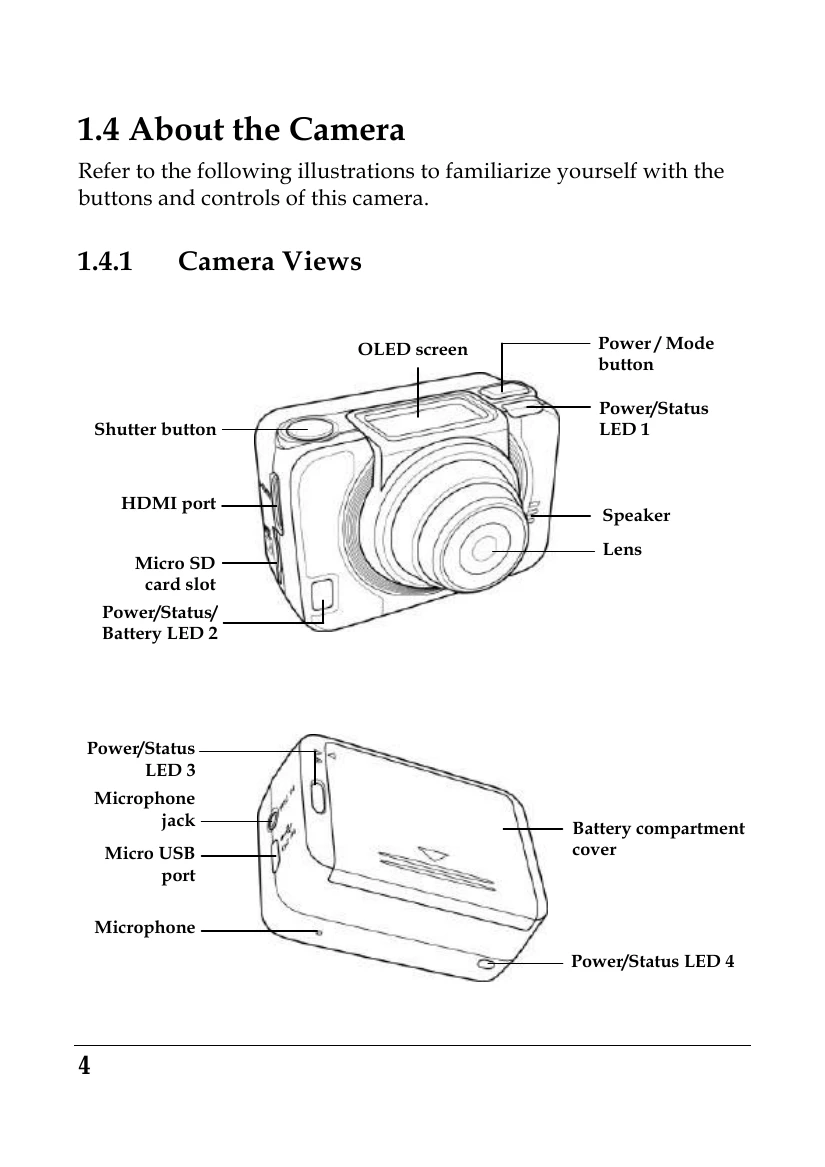
| Nothing happens when the Shutter button is pressed. | The Micro SD card is full. You cannot take photos or record videos at this point. | Transfer the Micro SD card files to the computer or delete the files in the Micro SD card. |
| Nothing happens when the Shutter button is pressed. "000" appears on the screen. | The Micro SD card may have compatibility issues. | Format the Micro SD card first using the camera (Delete menu). If it still does not work, format the Micro SD card using the PC. |
| Nothing happens when the Shutter button is pressed. "000" appears on the screen. | The Micro SD card is not inserted. | Insert the Micro SD card. |