Brand: GE
Category: Digital Camera
Document Type:
Language: EN
Brand: GE
Category: Digital Camera
Document Type:
Language: EN
Uploaded: Aug. 9, 2025, 11:58 p.m.
Manual Publish Date: 2012-01-01
The manual does not explicitly state the warranty period in months.
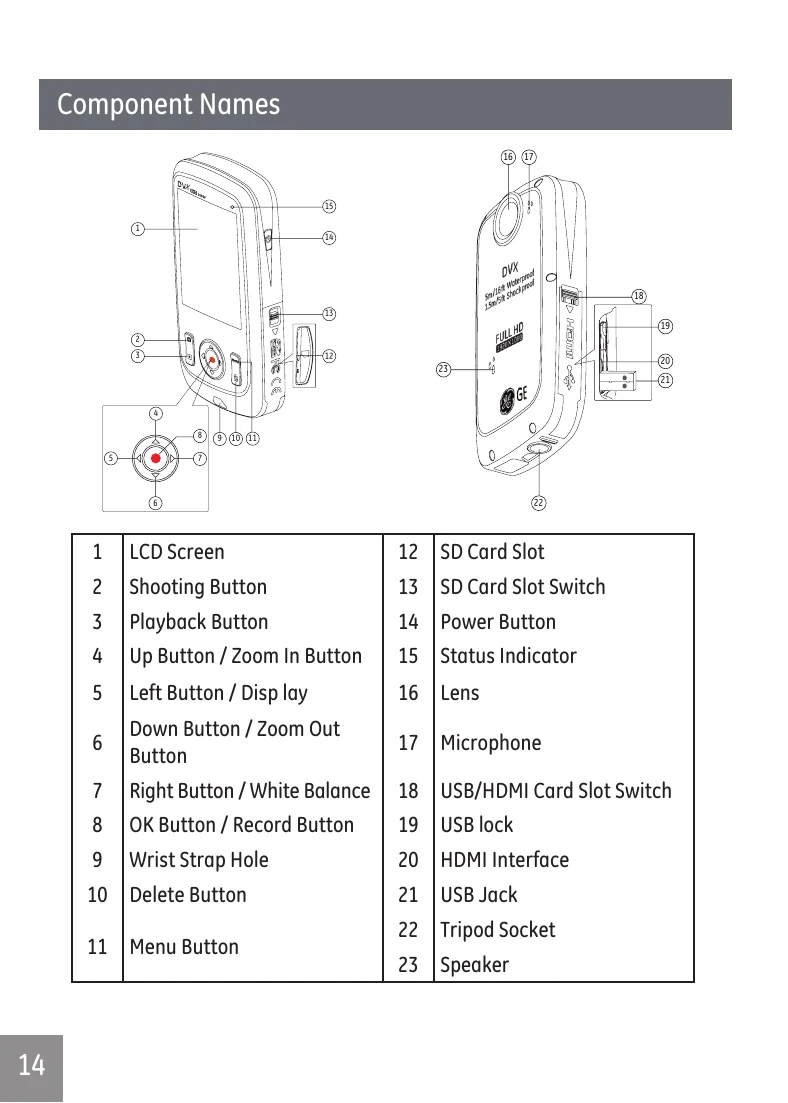
Press the Power button to turn the video camera on. Press the (record button) to begin taking video. Press the (record button) again to end the video recording.
Press the (up arrow button) to zoom in or the (down arrow button) to zoom out. The zoom icon on the screen will change from white to orange when the zoom function is engaged.
Adjust color temperature under different light sources. Press the (right arrow button) to scroll through options like Auto, Daylight, Cloudy, Fluorescent, Incandescent, and Waterproof.
Take photos while simultaneously recording video by pressing the (shutter button).
| Problem | Possible causes | Solution |
|---|---|---|
| Video camera won't turn on | Battery low | Charge battery |
| Video camera turns off suddenly while in operation | Battery is discharged | Charge battery |
| Photo is blurred | Camera is not steady when pictures are takens | Suggest using a tripod |
| Can't take photos |
|
|
| Can't record video |
|
|