Brand: GARMIN
Category: Other
Document Type: Manual
Language: EN
Brand: GARMIN
Category: Other
Document Type: Manual
Language: EN
Uploaded: Aug. 10, 2025, 12:45 a.m.
Manual Publish Date: 2017-05-01
Refer to the product box for important safety and product information.
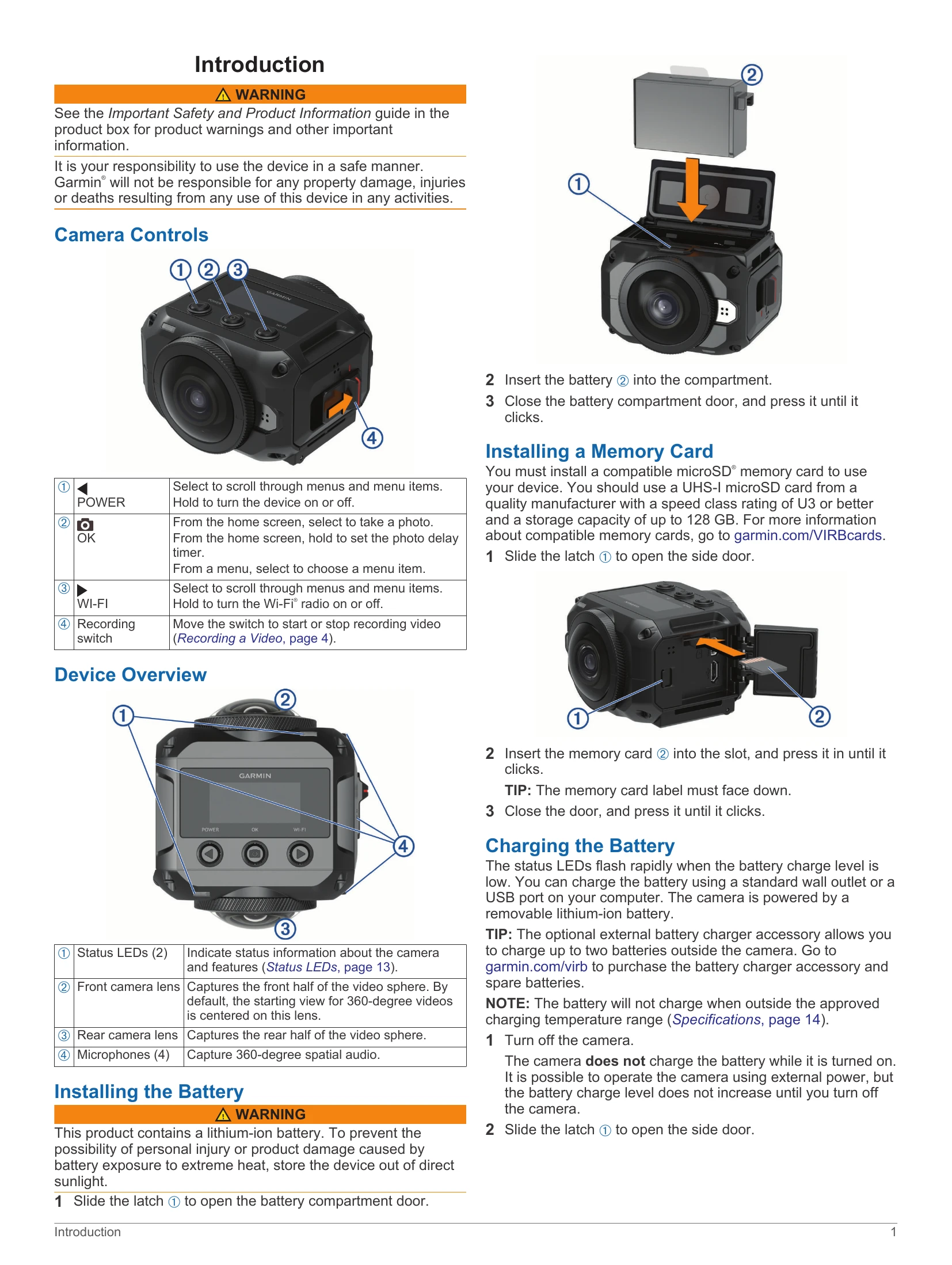
Camera Controls: The device features POWER, OK, WI-FI, and Recording switch buttons for various operations like scrolling menus, taking photos, turning Wi-Fi on/off, and starting/stopping video recording.
Device Overview: Familiarize yourself with the status LEDs, camera lenses, and microphones for optimal use.
Installation: Instructions are provided for installing the battery and a compatible microSD memory card.
Charging: The battery can be charged via a standard wall outlet or USB port. The device should be turned off for charging.
Powering On/Off: Use the POWER button or the recording switch to turn the device on and off.
Home Screen: Displays key information like photo mode, sensor status, battery capacity, Wi-Fi status, and memory card space.
Camera Mounts: Learn how to assemble the tripod and cradle, or action cradle for various mounting options.
Video Recording: Set up video modes, lens modes, and stitching distance for capturing 360-degree or other video formats.
Taking Photos: Capture single photos, bursts, or time-lapse photos with adjustable self-timer settings.
Voice Control: Control the camera using spoken commands after activating the feature with "OK, Garmin".
Garmin VIRB App: Connect to the app via NFC or Wi-Fi for remote control, live preview, settings adjustment, and sharing.
Troubleshooting: Addresses common issues like the camera not turning on, feeling warm, missing G-Metrix data, or shaky video recordings.
| Issue | Possible Cause and Solution |
|---|---|
| My camera does not turn on |
- Ensure external power is connected and the top status LED is on or red. Hold POWER to turn on.
- If the camera turns off due to high temperature, let it cool down and move to a cooler area or disable unneeded features. - Verify the battery is installed correctly. - Fully charge the battery. - Ensure the battery temperature is at least 0°C (32°F). |
| My camera feels warm while it is operating |
It is normal for the camera to feel warm during typical use, especially when recording high-resolution video or transmitting a Wi-Fi signal.
|
| Some G-Metrix data is missing |
- Enable GPS (System Settings, page 13) and go to an area with a clear sky.
- Connect additional ANT+ sensors (Pairing ANT+ Sensors, page 12). - Some data is only available when a compatible ANT+ sensor is connected. |
| My video recordings do not look smooth |
- Use the VIRB Edit application or Garmin VIRB mobile app to apply image stabilization.
- Install a recommended, high-speed memory card. - Ensure your playback device or software can smoothly play the video resolution. - Transfer video to your computer or playback device. Use VIRB Edit for playback. |
| My device turns off when I stop recording video |
If the device was turned on using the recording switch, it will turn off automatically when you move the recording switch backward.
|
| Extending the Battery Life |
- Disable Wi-Fi.
- Enable Auto-Off in system settings. - Turn the device on/off using the recording switch. - Disable ANT+, Wi-Fi, and remote wake-up when not in use. |