Manual for XG1200

Manual for XG1200

Brand: FUJITSU

Category: Storage Systems

Document Type: Manual

Language: EN
Uploaded: Nov. 21, 2025, 8:46 p.m.

Manual Publish Date: 2005-08-01

Chapter 2 Using the CLI

This chapter describes how to use the command line interface (CLI) to operate the XG1200.

2.1 Overview of the CLI

This section describes how to use the command line interface (CLI) for the XG Series.

2.1.1 Operating Environment for CLI

There are two ways to access the XG1200 to run commands. Up to 4 terminal sessions can access the XG1200 concurrently.
  • Serial connection
  • Remote connection via management LAN port

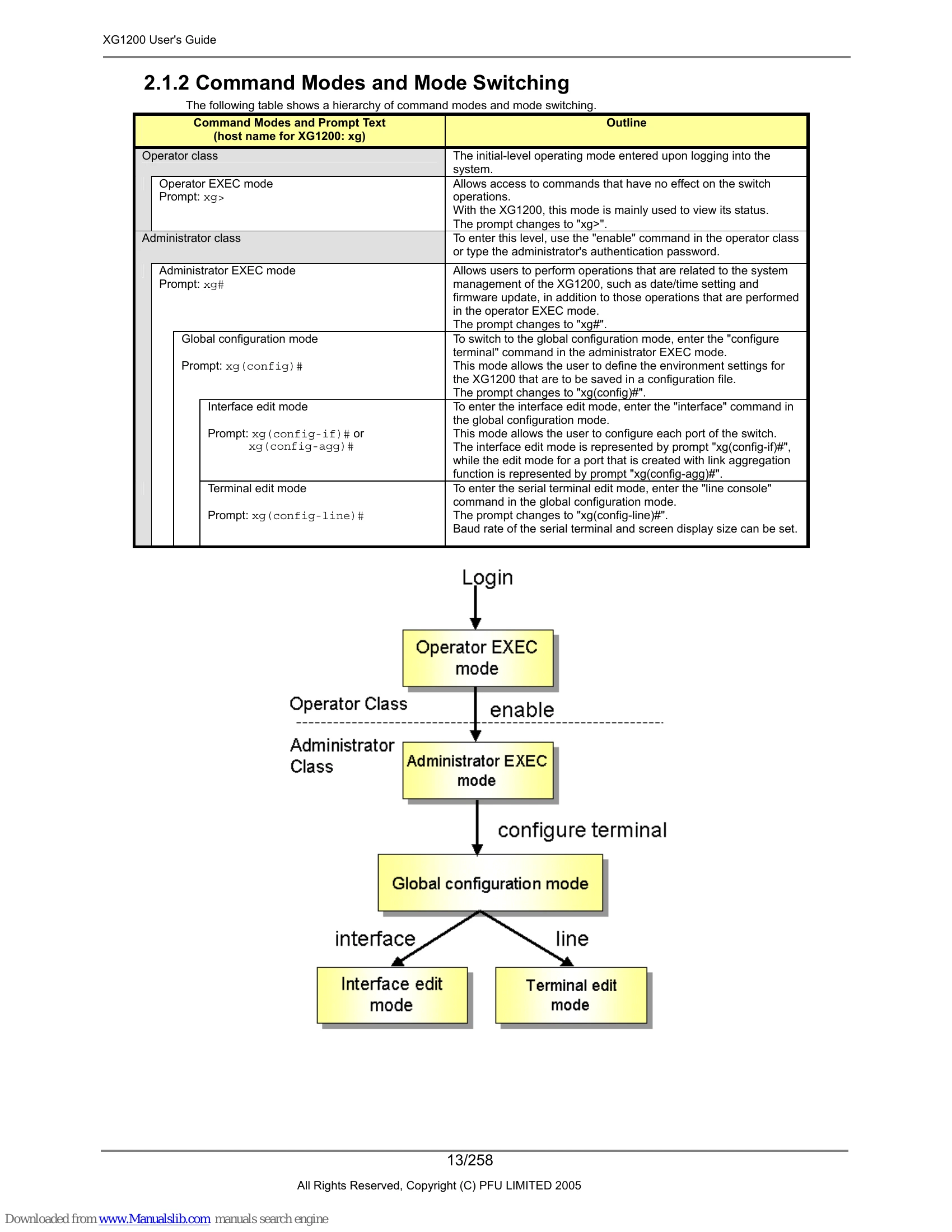
2.1.2 Command Modes and Mode Switching

The following table shows a hierarchy of command modes and mode switching.
Operator Class (xg>)
Administrator Class (xg#)
Global configuration mode (xg(config)#)
Interface edit mode (xg(config-if)# or xg(config-agg)#)
Terminal edit mode (xg(config-line)#)

2.1.3 startup-config and running-config

The XG1200 configuration information is saved to startup-config and running-config files.
  • startup-config: Stores environment settings for startup.
  • running-config: Represents the current operating environment.

Troubleshooting and error codes

Error Message Explanation
% Ambiguous command: "co t" You did not enter enough characters for the CLI to recognize the command.
Re-enter the correct command string.
% Incomplete command. You did not enter all of the options or values required by this command entry.
Set all necessary options and values.
% Invalid input detected at "^" marker You entered a command improperly. A caret symbol (^) indicates the incorrect entry.
Change incorrect entries and execute the command again.
% Unrecognized command You typed part of a command that is not found with the context-sensitive help.
Re-enter the correct command string.
Privacy Policy