Brand: Fujitsu
Category: Computers
Document Type: Manual
Language: EN
Brand: Fujitsu
Category: Computers
Document Type: Manual
Language: EN
Uploaded: Nov. 21, 2025, 9:13 p.m.
Manual Publish Date: 2014-01-01
No explicit warranty period mentioned in the provided pages.
| Problem | Possible Cause/Solution |
|---|---|
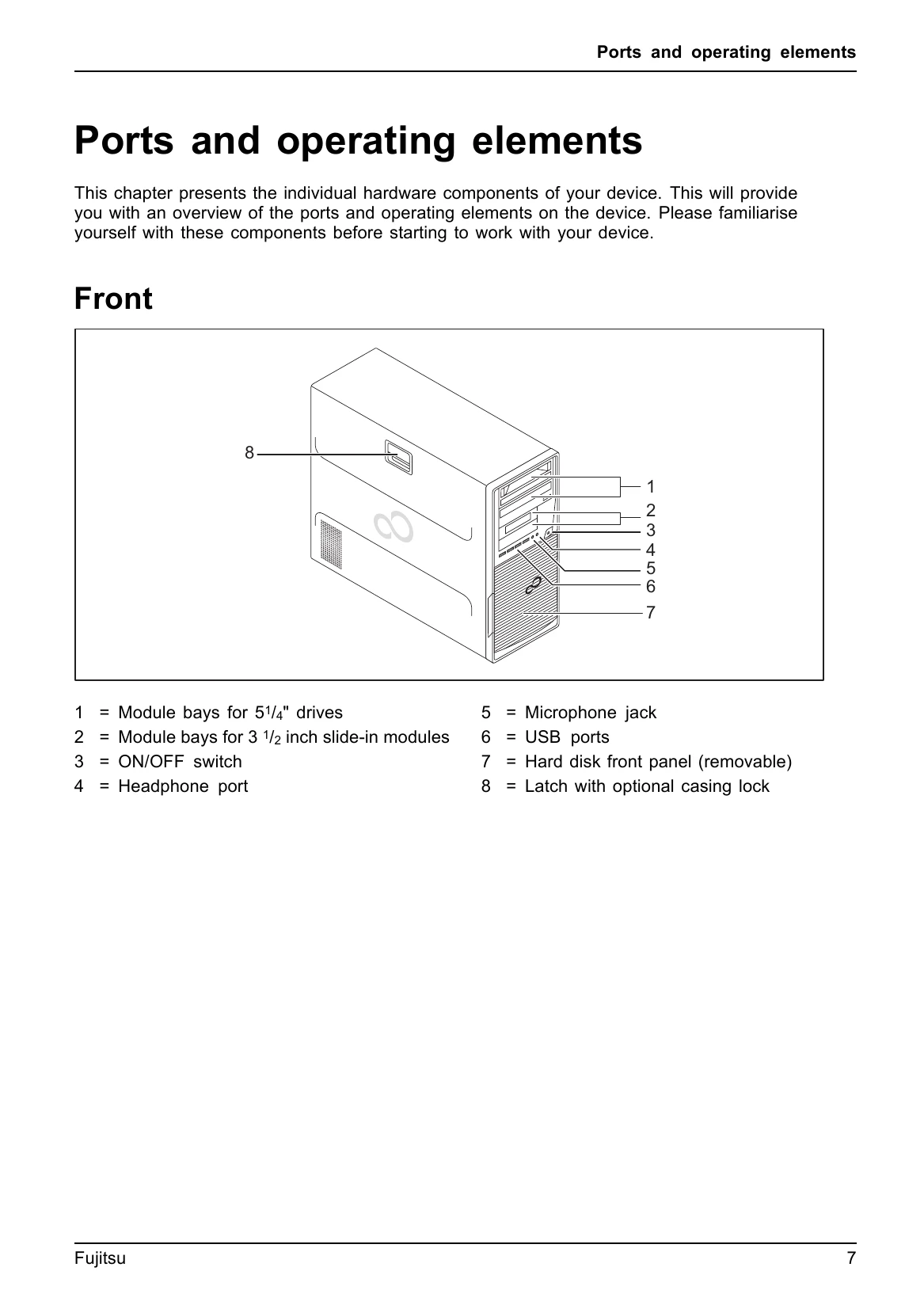
| Power-on indicator remains unlit after you have switched on your device | Ensure the device is correctly connected to the mains. Check the power outlet. |
| The device cannot be switched off with the ON/OFF switch. | Wait for the operating system to shut down. If the system does not respond, press and hold the ON/OFF switch for several seconds until the device turns off. |
| Monitor remains blank | Check all cable connections between the monitor and the device. Ensure the monitor is powered on and set to the correct input source. |
| Time and/or date is not correct | Check the BIOS settings for date and time. If the issue persists, the lithium battery may need to be replaced. |
| Error messages on the screen | Note the exact error message and consult the "Troubleshooting and tips" section or contact Fujitsu support. |