Brand: Fujifilm
Category: Digital Camera
Document Type:
Language: EN
Brand: Fujifilm
Category: Digital Camera
Document Type:
Language: EN
Uploaded: Aug. 9, 2025, 11:52 p.m.
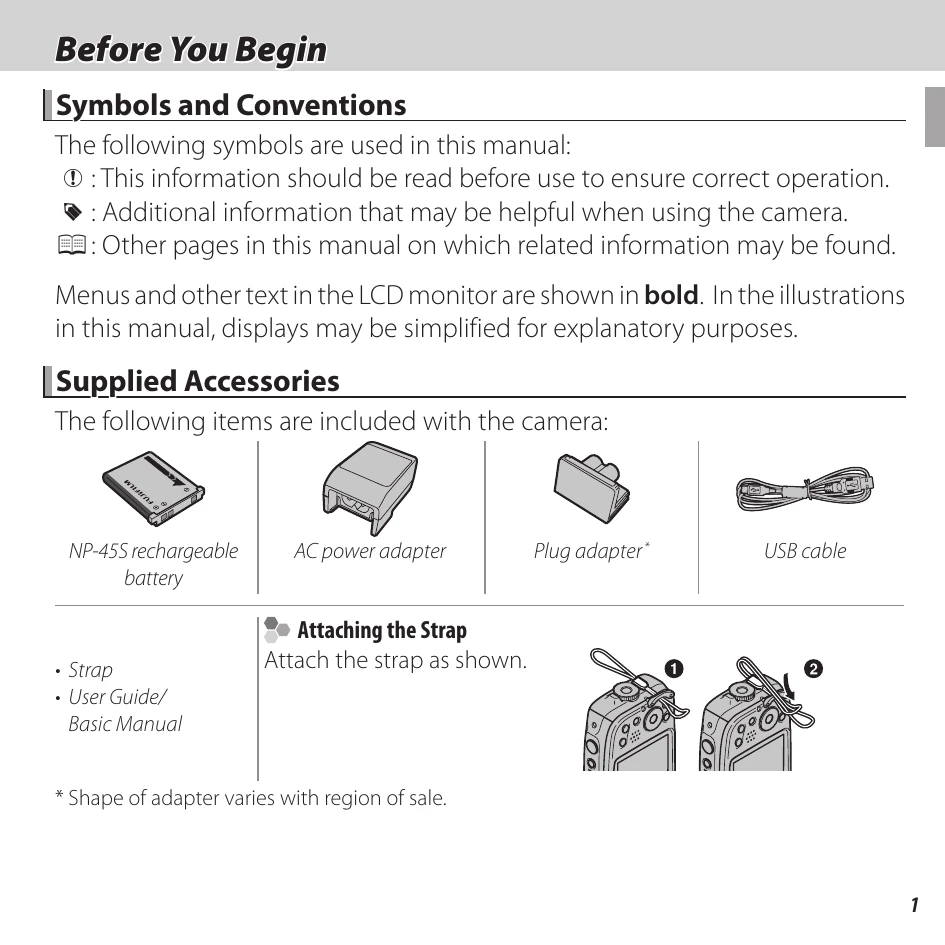
Familiarize yourself with the symbols and conventions used in the manual. Identify supplied accessories and learn how to attach the strap. Understand the parts of the camera by referring to the labeled diagrams. Review the various camera displays for shooting and playback information, including indicators for shooting mode, exposure, and battery level.
Learn how to insert the battery and a memory card correctly. Understand how to charge the battery and turn the camera on and off. Explore basic shooting and playback modes, and perform initial setup.
Learn to take pictures in various modes, including Scene Recognition. Discover how to view pictures and navigate playback options like zoom and multi-frame playback. Understand how to delete images and use image search functions.
Explore different shooting modes such as CINEMAGRAPH, ACTION CAMERA, PRO LOW-LIGHT, and HDR. Learn about advanced filters, panoramas, and intelligent face detection. Master focus lock, exposure compensation, macro mode, flash usage, and the self-timer.
Learn how to record and view movies, understanding various movie recording modes and settings.
Discover how to transfer photos wirelessly using FUJIFILM Camera Remote or PC AutoSave. Learn to connect with smartphones and save pictures to a computer.
Understand how to view pictures on HD TVs, create DPOF print orders, and connect to instax SHARE printers. Learn how to establish connections and print pictures. Explore viewing pictures on a computer and connecting the camera.
Navigate through the camera's menus for shooting and playback. Learn to adjust settings for shooting mode, ISO, image size and quality, color, white balance, continuous shooting, face detection, AF mode, movie settings, and wireless communication.
Master the setup menu options, including date/time, time difference, language, silent mode, reset, format, image display, frame numbering, operation volume, shutter sound, playback volume, LCD brightness, power save, auto power off, IS mode, digital image stabilizer, red-eye removal, intelligent digital zoom, movie zoom type, AF illuminator, autorotate, background color, wind filter, wireless settings, PC auto save, geotagging, and instax printer connection.
Refer to the troubleshooting section for solutions to common problems, including error messages related to memory cards, writing, reading, frame numbers, and communication issues.
Consult the appendix for information on memory card capacity and device specifications.
| Warning | Description |
|---|---|
| ! | Turn the camera off and wait for it to cool. If no action is taken, the camera will turn off automatically. |
| CARD ERROR | The memory card is not formatted for use in the camera. Format the card (89). The memory card contacts require cleaning or the memory card is damaged. Clean the contacts with a soft, dry cloth. If the message is repeated, format the card (89). If the message persists, replace the card. Incompatible memory card. Use a compatible card (12). Camera malfunction. Contact a FUJIFILM dealer. |
| IN MEMORY FULL SMEMORY FULL INTERNAL MEMORY IS FULL INSERT A NEW CARD |
The memory card or internal memory is full and pictures can not be recorded or copied. Delete pictures or insert a memory card with more free space. |
| WRITE ERROR | • Memory card error or connection error: Reinsert the card or turn the camera off and then on again. If the message persists, contact a FUJIFILM dealer. • Not enough memory remaining to record additional pictures: Delete pictures or insert a memory card with more free space. • The memory card or internal memory is not formatted: Format the memory card or internal memory (89). |
| READ ERROR | • The file is corrupt or was not created with the camera: The file can not be viewed. • The memory card contacts require cleaning: Clean the contacts with a soft, dry cloth. If the message is repeated, format the card (89). If the message persists, replace the card. • Camera malfunction: Contact a FUJIFILM dealer. |