Brand: Fujifilm
Category: Compact Camera
Document Type:
Language: EN
Brand: Fujifilm
Category: Compact Camera
Document Type:
Language: EN
Uploaded: Aug. 9, 2025, 11:50 p.m.
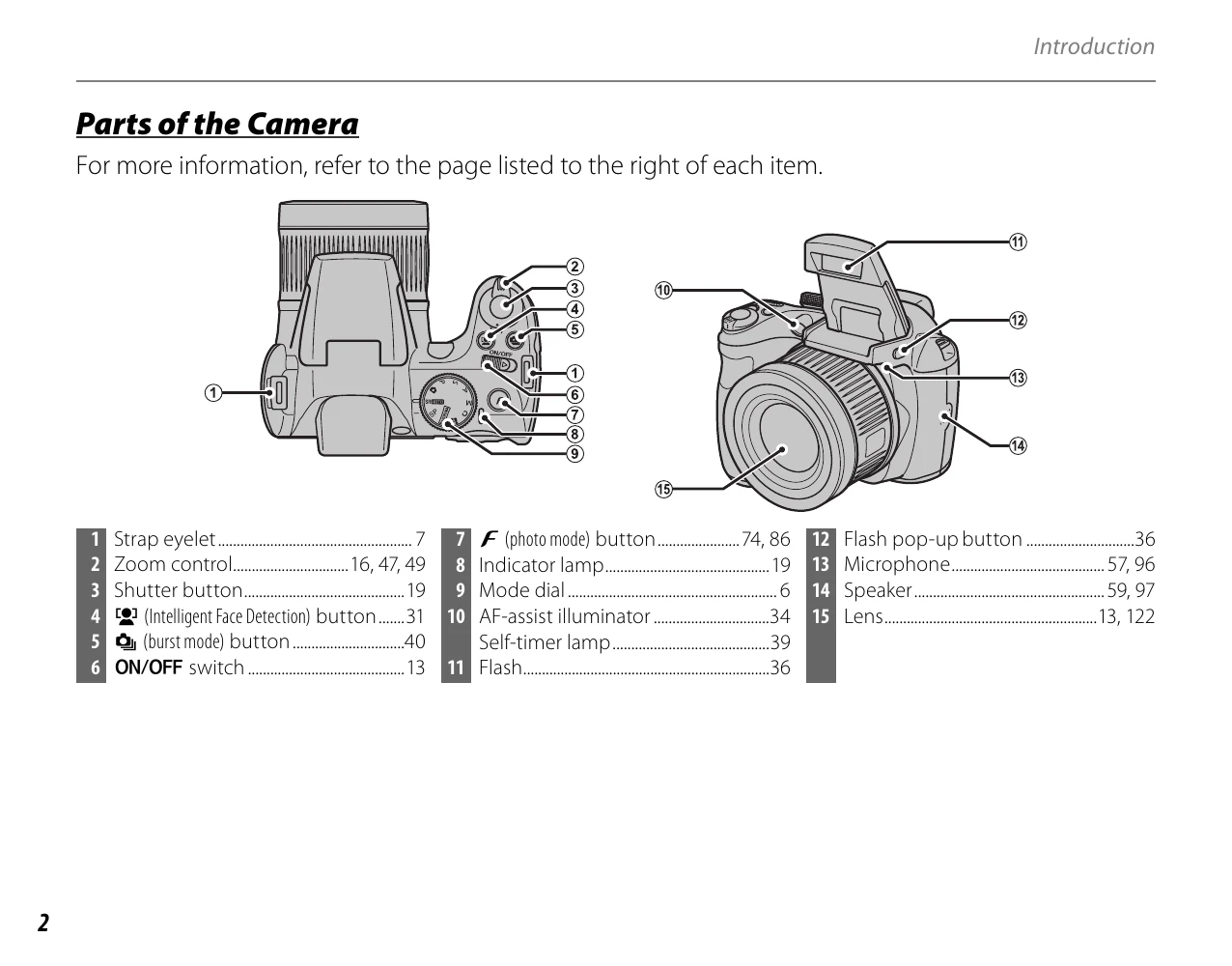
1. Insert batteries and memory card. 2. Attach strap and lens cap. 3. Turn the camera ON/OFF. 4. Select shooting mode using the Mode Dial.
Explore menus for settings like image size, quality, flash options, and more.
| Warning | Description | Solution |
|---|---|---|
| CAN NOT BE PRINTED | An attempt was made to print a movie, a picture not created with the camera, or a picture in a format not supported by the printer. | Movies and some pictures created with other devices can not be printed. If the picture was created with the camera, check the printer manual to confirm that the printer supports the JFIF-JPEG or Exif-JPEG format. If it does not, the pictures can not be printed. |