Manual for CLEAR SHOT / SMART SHOT

Manual for CLEAR SHOT / SMART SHOT

Brand: FUJIFILM

Category: Compact Camera

Document Type:

Language: EN
Uploaded: Aug. 9, 2025, 11:48 p.m.

Warranty Information

Specifications are subject to change without notice.

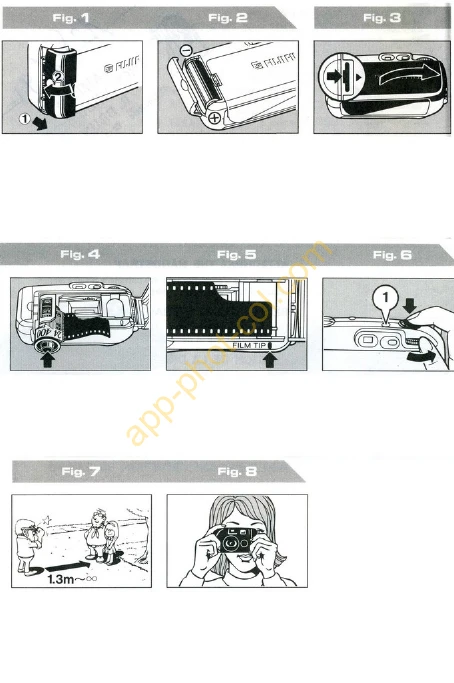
Loading the Battery

  1. Open the battery compartment cover by pushing it outward and lifting the front end up.
  2. Insert the battery (one alkaline-manganese penlight battery) correctly and close the cover.

Loading the Film

  1. Open the camera back.
  2. Insert the film cartridge into the film chamber.
  3. Align the film tip with the Film Tip Mark.
  4. Close the camera back.
  5. Advance the film to the first frame by winding the film and pressing the shutter release three times until '1' appears in the Exposure Counter.

Taking Your Picture

  1. Keep at least 1.3m away from your subject.
  2. Hold the camera still and press the shutter release gently.

Taking Flash Pictures

  1. Press the Flash Button until the Flash Ready Lamp turns on.
  2. Wait for the Flash Ready Lamp to light up, then take your picture.

Rewind the Film

  1. Erect the Film Rewind Crank.
  2. Press in the Film Rewind Button and turn the crank clockwise until the Exposure Counter returns to "S".
  3. Unload the film.

Troubleshooting and error codes

Column 1 Header Column 2 Header Column 3 Header
Row 1, Column 1 Data Row 1, Column 2 Data Row 1, Column 3 Data
Row 2, Column 1 Data Row 2, Column 2 Data Row 2, Column 3 Data
Row 3, Column 1 Data Row 3, Column 2 Data Row 3, Column 3 Data
Privacy Policy