Brand: FUJIFILM
Category: Camera
Document Type:
Language: EN
Brand: FUJIFILM
Category: Camera
Document Type:
Language: EN
Uploaded: Aug. 9, 2025, 11:49 p.m.
FUJIFILM warrants the media to be free from material and workmanship defects for ninety (90) days from receipt.
| Problem | Possible Cause | Solution |
|---|---|---|
| Screen is blank. | The batteries are depleted. | Replace or recharge the batteries. (p.16) |
| Camera does not turn on. | The batteries are depleted. | Replace or recharge the batteries. (p.16) |
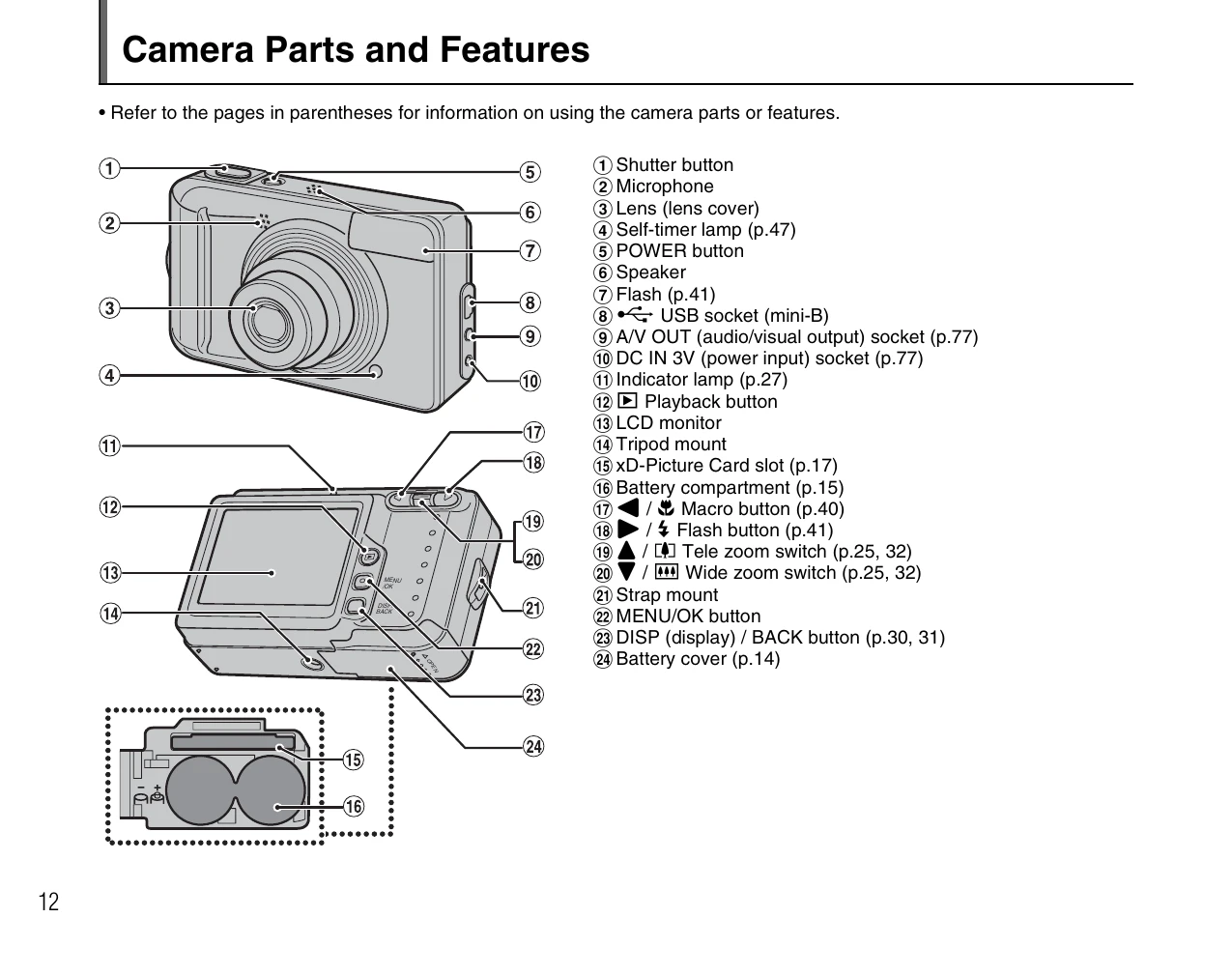
| Cannot insert the xD-Picture Card. | The xD-Picture Card is oriented incorrectly. | Ensure the card is inserted correctly. Do not force it. (p.18) |
| Images are corrupted or lost. | Internal memory issues or camera faults. | Save important data to other media. Transfer to xD-Picture Card if possible. (p.18) |