Manual for HD-S FUJICA

Manual for HD-S FUJICA

Brand: FUJI

Category: Camera

Document Type:

Language: EN
Uploaded: Aug. 9, 2025, 11:48 p.m.

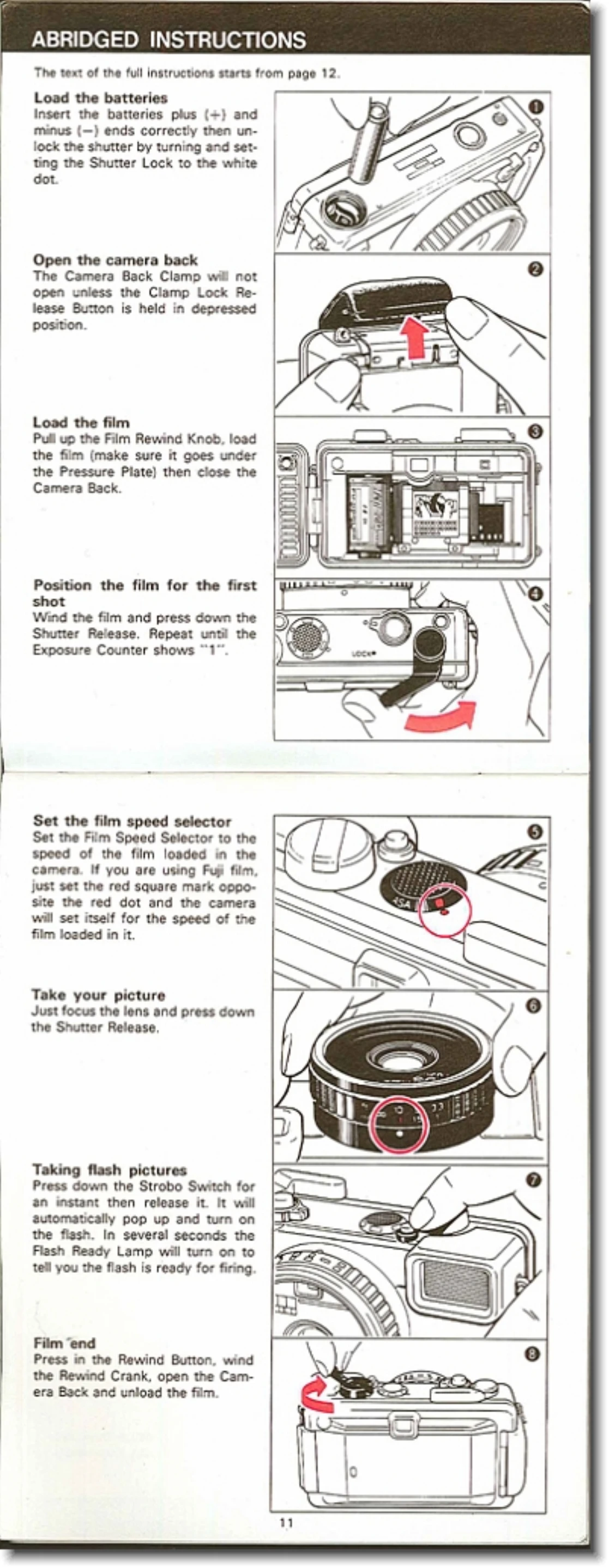
  1. Loading Batteries: Insert batteries correctly, then unlock the shutter by turning the Shutter Lock to the white dot.
  2. Opening Camera Back: Press the Clamp Lock Release Button to open the camera back.
  3. Loading Film: Pull up the Film Rewind Knob, load the film under the Pressure Plate, and close the Camera Back.
  4. Positioning Film: Wind the film and press the Shutter Release until the Exposure Counter shows "1".
  5. Setting Film Speed: Adjust the Film Speed Selector to match the loaded film, or use the auto-setting mark for compatible Fuji films.
  6. Focusing: Estimate the distance to the subject and adjust the Distance Ring. Use viewfinder symbols as a guide.
  7. Taking a Picture: Compose the shot and gently press the Shutter Release.
  8. Flash Photography: Press the Strobo Switch to pop up and activate the flash. Wait for the Flash Ready Lamp. Focus, frame, and trip the shutter.
  9. Using Self-Timer: Wind the film, then wind and start the Self-timer lever. The shutter will trip after approximately 8 seconds.
  10. Rewinding Film: Push the Rewind Button, then erect and turn the Rewind Crank clockwise until the film is wound back.

Troubleshooting and error codes

Problem Shutter does not trip
Possible Causes
  • Shutter Lock is set to the red dot.
  • Film has not been wound.
  • Self-timer has stopped before completing its run.
  • Batteries are incorrectly loaded.
  • Batteries are exhausted.
  • Battery Compartment Cover is not screwed in tightly enough.
  • Camera itself is damaged.
Problem Underexposure Warning Lamp is ON
Possible Causes
  • Insufficient light.
  • Shutter will operate at 1/30-sec. or slower. Hold camera still, use tripod, or use built-in flash.
Privacy Policy