Brand: EURO FIRE
Category: Fire Alarm System
Document Type: Manual
Language: EN
Brand: EURO FIRE
Category: Fire Alarm System
Document Type: Manual
Language: EN
Uploaded: April 20, 2026, 7:41 p.m.
Refer to technical sales for detailed standby duration information.
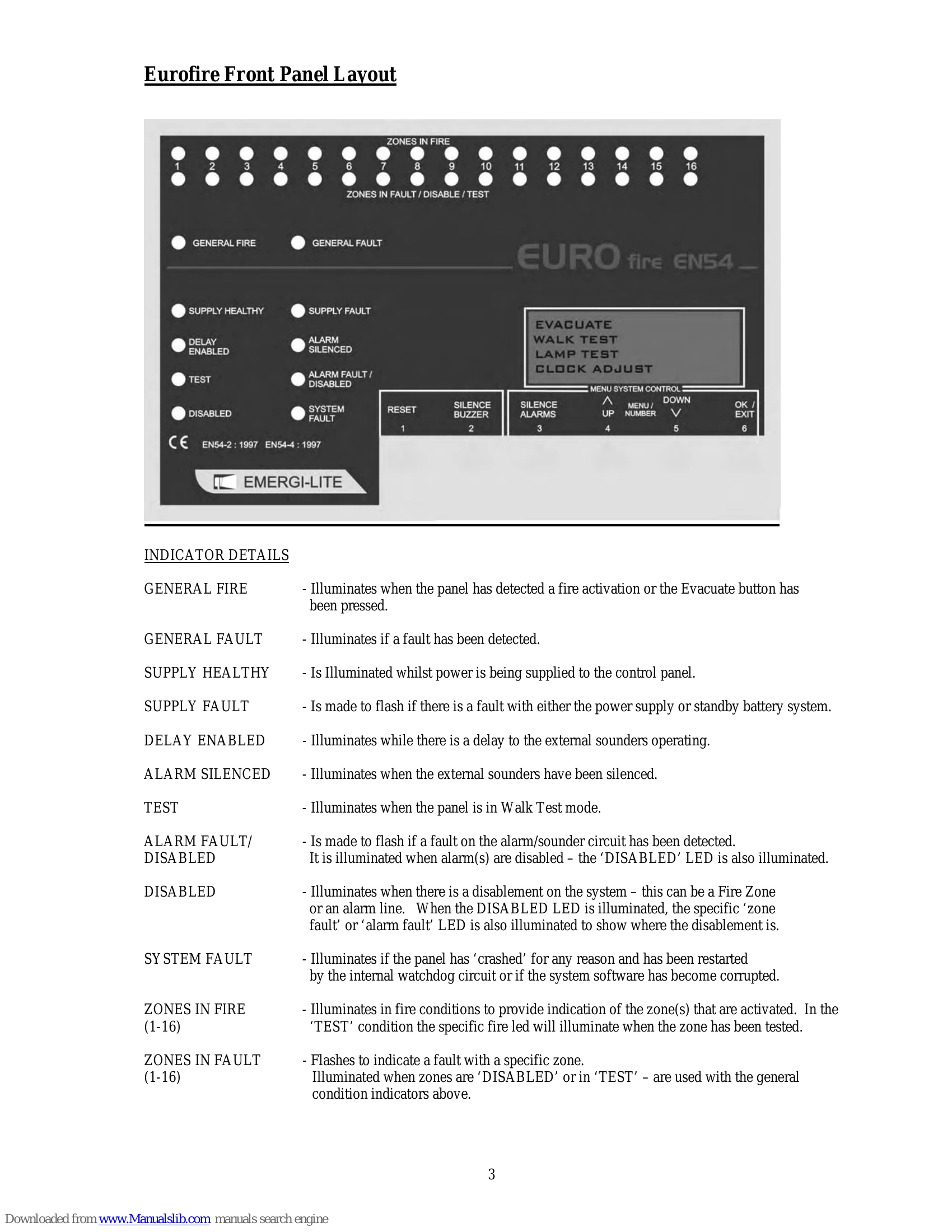
The fire control panel is operated by 6 buttons below the LCD. Access to functions requires a 4-digit user code. Initially, this is 3545.
Access the User menu via the LCD display. Use buttons 4 (UP) and 5 (Down) to scroll through options, and button 6 (OK) to select.
LCD displays system messages, zone count, and time.
Panel sounds internal buzzer, activates external sounders, and illuminates 'GENERAL FIRE' and relevant zone LEDs. The LCD shows fire details.
Internal buzzer sounds, 'GENERAL FAULT' LED illuminates, and specific fault LEDs flash. Devices connected to fault relays may be triggered.
| Fault Displayed | Meaning | Action Required |
|---|---|---|
| Zn X missing/open/EoL | Zone X (1-16) fault: missing detector, wiring break, or missing End of Line device. | Investigate wiring and devices. |
| Zn X Short Circuit | Zone X (1-16) wiring short circuit. | Investigate wiring for shorts. |
| Zn X Det Missing | Detector removed from zone X (Two Wire zones only). | Replace detector or check connections. |
| Pnl X AL Y Short Circuit | Panel at address X (1-32) has Alarm Y (1-4) wiring short circuit. | Investigate panel alarm wiring. |
| Pnl X EOL AL Y msng | Panel at address X (1-32), Alarm Y (1-4) has missing EoL device or open circuit wiring. | Check EoL devices and wiring. |
| Mains Failed | 230V AC mains supply disconnected. System will run on battery for approx. 48 hours. | Investigate and rectify mains supply. |
| Battery Missing | Standby battery disconnected. | Check battery connections. |
| Temp Sensor Fail | Battery charging temperature sensor failed. Battery still charged. | Investigate and rectify sensor. |
| Aux 12V Fault | Auxiliary 12V Output has failed. | Investigate and rectify output. |
| Aux 24V Fault | Auxiliary 24V Output has failed. | Investigate and rectify output. |
| Earth Fault | Fault with system earthing. | Investigate and rectify earthing. |
| Fault of Panel X | Panel at address X (1-32) is in fault condition. | Check panel and description of fault. |
| Micro CRC Fault and NVRAM CRC Fault | Internal self-check error detected. | Contact technical support. |
| Watchdog Reset | Microprocessor failed and restarted by watchdog circuit. System may be unstable. | Investigate cause of reset by engineer. If system fails, fire cover is lost. |