Brand: EPSON
Category: Projector
Document Type: Manual
Language: EN
Brand: EPSON
Category: Projector
Document Type: Manual
Language: EN
Uploaded: Nov. 21, 2025, 6:35 p.m.
Refer to the manual for warranty information, as it is not explicitly stated in the provided text.
Basic Operations:
Setup:
| Problem | Possible Cause | Solution |
|---|---|---|
| Projector does not turn on | Power cord is not connected. | Connect the power cord securely. |
| No image is projected | Projector is not turned on. | Turn on the projector. |
| No input signal. | Connect a source device or select the correct input source. | |
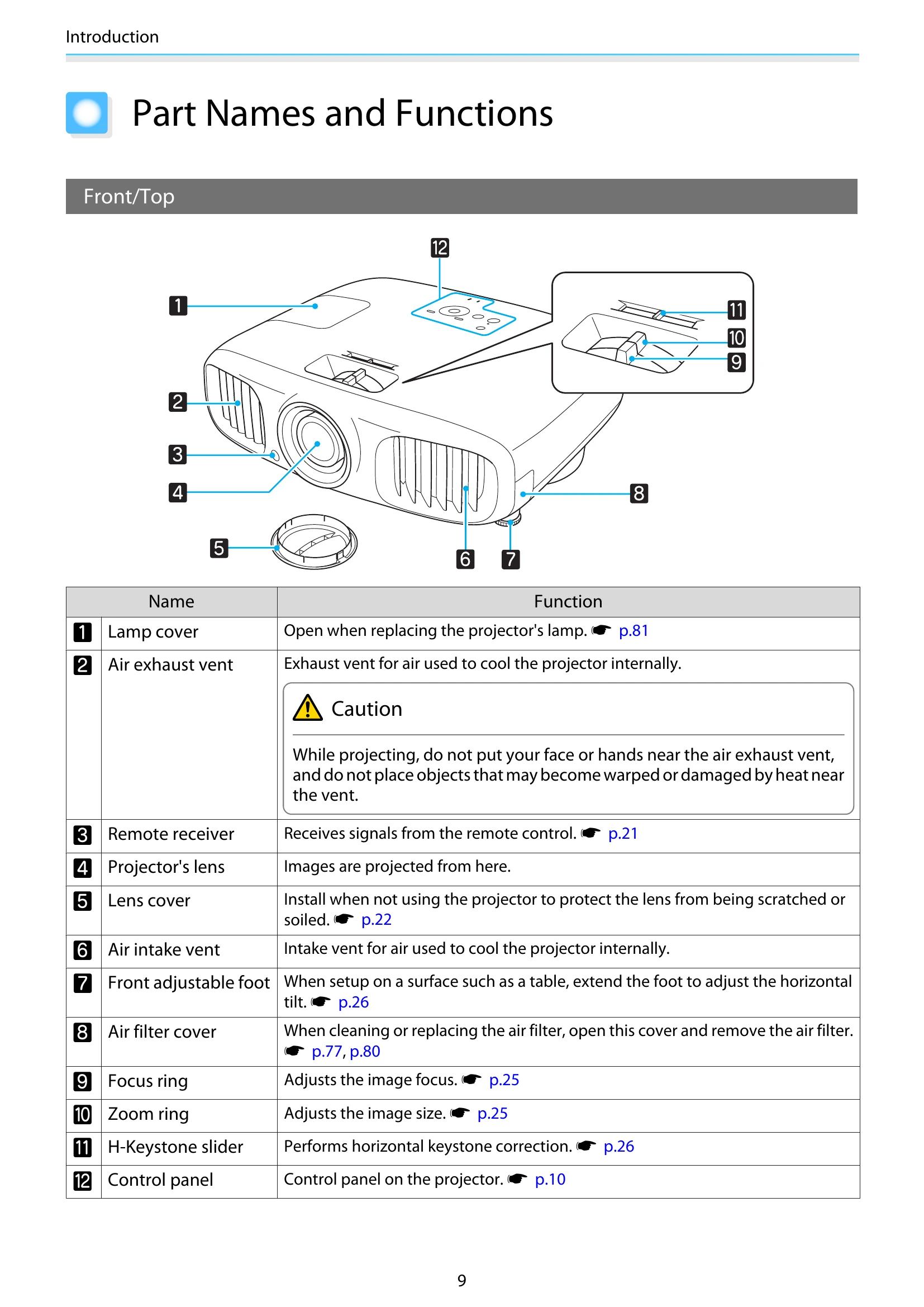
| Image is distorted or unclear | Focus is not adjusted correctly. | Adjust the focus using the focus ring. |
| Keystone distortion is present. | Adjust keystone distortion using the H-Keystone slider. |