Brand: EPSON
Category: Other
Document Type: Manual
Language: EN
Brand: EPSON
Category: Other
Document Type: Manual
Language: EN
Uploaded: Sept. 12, 2025, 4:21 a.m.
Warranty information is not explicitly detailed in the provided pages.
The PDF manual allows you to search for information by keyword or jump directly to specific sections using bookmarks. You can also print only the pages you need.
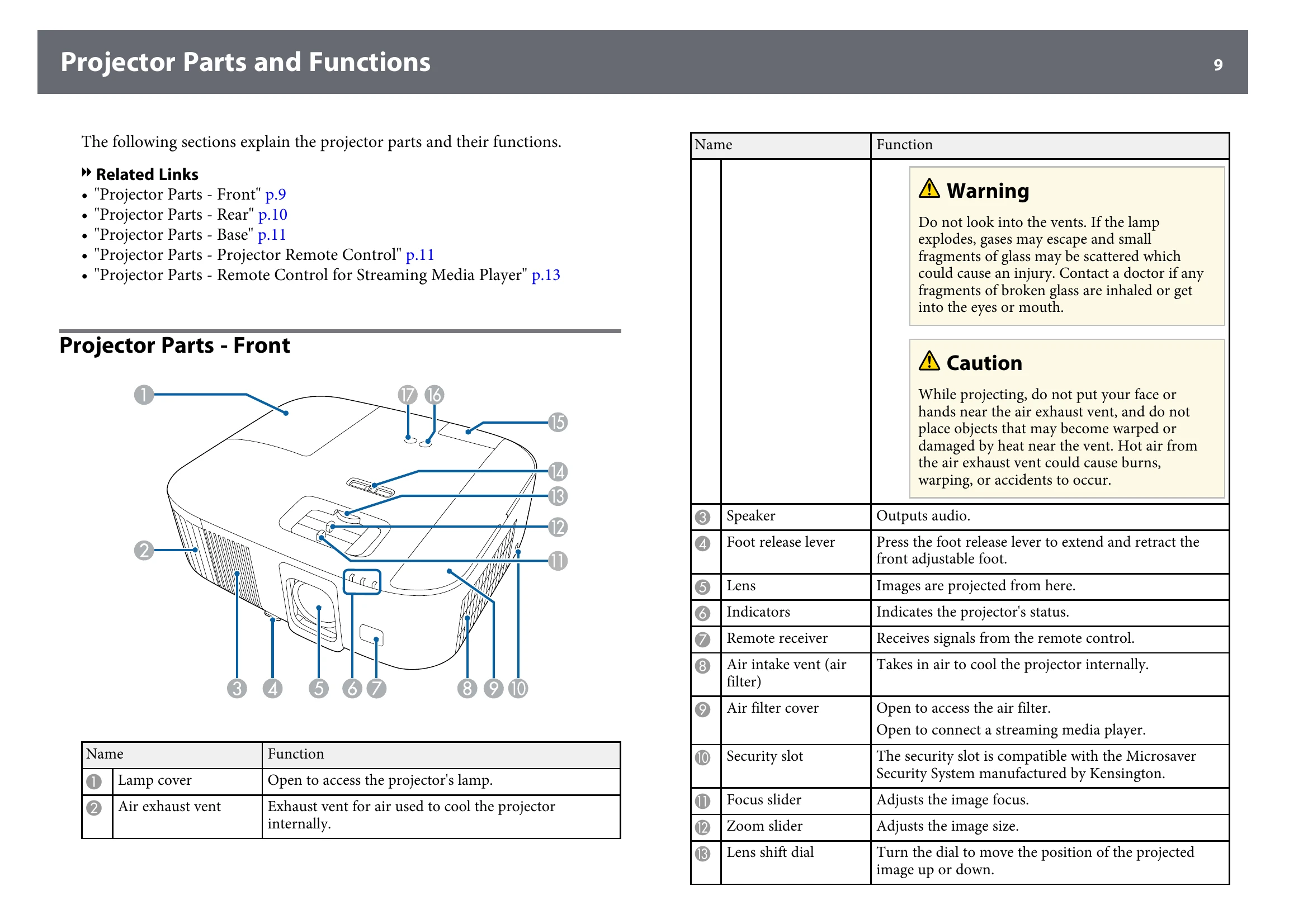
Learn about your projector's features and part names.
This section details the various parts of the projector and their functions, including front, rear, and base components, as well as the remote controls.
Follow instructions for projector placement, installing a safety wire, and making necessary connections.
Set up or install your projector in various ways.
| Problem | Possible Cause | Solution |
|---|---|---|
| Solving Image Problems | Solving Missing Image Problems | Adjusting an image that is not rectangular, fuzzy or blurry, partial image problems, contains noise or static, incorrect brightness or colors, or upside-down image. |
| Solving Sound Problems | (See page 100) | (Details not provided in this snippet) |
| Solving Remote Control Operation Problems | (See page 101) | (Details not provided in this snippet) |
| Solving HDMI Link Problems | (See page 102) | (Details not provided in this snippet) |