Manual for EB-G7905U

Manual for EB-G7905U

Brand: EPSON

Category: Other

Document Type: Manual

Language: EN
Uploaded: Sept. 12, 2025, 4:22 a.m.

Warranty Information

Warranty information is not explicitly stated in the provided document pages.

Introduction

This chapter explains the names for each part.

Part Names and Functions

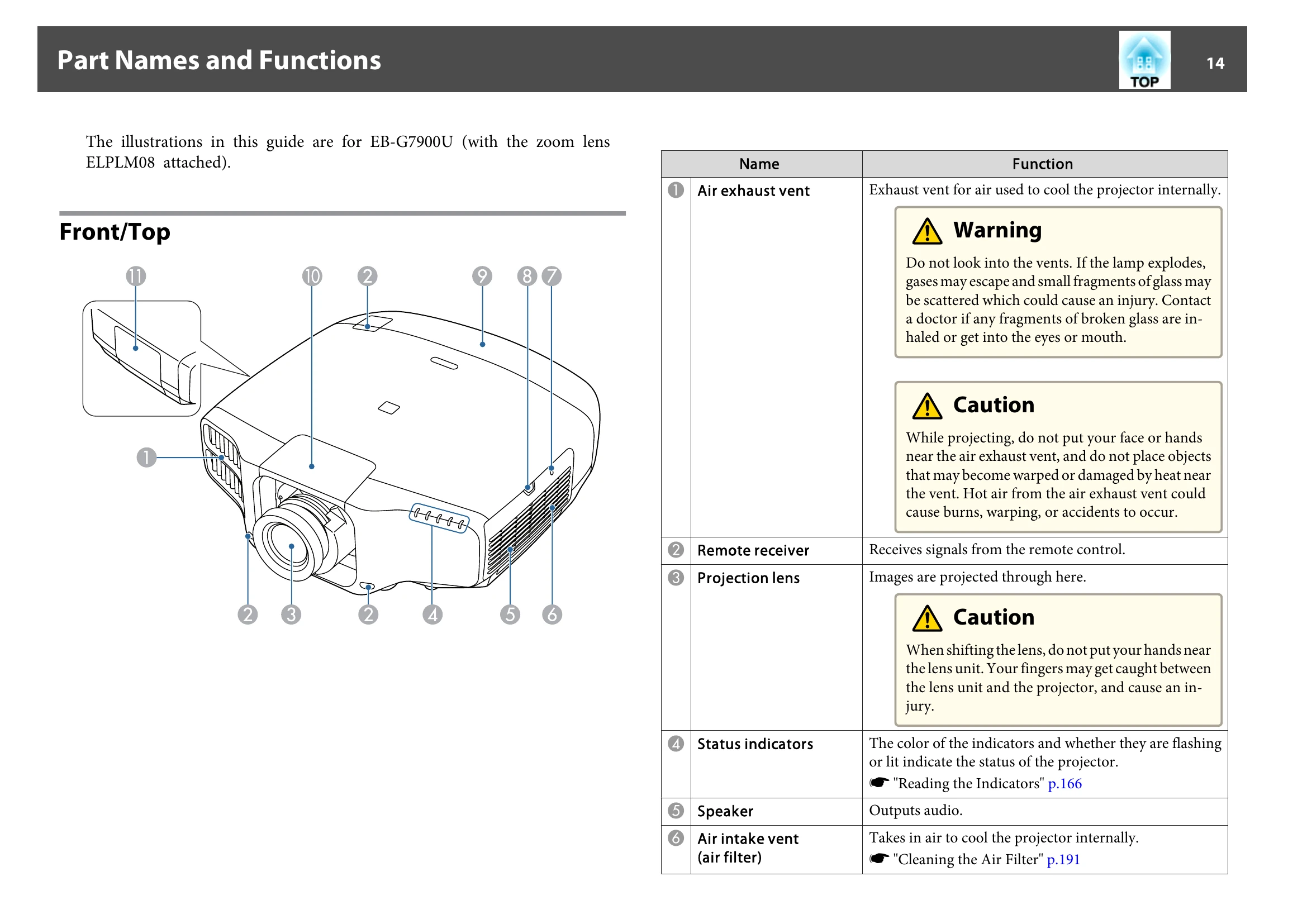
The illustrations in this guide are for EB-G7900U (with the zoom lens ELPLM08 attached).

Front/Top

  • 1 Air exhaust vent: Exhaust vent for air used to cool the projector internally.
  • 2 Remote receiver: Receives signals from the remote control.
  • 3 Projection lens: Images are projected through here.
  • 4 Status indicators: The color of the indicators and whether they are flashing or lit indicate the status of the projector.
  • 5 Speaker: Outputs audio.
  • 6 Air intake vent (air filter): Takes in air to cool the projector internally.

Rear

  • 1 Power inlet: Connects the power cord to the projector.
  • 2 Control panel: "Control Panel" p.17
  • 3 Security slot: The security slot is compatible with the Microsaver Security System manufactured by Kensington.
  • 4 Interface: "Interface" p.16

Interface

  • 1 BNC port: For analog RGB signals from a computer and component video signals from other video sources.
  • 2 Computer port: For analog RGB signals from a computer and component video signals from other video sources.
  • 3 Audio3 port: Inputs audio from equipment connected to the HDMI port or the DVI-D port.
  • 4 Audio1 port: Inputs audio from equipment connected to the Computer port.
  • 5 Monitor Out port: Outputs to an external monitor the analog signal from the computer connected to the Computer port or the BNC port.
  • 6 Audio Out port: Outputs audio from the currently projected image to an external speaker.
  • 7 Audio2 port: Inputs audio from equipment connected to the BNC port.
  • 8 Cable holder: Run a commercially available cable tie to secure cables.
  • 9 RS-232C port: For control use and should not normally be used.
  • 10 Remote port: Connects the optional remote control cable set and inputs signals from the remote control.
  • 11 Service port: Used by maintenance personnel to control the projector.
  • 12 HDMI port: Inputs video signals from HDMI compatible video equipment and computers.
  • 13 DVI-D port: Inputs the computer DVI-D signals.
  • 14 HDBaseT port: Connects a LAN cable to the optional HDBaseT Transmitter.
  • 15 LAN port: Connects a LAN cable to connect to a network.

Base

  • 1 Front adjustable foot: Extends to adjust the image position.
  • 2 Rear feet: Turn to extend and retract to adjust the horizontal tilt.
  • 3 Security cable installation point: Pass a wire lock through here and lock it in place.
  • 4 Screw holes to fix the cable cover: Screw holes to fix the cable cover.
  • 5 Ceiling mount fixing points (four points): For attaching the optional Ceiling Mount.
  • 6 Ceiling mount fixing points (four points): For attaching the optional Ceiling Mount.

Control Panel

  • 1 [Power] button: Turns the projector on.
  • 2 [Source Search] button: Changes to the next input source that is sending an image.
  • 3 [Menu] button: Displays and closes the Configuration menu.

Troubleshooting and error codes

Problem Solution
No images appear Refer to "No images appear" on page 180.
Moving images are not displayed Refer to "Moving images are not displayed" on page 180.
Projection stops automatically Refer to "Projection stops automatically" on page 181.
Not supported is displayed Refer to "Not supported is displayed" on page 181.
No Signal is displayed Refer to "No Signal is displayed" on page 181.
Images are fuzzy, out of focus, or distorted Refer to "Images are fuzzy, out of focus, or distorted" on page 182.
Interference or distortion appear in images Refer to "Interference or distortion appear in images" on page 182.
The image is truncated (large) or small, the aspect is not suitable, or the image has been reversed Refer to "The image is truncated (large) or small, the aspect is not suitable, or the image has been reversed" on page 183.
Image colors are not right Refer to "Image colors are not right" on page 184.
Images appear dark Refer to "Images appear dark" on page 184.
Problems when Projection Starts Refer to "Problems when Projection Starts" on page 185.
The projector does not turn on Refer to "The projector does not turn on" on page 185.
Other Problems Refer to "Other Problems" on page 186.
No sound can be heard or the sound is faint Refer to "No sound can be heard or the sound is faint" on page 186.
The remote control does not work Refer to "The remote control does not work" on page 186.
Nothing appears on the external monitor Refer to "Nothing appears on the external monitor" on page 187.
I want to change the language for messages and menus Refer to "I want to change the language for messages and menus" on page 188.
Email is not received even if a problem occurs in the projector Refer to "Email is not received even if a problem occurs in the projector" on page 188.
The battery that saves your clock settings is running low. is displayed Refer to "The battery that saves your clock settings is running low. is displayed" on page 188.
Privacy Policy