Manual for ES-580W

Manual for ES-580W

Brand: EPSON

Category: Computer

Document Type: Manual

Language: EN
Uploaded: Sept. 12, 2025, 4:16 a.m.

Warranty Information

No specific warranty period is mentioned in the provided document sections.

Product Features

  • Computerless Operation: Scan to network folders, email, cloud services, or USB devices directly from the scanner's touchscreen. Use Epson Smart Panel app for mobile control.
  • Customizable Interface: A large 4.3-inch touchscreen allows for easy navigation and customization of scanning settings, ideal for shared use.
  • Secure Scanning: Prevent accidental operations and unauthorized access by using presets and hiding unnecessary features.

Scanner Basics

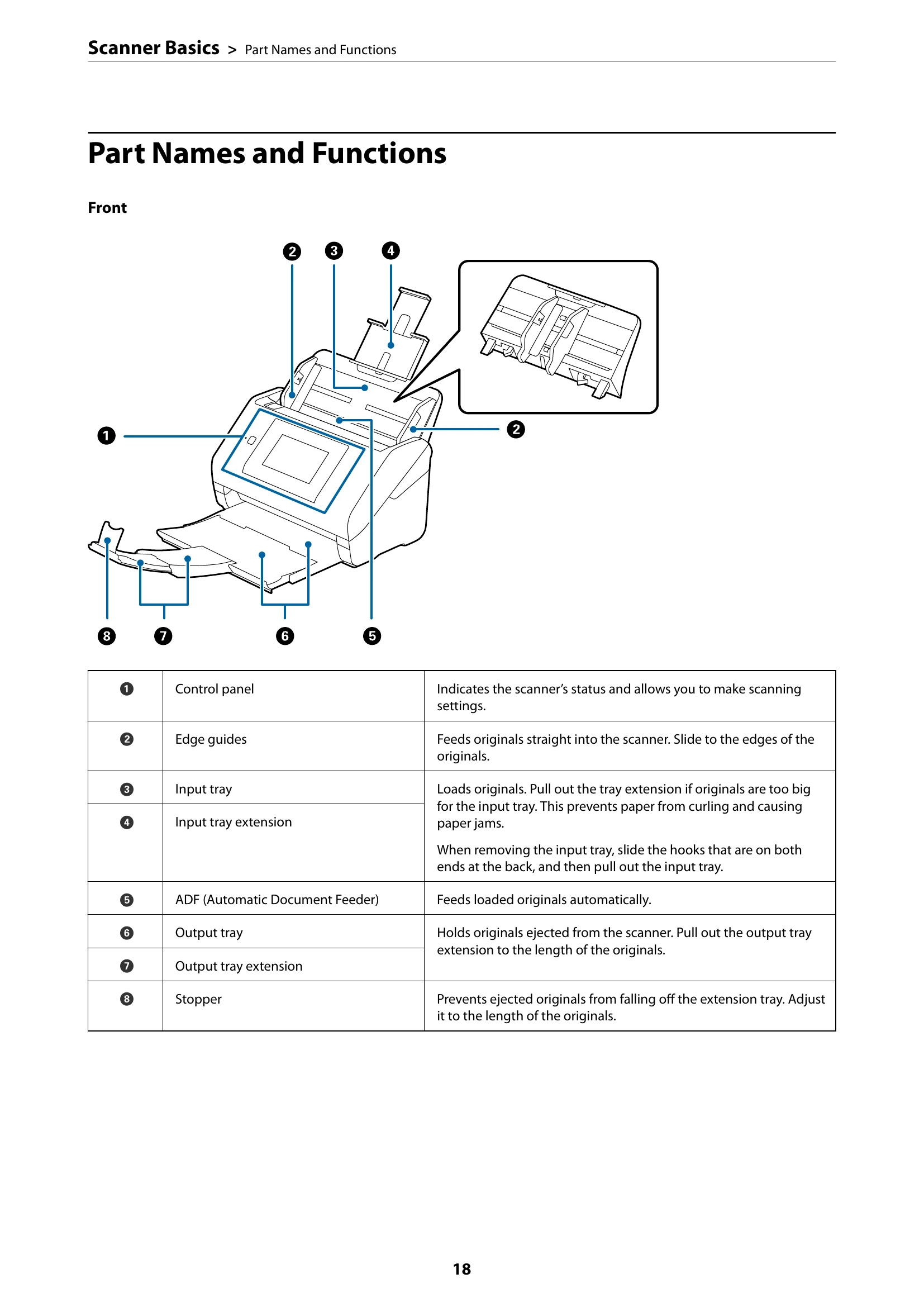
  • Familiarize yourself with the scanner's parts (front, rear, inside) including the control panel, input/output trays, ADF, USB ports, and rollers.
  • Learn how to insert and remove external USB devices.
  • Understand the control panel layout, buttons, lights, and basic screen composition for making settings and initiating scans.
  • Explore different scanning methods: using the scanner's control panel, scanning to a computer via Epson ScanSmart or Epson Smart Panel, and network scanning.

Troubleshooting and error codes

ProblemPossible CauseSolution
The Scanner Does Not Turn On Scanner or AC adapter is not connected properly. Check the power cord and AC adapter connections.
Cannot Start Scanning from Computer Scanner is not connected to the computer or network. Check network and USB connections. Ensure scanner driver is installed.
Paper Feeding Problems Dirty rollers or incorrect paper loading. Clean the rollers and ensure originals are loaded correctly.
Scanned Image Problems (e.g., lines, dirt) Dirty scanning sensor or glass. Clean the scanner's glass and sensor.
Privacy Policy