Brand: ELECTROLUX
Category: Oven
Document Type: Manual
Language: EN
Brand: ELECTROLUX
Category: Oven
Document Type: Manual
Language: EN
Uploaded: Sept. 12, 2025, 4:13 a.m.
Manual Publish Date: 2002-01-01
1. Programming the Default Parameters:
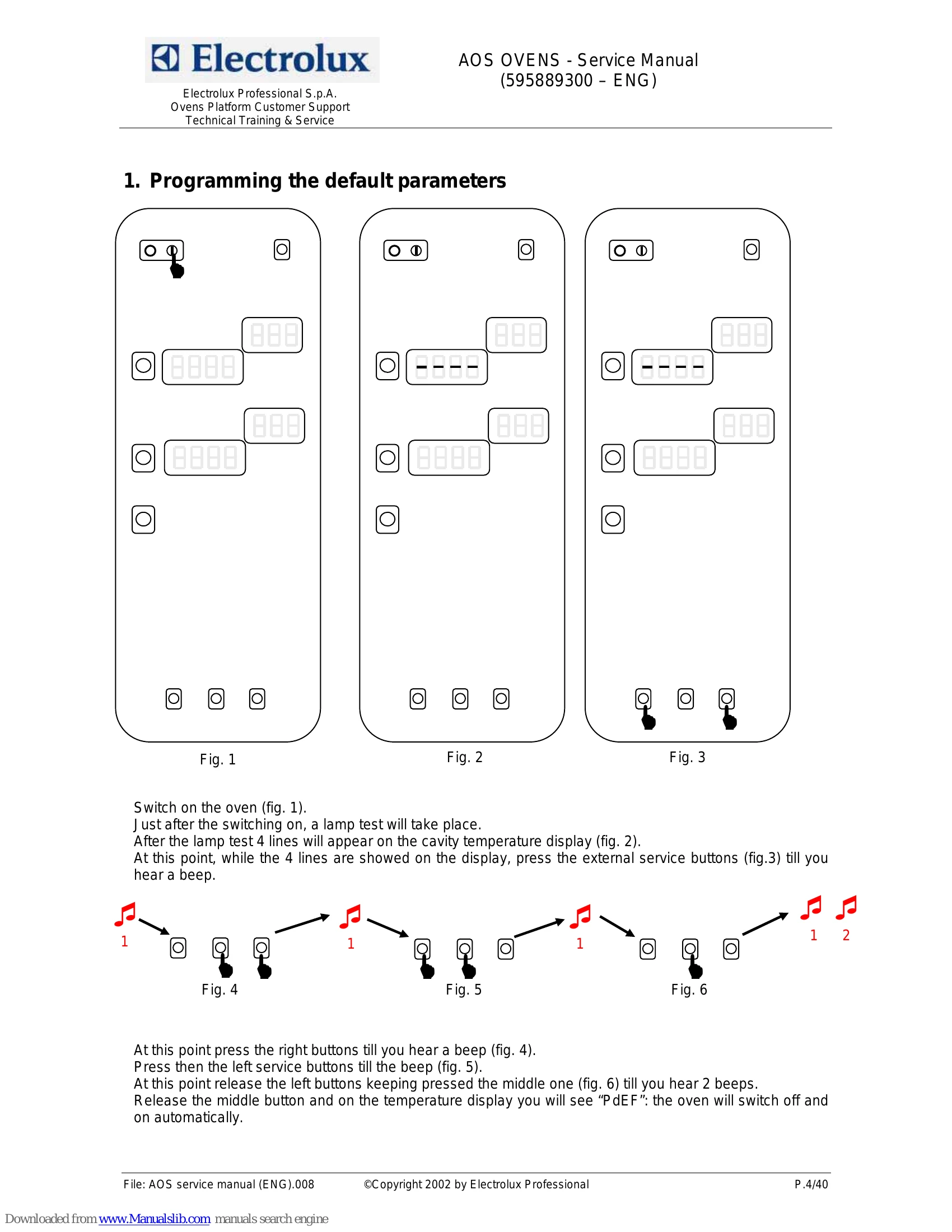
Switch on the oven. After the lamp test, 4 lines appear. Press external service buttons until a beep. Then press right buttons for a beep, followed by left buttons for a beep. Release left buttons while holding the middle one until 2 beeps. Release the middle button. "PdEF" will appear, and the oven will switch off and on.
2. Advanced Programming:
Similar to default programming. After the lamp test, press external service buttons until a beep. Press right buttons for a beep, then left buttons for a beep. Release the button to see "P 1" and the parameter name. Use external buttons to scroll through parameters and the middle button to view/modify values.
3. By-pass Calibration (Lev. B Ovens):
Switch on, enter programming, set 'cort' to 0. Exit, switch on again. Wait for pre-heating, select steam cycle (100°C), continuous time. Press and hold left buttons and START. Release buttons and wait for stabilization. Press three buttons together to memorize.
4. Lambda Probe Calibration (Lev. A Ovens):
Set hot air cycle (150°C, >15 min, open flap). Start cycle by pressing left, middle, and START buttons. Wait 10-15 min to dry cavity. Close flap, wait 20 sec. Press 3 buttons to store. Stop cycle with START.
| Oven | Problem | Analysis | Probable anomaly | Checks/causes |
|---|---|---|---|---|
| AOS gas | The burners switch on only for few seconds and then they switch off | The problem occurs on all the burners (cavity and boiler) | Inversion of Phase-Neutral | Check cables on main terminal board |
| AOS gas | The problem occurs only on a cavity burner or on boiler burner | Detection problem | Change the ignition device with one working device to check if the problem persists | |
| AOS gas | Oven is always loading water, water in the cavity overflowing from the boiler | Water level probe are not detecting water | Water level system on main board not working | Check detection rod and integrity of relevant cable |
| AOS gas | Water level probe are not detecting water | Water level probes covered with scale or other | Check water level probes | |
| AOS gas | Water level probe are not detecting water | Broken probe cable | Check continuity of the cable | |
| AOS gas | Oven is always loading water, water in the cavity overflowing from the boiler | Water level system on main board not working | Make a short between X25/26-1 and X25/26-3: the fast filling valve has to close; make a short between X25/26-2 and X25/26-3: the slow filling valve has to close. If this is not happening change main board but before check also next point | |
| AOS gas | Noise on ground circuit | Bad ground connection of some devices inside the oven, mainly the switching feeder TR_Fx or TR_HC are not connected to ground | Check the ground connections |