Brand: DENVER
Category: Clock Radio
Document Type: Manual
Language: EN
Brand: DENVER
Category: Clock Radio
Document Type: Manual
Language: EN
Uploaded: April 20, 2026, 8:05 p.m.
The manual implies a warranty but does not specify a duration.
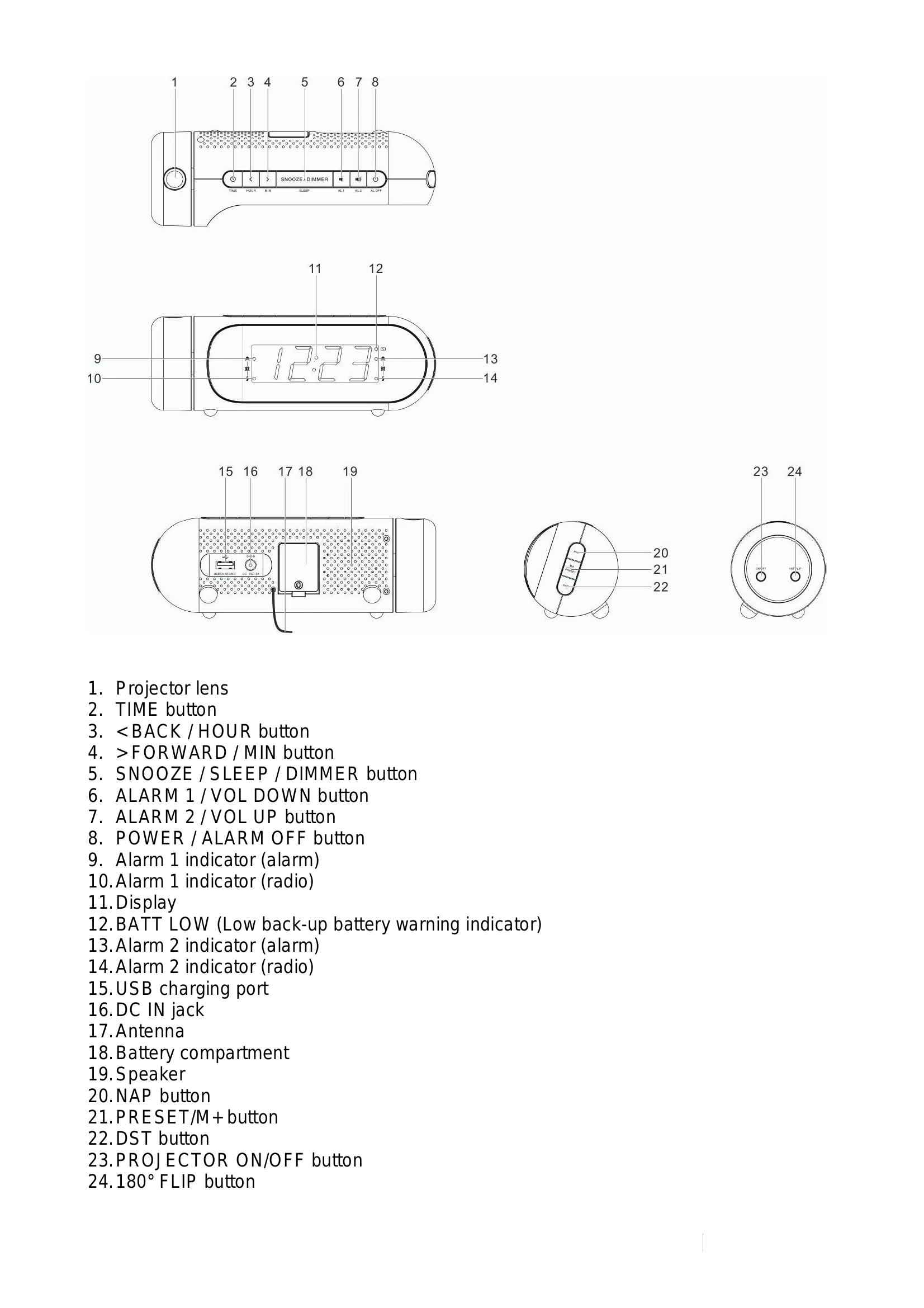
Connect the power adapter to the DC IN jack and then to a wall socket. The radio powers on and enters standby mode.
A 3V lithium battery (CR2032) acts as a backup. In case of a power cut, the radio uses battery power to retain clock and timer settings (without display).
In standby mode, press and hold TIME. Use BACK for hours and FORWARD for minutes. Press TIME to confirm.
Press POWER to turn on. Use BACK/FORWARD for frequency tuning or auto-tuning. Extend the antenna for better reception. Press POWER to turn off.
Tune to a station. Press and hold PRESET/M+ until 'P01' appears. Use BACK/FORWARD to select a preset number (P01-P10) and press PRESET/M+ to confirm. Press PRESET/M+ repeatedly or use BACK/FORWARD to select stored stations.
In standby mode, press and hold ALARM 1 or ALARM 2 to enter alarm setting mode. Cycle through options (Alarm time > Alarm source) using ALARM 1/2 buttons. Set time with BACK/FORWARD. Select source (alarm/radio) with BACK/FORWARD. Alarm indicators will light up when enabled.
With the clock displayed, press ALARM 1 or ALARM 2 to enable/disable the alarm. Corresponding indicators will turn on.
Press ALARM OFF to silence a sounding alarm. Indicators flash when the alarm is sounding.
Press SNOOZE to temporarily silence an alarm. It will sound again after 9 minutes. Press ALARM OFF to cancel snooze and alarm.
While the radio is on, press SLEEP repeatedly to select a duration (90-10 mins, Off). The radio will switch off automatically. Press SLEEP to check remaining time. Press POWER to cancel.
Press DIMMER to cycle through brightness levels (low, high, off).
Press and hold DST to activate/deactivate DST.
Press PROJECTOR ON/OFF to project time. Rotate projector for angle. Press 180° FLIP to flip the image. Works best in a darkened room (90-270 cm range).
Connect devices via USB cable to the USB jack for charging. The radio cannot access device content.