Quick Start Guide for DVC-2000

Quick Start Guide for DVC-2000

Brand: D-Link

Category: Video Conferencing

Document Type: Quick Start Guide

Language: EN
Uploaded: Sept. 12, 2025, 4:14 a.m.

Manual Publish Date: 2005-06-22

Warranty Information

Contact D-Link technical support for warranty information.

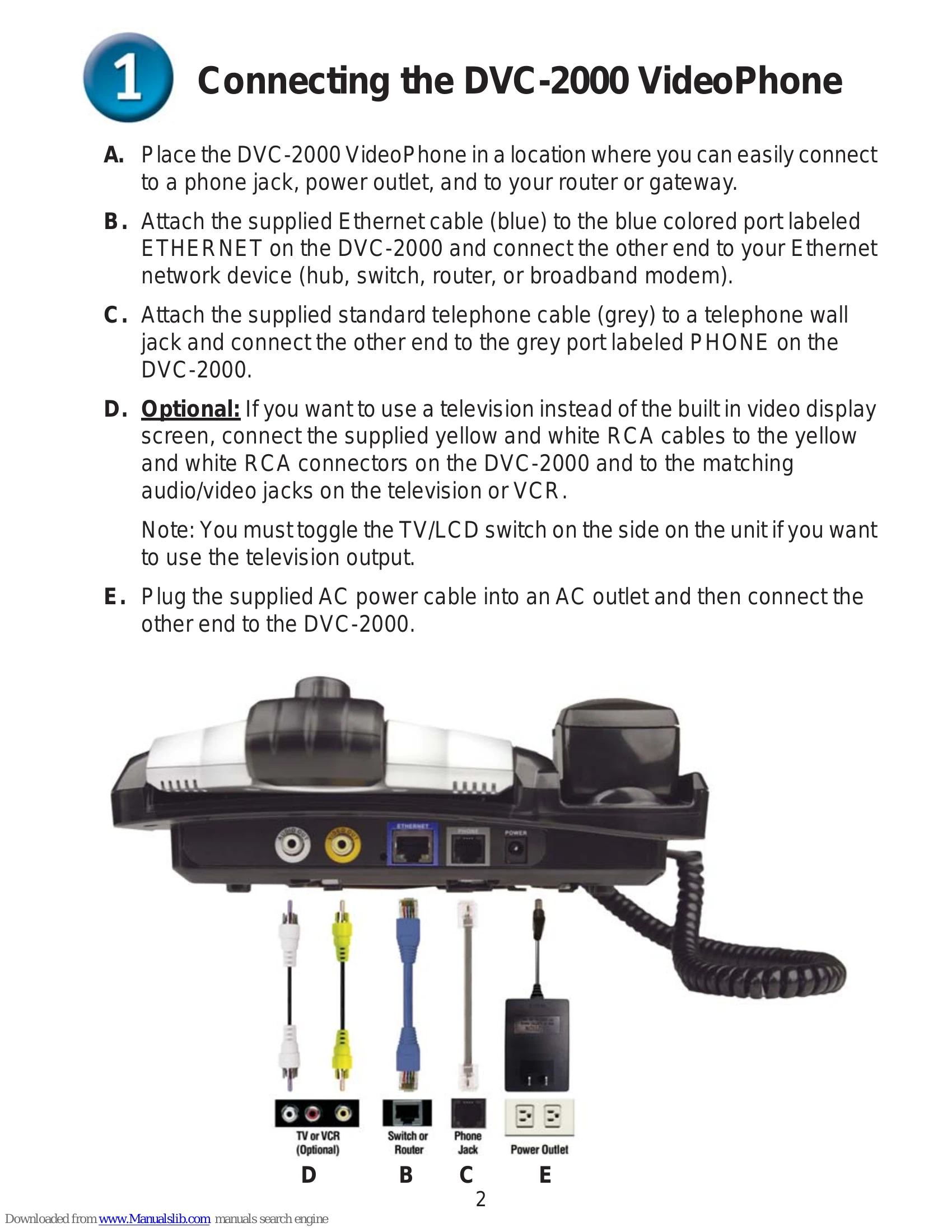
  1. Connecting the DVC-2000 VideoPhone: Place the VideoPhone in a convenient location. Connect the Ethernet cable to your router/modem and the VideoPhone. Connect the telephone cable to a wall jack and the VideoPhone. Optionally, connect RCA cables to a TV/VCR. Plug in the power adapter.
  2. Sharing a Broadband Connection: If sharing your connection, use additional Ethernet cables to connect to your router or residential gateway.
  3. Hardware Overview: Familiarize yourself with the buttons and features: Video Camera, LCD Display, Speed Dial, Cancel, Privacy, Broadband, Numeric Keypad, Speakerphone, OK, and Arrow keys.
  4. On-Screen Keyboard: Use the OK button to bring up the keyboard for entering text. Use arrow keys to navigate and OK to select characters. Press Cancel or highlight OK to dismiss the keyboard.
  5. Setup Wizard: The VideoPhone has a built-in wizard. Follow the on-screen prompts to enter personal information, network address (DHCP, Fixed IP, or PPPoE), and network speed. Restart the device to complete the setup.
  6. Using the DVC-2000: The device has two modes: PSTN (standard phone) and Broadband (video conferencing). Toggle between modes using the Broadband button. In Broadband mode, the Main Window displays the call and the Self-View Window displays your video.
Privacy Policy