Installation Guide for DWR-720 /P

Installation Guide for DWR-720 /P

Brand: D-Link

Category: Networking

Document Type: Installation Guide

Language: EN
Uploaded: Nov. 21, 2025, 6:44 p.m.

Warranty Information

Refer to the user manual on Telkom.d-link.co.za for detailed information.

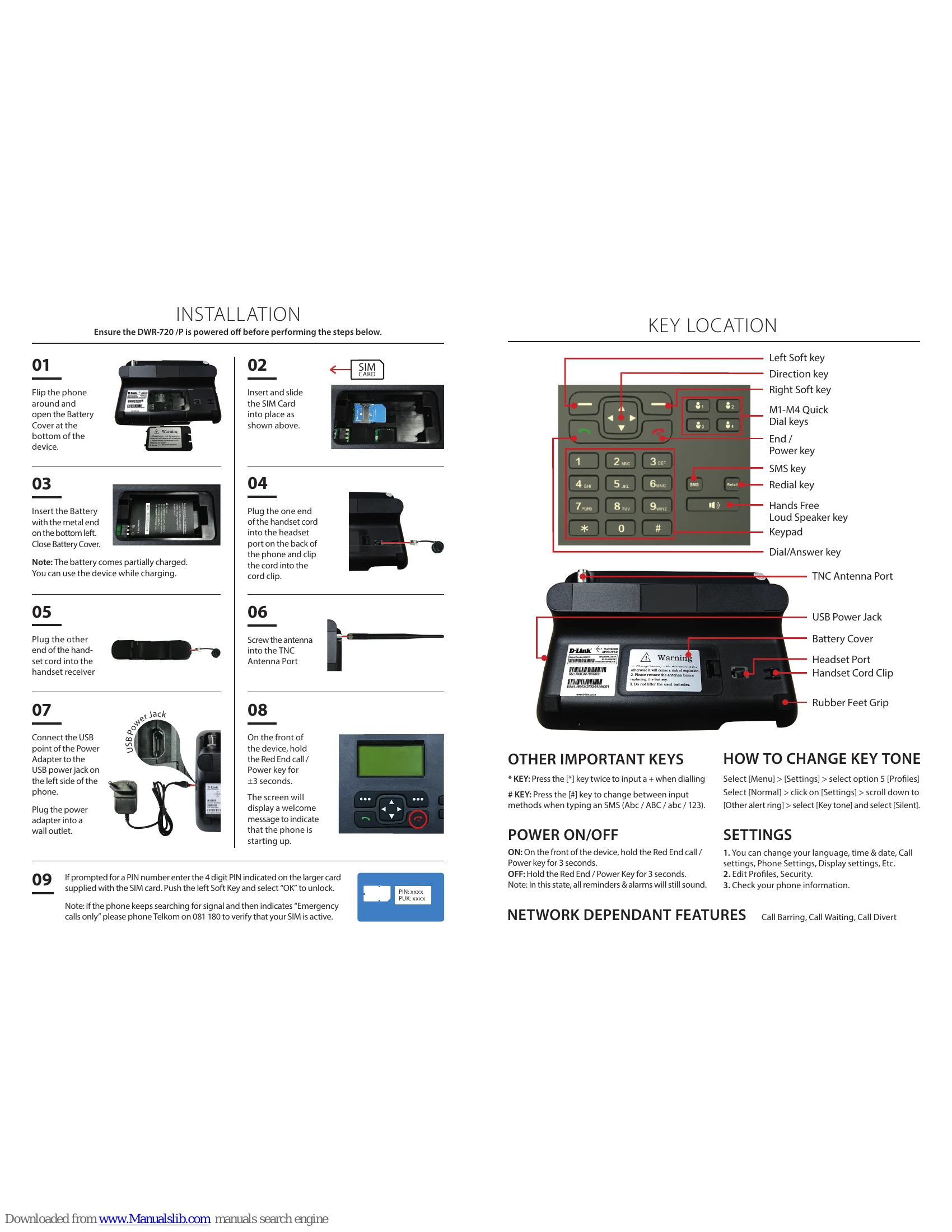
Making and Ending a Call:
  1. In idle mode, enter the number and press Dial/Answer.
  2. For hands-free, ensure the handset is on hook.
  3. Pick up the handset to disable hands-free.
  4. Press the speaker icon during a call for hands-free.
  5. Press End/Power to end a call.
Sending an SMS:
  1. Press Menu > Messaging > Write Message.
  2. Enter message, press Options > Send.
  3. Manually enter recipient or select from Contacts.
  4. Press OK to send.
Checking Airtime Balance:
  1. In idle state, enter *188# and dial.
  2. On-screen message shows balance.
Adding a Contact:
  1. Press Menu > Contacts.
  2. Select New, choose SIM or phone, press Ok.
  3. Select Options > Modify, enter name & number, press Ok.
  4. Press Options > Save.
Setting Quick Dial Keys (M1-M4):
  1. Press Menu > Settings.
  2. Select Phone Settings > Shortcut dial settings.
  3. Select M# > Options > Edit.
  4. Enter number or select Contact, press Ok.

Troubleshooting and error codes

Problem Phone displays "Emergency Calls Only"

1. SIM card may not be active (24-48 hrs). Phone Telkom on 081 180.

2. No mobile service/coverage in the area. Phone Telkom on 081 180.

Problem Phone does not power on
Ensure the battery is correctly inserted and charged. Connect to power adapter.
Problem Cannot make or receive calls
Check SIM card activation and signal strength. Ensure handset is connected properly.
Problem SMS not sending/receiving
Check message center number settings. Ensure sufficient credit.
Privacy Policy