Brand: D-Link
Category: Networking
Document Type: Manual
Language: EN
Brand: D-Link
Category: Networking
Document Type: Manual
Language: EN
Uploaded: Sept. 12, 2025, 4:30 a.m.
Manual Publish Date: 2014-04-22
Copyright © 2014 D-Link Corporation. All rights reserved.
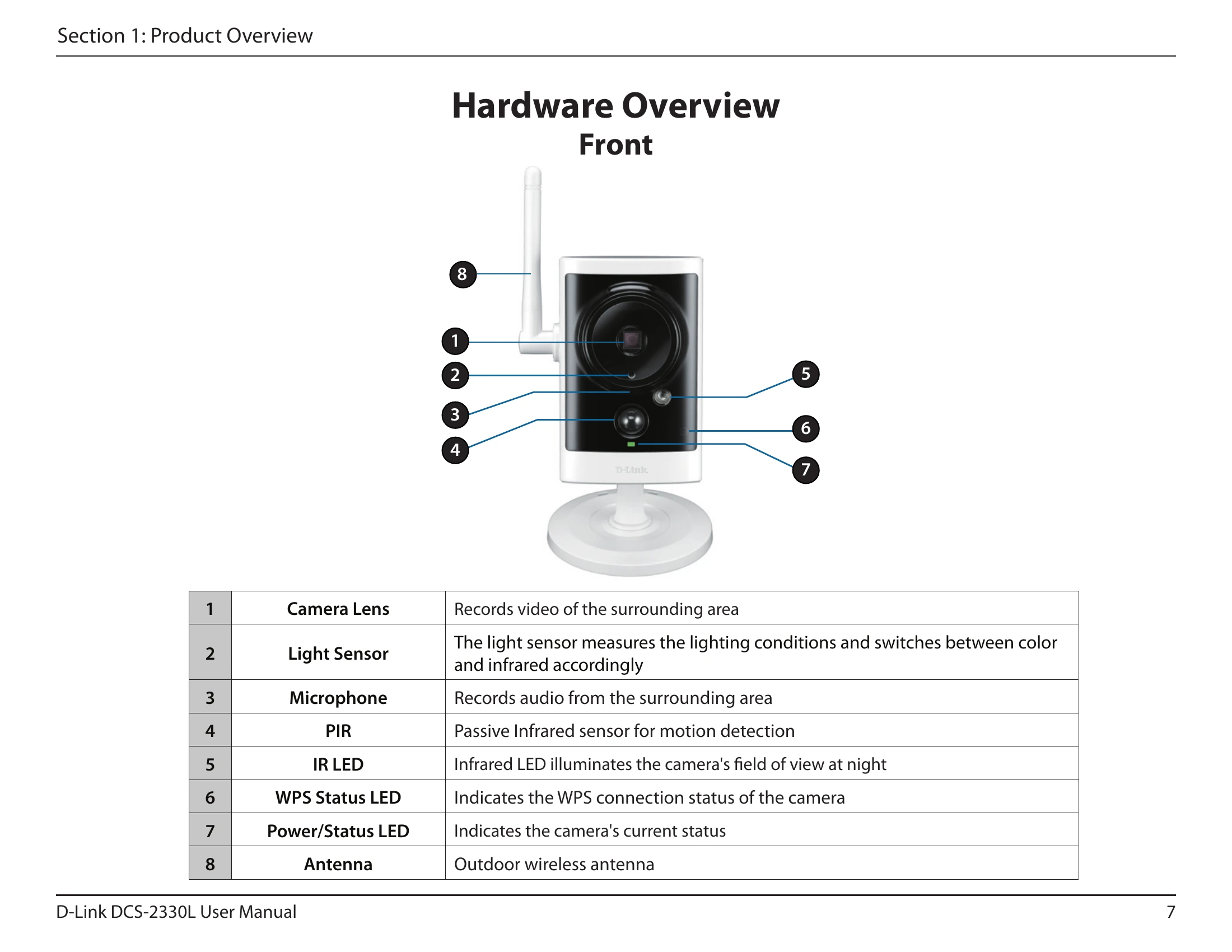
The DCS-2330L is an HD Wireless Outdoor Cloud Camera designed for small offices or homes. It features a built-in CPU and web server for high-quality video streaming, remote access via a web browser, and easy integration with wired or wireless networks. Key features include remote monitoring, motion detection, IR LEDs for night vision, and IP65 weatherproof housing.
Installation can be done via Zero Configuration (if you have a mydlink-enabled Cloud Router), or through a Camera Installation Wizard (for Windows and Mac users). Manual hardware installation involves connecting the Ethernet cable and power supply.
The camera offers various configuration options including SD card management, advanced settings like ICR and IR control, HTTPS secure connection setup, access list management, device management (passwords, user accounts), system settings (backup, restore, reboot), and firmware upgrades.
Users can view device information, check status, and access logs. Live video viewing is available through the mydlink portal or the D-ViewCam application.