Brand: Contax
Category: Digital Camera
Document Type:
Language: EN
Brand: Contax
Category: Digital Camera
Document Type:
Language: EN
Uploaded: Aug. 9, 2025, 11:34 p.m.
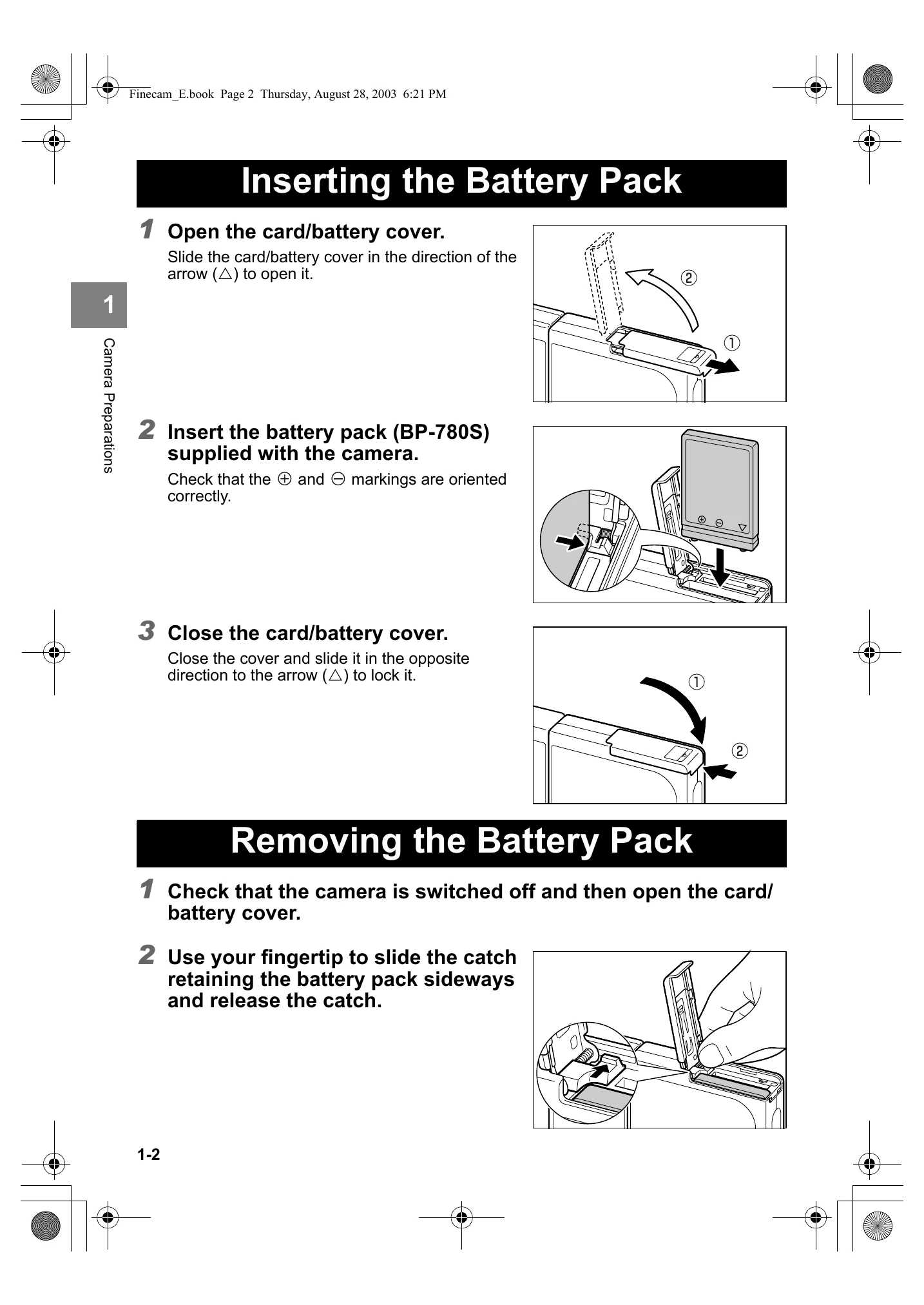
Inserting the Battery Pack: Open cover, insert battery (check orientation), close cover.
Removing the Battery Pack: Open cover, slide catch, pull out battery.
Charging the Battery: Ensure battery is in camera, connect AC adapter. Full charge takes ~3 hours. Caution LED indicates charging.
Loading the Memory Card: Open cover, insert card (label facing LCD), push until click, close cover.
Removing the Memory Card: Open cover, push card gently to pop out, pull out. Do not remove when card access LED is flashing.
Switching the Camera On: Ensure memory card is loaded, press POWER button.
Setting the Date and Time: Press mode button until "SET UP" icon lights, use 4-way button to select [DATE], press.
| Problem | Cause | Solution |
|---|---|---|
| Nothing appears on the LCD monitor. | The lithium-ion battery pack is flat or is not inserted. | Load a lithium-ion battery pack into the camera and re-charge it. |
| Nothing appears on the LCD monitor. | The Power Save function has switched the camera off. | Press the POWER button again to switch the camera back on. |
| Nothing appears on the LCD monitor. | If you leave the camera for a while without using it, the camera goes into Sleep mode. | Press the shutter release button halfway or press any other camera button to restore the camera to Shooting mode. The details vary depending on the Power Save function settings. |
| Nothing appears on the LCD monitor. | There is something generating a magnetic field (such as a magnet or TV) close to the camera. | Move the camera further away from the magnetic object. |
| There is no image on the LCD monitor. | This is because the photographed image size is small. | This is dependent on factors such as the quality mode and the subject and is not a problem. |
| I cannot erase an image. The [] icon appears. | The image is protected. | Unprotect the image. |
| I cannot erase an image. | The image file was recorded using a different device. | The image cannot be erased using this camera. You can use FORMAT to erase the image, but this will erase all the images on the card. |
| The number of available shots did not increase after I erased an image. | This is because the erased image size is small. | This is dependent on factors such as the quality mode and the subject and is not a problem. |
| I cannot charge the battery. | There is no lithium-ion battery pack loaded in the camera. | Load a lithium-ion battery pack into the camera. |
| I cannot charge the battery. | The lithium-ion battery pack poles (+ and -) are the wrong way round. | Reload the lithium-ion battery pack correctly. |
| I cannot charge the battery. | The AC adapter is not connected correctly. | Check that the adapter is securely connected to the camera and the power socket. |
| I cannot charge the battery. Or charging stops. The caution LED flashes slowly. | The battery pack terminals are soiled. | Wipe the terminals with a soft clean cloth. |
| I cannot charge the battery. Or charging stops. The caution LED flashes slowly. | The charging protection circuit was activated and halted charging because the ambient temperature is too high or too low. | Charge the battery when the ambient temperature is between 10°C and 30°C. (Charging is possible between 5°C and 40°C but will take slightly longer.) |
| The camera gets hot. | A strong current flows through the camera when the LCD monitor is used so the camera gets hot if the LCD monitor is used for an extended period. | While this is not a fault, you should leave the camera for a time before using it again. |
| The caution LED flashes slowly. | The flash is charging. | Briefly take your finger off the shutter release button and wait. |
| The caution LED flashes quickly. | This is the camera shake warning. The shutter speed is slow. | Place the camera on a stable surface to take the picture. |
| The camera will not focus. The shooting mark flashes. | The subject is a type that is not suited to autofocus. | Use focus lock to focus on a strongly contrasting part of the subject, then compose the shot and take the picture. |
| The picture came out completely white. | The image is overexposed. | Set LONG EXP to OFF or reset the camera settings. |
| I can't rotate or protect the image or specify DPOF settings. | The SD memory card is write-protected. | Release the write-protection for the card or use another memory card. |