Manual for Tvs III

Manual for Tvs III

Brand: Contax

Category: Camera

Document Type:

Language: EN
Uploaded: Aug. 9, 2025, 11:33 p.m.

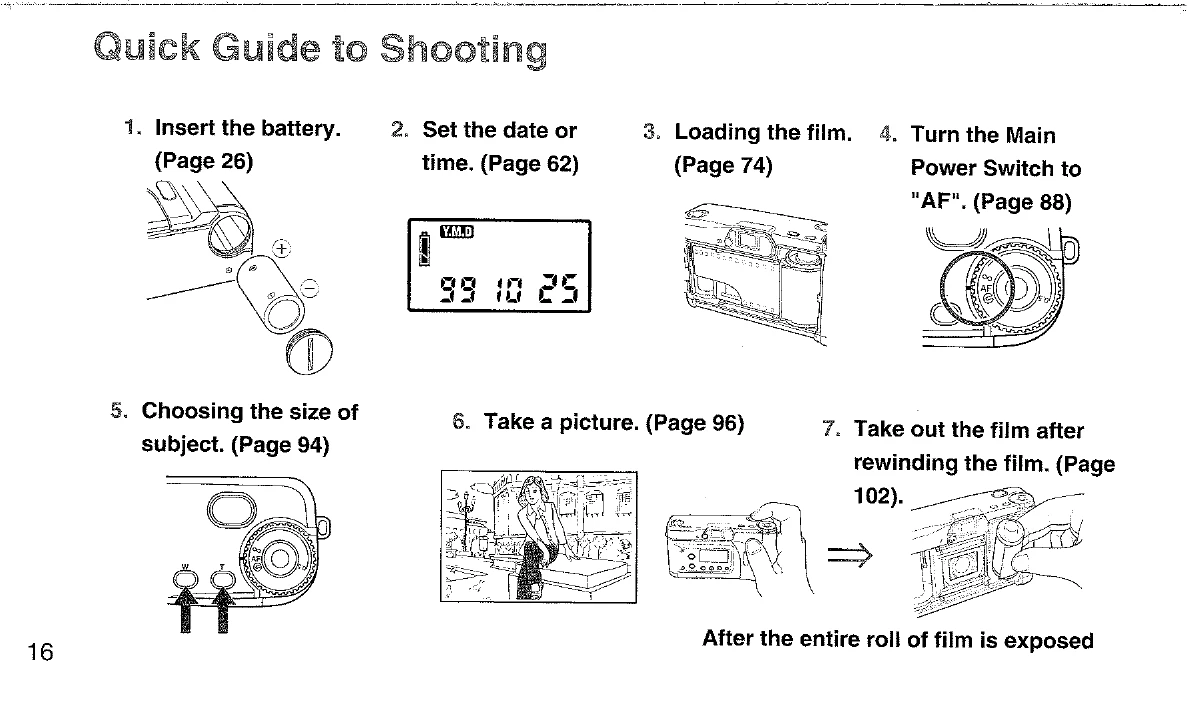
  • Loading the Battery: Open battery compartment, insert 3V lithium battery (+ and - correctly placed), and replace cover. Check battery by turning camera on; a battery capacity indicator will appear.
  • Setting Date/Time: Use buttons to set year, month, day, hour, and minute.
  • Loading Film: Open camera back, insert film cartridge, pull film leader to the right, secure with spool, and close camera back.
  • Turning on the Camera: Turn the main power switch to "AF".
  • Shooting: Frame your subject using the viewfinder. Press the shutter release button halfway for focusing and exposure metering, then fully to take the picture.
  • Taking out Film: After the entire roll is exposed, rewind the film using the rewind button. Open the camera back and remove the film.

Troubleshooting and error codes

Column 1 Column 2 Column 3 Column 4
Row 1 Data 1 Row 1 Data 2 Row 1 Data 3 Row 1 Data 4
Row 2 Data 1 Row 2 Data 2 Row 2 Data 3 Row 2 Data 4
Row 3 Data 1 Row 3 Data 2 Row 3 Data 3 Row 3 Data 4
Privacy Policy