Brand: Contax
Category: Camera
Document Type:
Language: EN
Brand: Contax
Category: Camera
Document Type:
Language: EN
Uploaded: Aug. 9, 2025, 11:34 p.m.
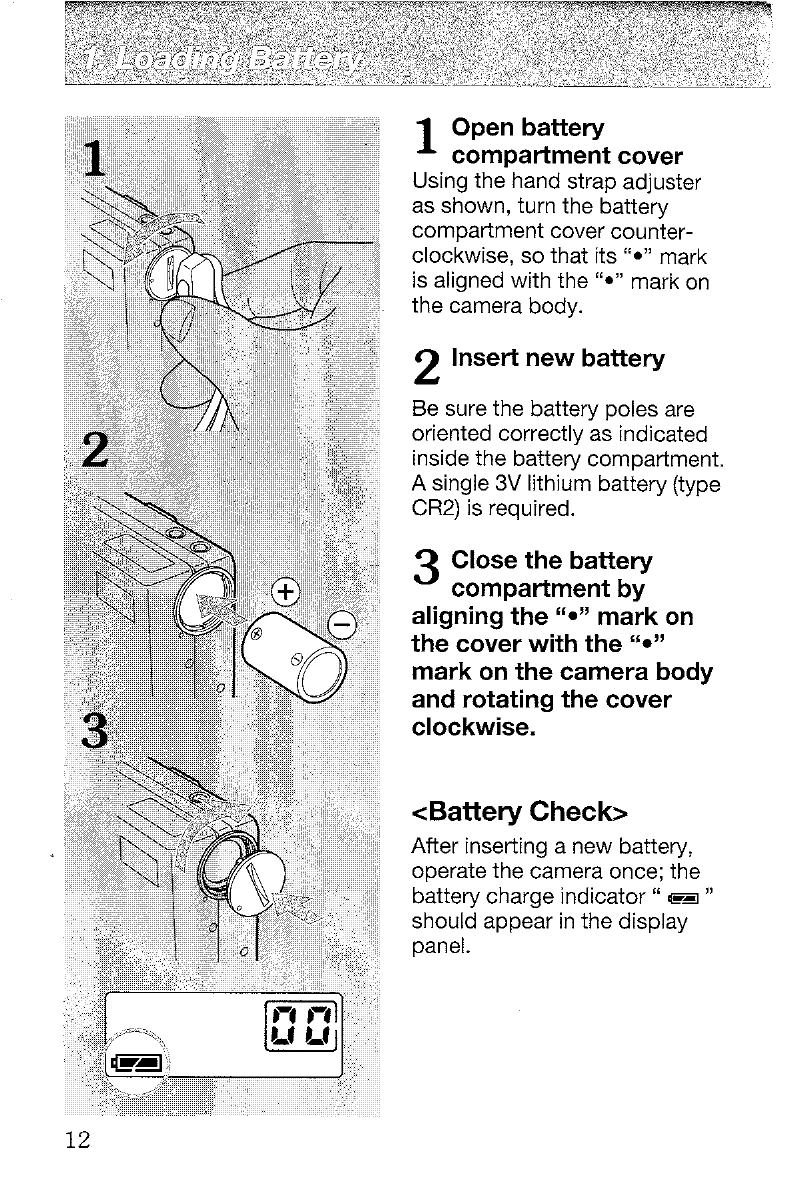
1. Loading Battery: Open the battery compartment by turning the cover counter-clockwise, insert a new CR2 lithium battery ensuring correct polarity, and close the cover by rotating it clockwise. A battery check displays " " on the panel after a successful insertion.
2. Pressing the Shutter Release Button: The button has two stages: halfway depressed for focusing and metering, and fully depressed to take the picture and advance the film. Press gently with the pad of your finger to prevent camera shake.
3. Holding the Camera Correctly: Hold elbows close to the body for stability. Hold your breath while pressing the shutter. Avoid grasping too tightly. For vertical shots, hold the camera with the flash at the top for natural lighting. Be careful not to block the lens or sensors.
4. Turning on the Camera: Turn the main switch from " " to "P". The lens barrier opens, and the camera defaults to automatic focus, programmed auto exposure, and automatic flash mode.
5. Taking Pictures: Point the viewfinder's focus frame at the subject and depress the shutter halfway. A " " mark indicates focus. Gently press the shutter release fully to take the photograph. The camera uses a multi-autofocus system.
6. Flash Photography: Select flash modes (Auto, Red-eye reduction, No flash, Fill-in, Night Portrait) using the flash mode button. The default mode can be changed.
7. Loading Film: Open the camera back, insert a DX-coded 35mm film cartridge diagonally, pull the leader to the film leader mark, lay it on the take-up spool, and close the camera back. The film advances to frame 01.
8. Removing Exposed Film: The camera automatically rewinds film. Do not open the back until rewinding is complete. A blinking "00" indicates completion. A rewind button "R" allows mid-roll rewind.
| Problem | Possible Cause | Solution |
|---|---|---|
| Battery indicator blinks | Battery low | Replace battery |
| Shutter does not operate | Film not loaded correctly | Open camera back and load film correctly |
| Shutter does not operate | Film not advanced to frame 01 | Close camera back; film should advance automatically. |
| Flash does not fire | Flash mode set to "No flash" | Select a different flash mode |
| " " indicator blinks quickly | Subject too far for flash | Move closer to subject |
| " " indicator blinks | Subject too close | Move farther from subject (minimum 0.35 m) |
| "500" blinks in viewfinder | Subject too bright | Reduce exposure (e.g., use aperture-priority mode and a smaller aperture if possible) |
| Focus lock fails | Subject not suitable for autofocus | Try focusing on another object at the same distance, then reframe on the subject. |