Manual for SC200

Manual for SC200

Brand: COBRA

Category: Electronics

Document Type: Manual

Language: EN
Uploaded: Aug. 10, 2025, 12:38 a.m.

Powering On/Off:

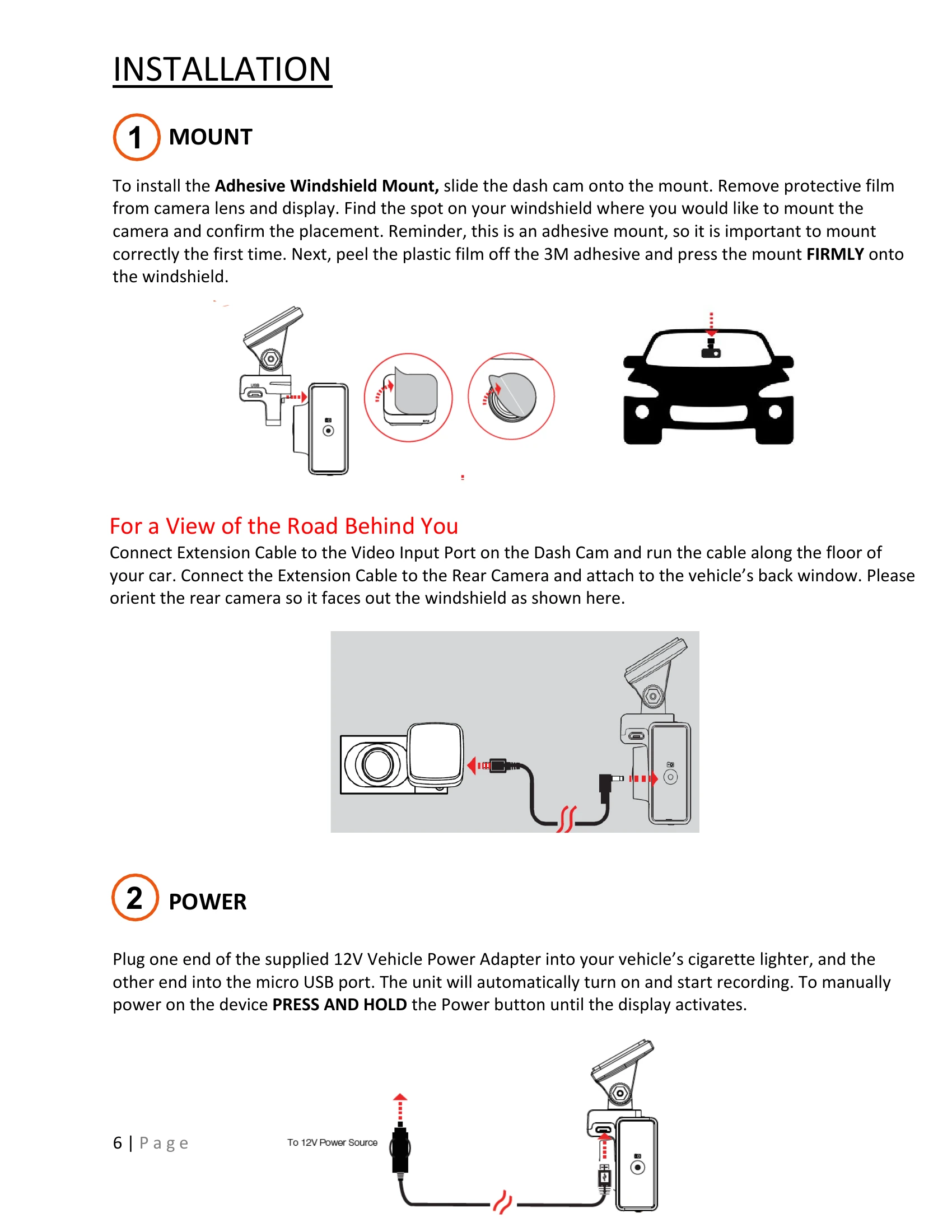
The device powers on automatically when plugged in. To manually power on, press and hold the On/Off button until the display activates. The device will automatically start loop recording when powered on.

Loop Recording:

The dash cam continuously overwrites the oldest footage when the SD card is full. To protect a clip from being overwritten, press the Emergency Record/Favorites Button.

Emergency Recordings:

Triggered by pressing the Emergency Record/Favorites Button or by the G-Sensor detecting a significant impact. These create locked files that are not overwritten.

Micro SD Card:

The device comes with a Micro SD card. To remove, press firmly on the card. To insert, push until it locks. Supports up to 256GB. Format the card in-camera before use. Class 10 cards are recommended.

Navigating Menus:

Use the arrow keys to navigate menu items and the OK button to select or change options. Pressing the designated exit button will exit the menu without saving.

Volume Adjust:

Volume for notifications and voice announcements can be adjusted in the settings menu or via the Drive Smarter App.

Troubleshooting and error codes

Issue Possible Solutions
Unit not operating properly
  • Ensure the power cord is properly connected.
  • Check that the cigarette lighter socket is clean and free of corrosion.
  • Ensure the power cord's adapter is firmly seated in the cigarette lighter.
  • Download the latest firmware to your unit.
Unit not powering up
  • Ensure your unit is properly connected.
  • If the unit was turned off, press and hold the power button to turn it on.
  • If using Parking Mode and Motion Detection with a hardwire kit, the unit might not "wake up" immediately. Begin driving; it will wake up and start recording.
Cabin/interior recordings appear black and white This is normal operation of the Infrared LED night-vision camera. Infrared recording allows accurate recording in low-light conditions. Infrared recording can be turned off in the settings menu.
How to use Parking Mode and Motion Detection Enable these features in the camera's settings. They monitor your vehicle when parked if connected via a hardwire kit. The unit goes into a low-power state and wakes up upon detecting motion or impact.
Why is my unit not getting a GPS Lock (GPS icon is red) The GPS locks best when on the road. A GPS lock may not be possible in garages, parking structures, or when testing indoors.
Privacy Policy