Installation Guide for CP-8865

Installation Guide for CP-8865

Brand: Cisco

Category: Telephony

Document Type: Installation Guide

Language: EN
Uploaded: Nov. 21, 2025, 6:10 p.m.

Manual Publish Date: 2019-02-07

Installation Instructions for Cisco CP-8865 Enclosure:

This guide details the installation of the CP-8865 enclosure. Key steps include:

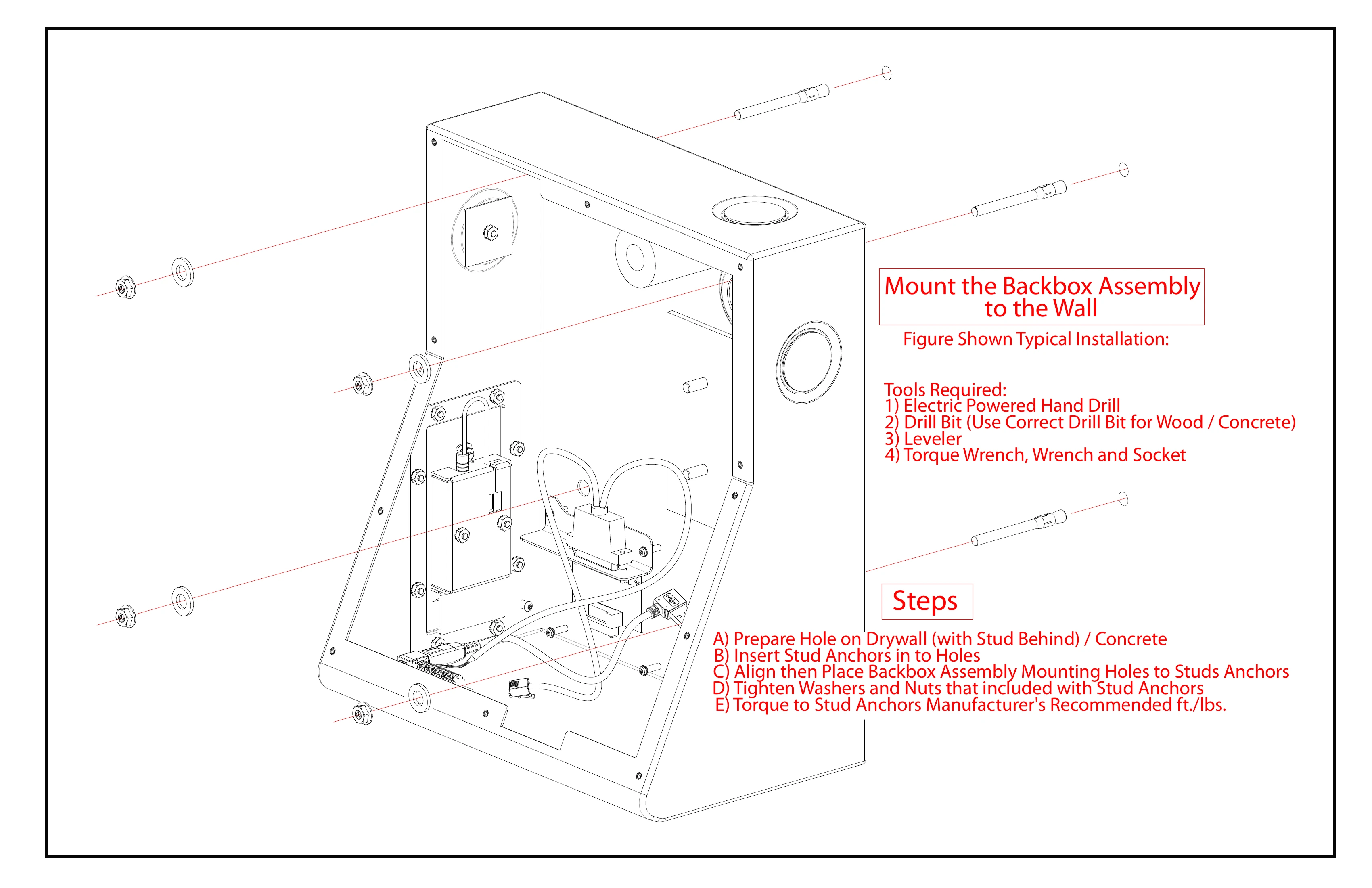
  • Mounting the Backbox: Ensure the wall can support the system, use appropriate screws, and install by qualified personnel according to local regulations. Tools required include a drill, leveler, and torque wrench.
  • Phone and Cable Connections: Remove handset and disconnect cord. Connect power and network cables through the mounting bracket. Ensure the USB to Analog Audio Module (UAAM) is connected.
  • Faceplate Assembly: Reconnect factory-disconnected components. Install upper and lower faceplates, ensuring the camera lines up with the faceplate hole.
  • Grounding: Ground the backbox and faceplate from ESD.
  • Accessory Kits: Various kits are provided for mounting, keypad cover, and phone mounting screws.

Important Note: Do not ship the enclosure with the phone installed. The phone must be installed on-site.

Privacy Policy