Brand: CASIO
Category: Digital Camera
Document Type:
Language: EN
Brand: CASIO
Category: Digital Camera
Document Type:
Language: EN
Uploaded: Aug. 9, 2025, 11:43 p.m.
| Symptom | Possible Cause | Action |
|---|---|---|
| Power does not turn on. |
1) The batteries are not oriented correctly. 2) The batteries are dead. 3) You are using the wrong type of AC adaptor. |
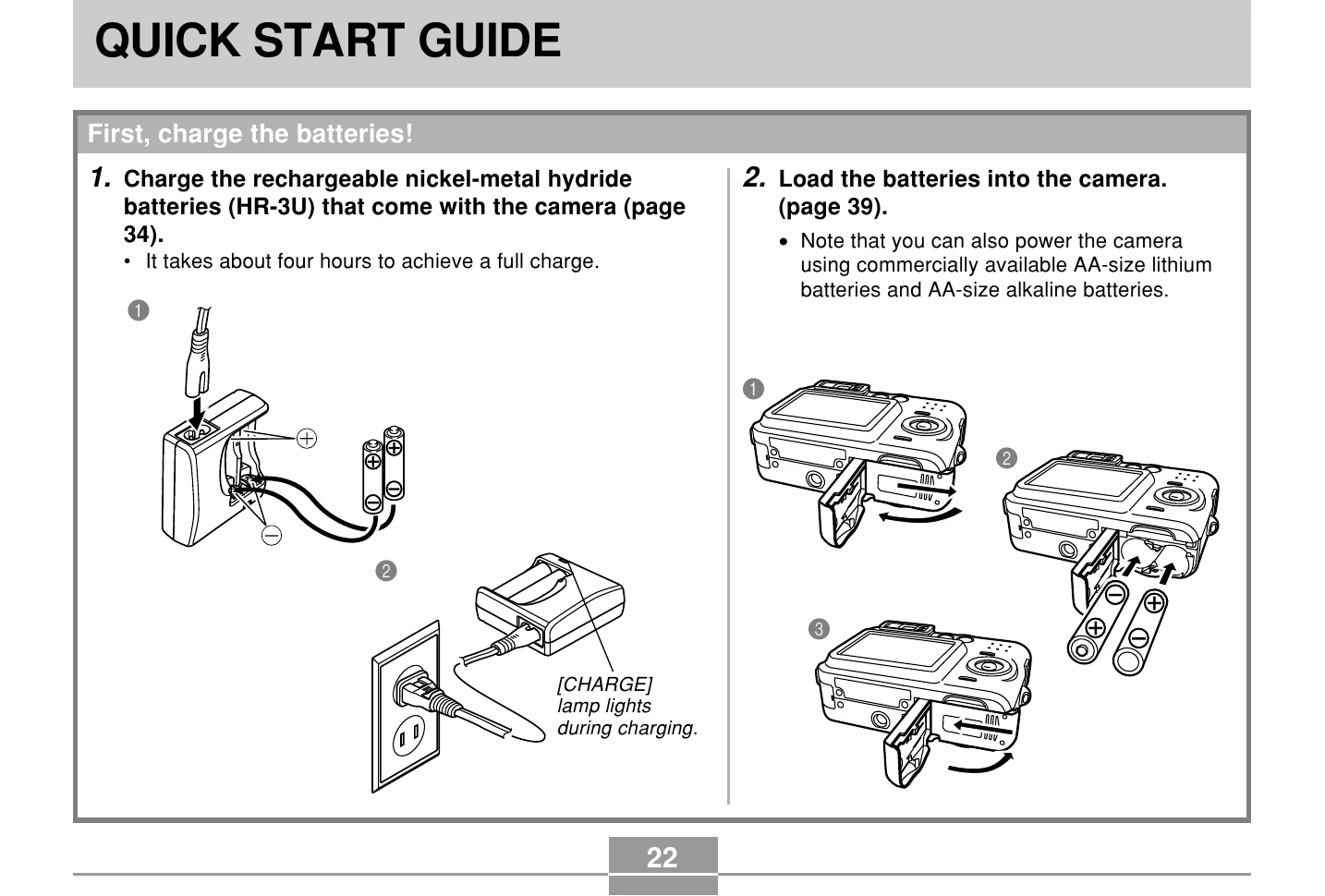
1) Orient the batteries correctly (page 39). 2) Charge the batteries (page 34). If the batteries go dead soon after being charged, it means they have reached the end of their life and need to be replaced. Purchase separately available rechargeable nickel-metal hydride batteries (HR-3U), or replace the batteries with other ones. 3) Use only the type of AC adaptor (AD-C30) specified for this camera. |
| Camera suddenly powers down. |
1) Auto Power Off activated (page 46). 2) The batteries are dead. |
1) Turn power back on. 2) Charge or replace the batteries. |
| Image is not recorded when the shutter button is pressed. |
1) The camera is in the PLAY mode. 2) Flash unit is being charged. 3) Memory is full. |
1) Press [] (REC) to enter the currently selected recording mode. 2) Wait until the flash unit finishes charging. 3) Transfer files you want to keep to your computer and then delete files from image memory, or use a different memory card. |
| Auto Focus does not focus properly |
1) The lens is dirty. 2) The subject is not located in the center of the focus frame when you compose the image. 3) The subject you are shooting is a type that is not compatible with Auto Focus operation (page 73). 4) You are moving the camera. |
1) Clean the lens. 2) Make sure the subject is centered in the focus frame when composing the image. 3) Use manual focus (page 76). 4) Mount the camera on a tripod. |
| The subject is out of focus in the recorded image. | The image is not focused properly. | When composing the image, make sure the subject on which you want to focus is located inside the focus frame. |
| The flash does not fire. |
1) (flash off) is selected as the flash mode. 2) The batteries are dead. 3) The camera is in the Movie mode. 4) A scene that selects (flash off) as the flash mode is selected in the BESTSHOT Mode. |
1) Select a different flash mode (page 63). 2) Charge or replace the camera's batteries (page 34). 3) Select a different REC mode. 4) Select a different flash mode (page 63) or BESTSHOT scene (page 84). |
| Camera powers down during self-timer countdown. | The batteries are dead. | Charge or replace the camera's batteries. |
| Monitor screen image is out of focus. |
1) You are using the Manual Focus Mode and have not focused the image. 2) You are trying to use the Macro Mode when shooting a scenery or portrait shot. 3) You are trying to use Auto Focus or the Infinity Mode() when shooting a close-up shot. |
1) Focus the image (page 76). 2) Use Auto Focus for scenery and portrait shots. 3) Use the Macro Mode for close-ups. |
| Recorded images are not saved in memory. |
1) Camera powers down before the save operation is complete. 2) Removing the memory card before the save operation is complete. |
1) When the battery indicator shows charge or replace the camera's batteries. 2) Do not remove the memory card before the save operation is complete. |
| Color of the playback image is different from the image on the monitor screen during recording. | Sunlight or light from another source is shining directly into the lens during recording. | Position the camera so sunlight does not shine directly into the lens. |
| Images are not displayed. | A memory card with non-DCF images recorded with another camera is loaded in the camera. | Use a different card. This camera cannot display non-DCF images recorded onto a memory card using another digital camera. |
| All buttons and switches are disabled. | Circuit problem caused by electrostatic charge, impact, etc. while the camera was connected to another device. | Remove the batteries from the camera, reinsert them, and then try again. |
| Monitor screen is off. |
1) USB communication is in progress. 2) The monitor screen is turned off (in the REC mode). |
1) After confirming that the computer is not accessing camera memory, disconnect the USB cable. 2) Press [DISP] to turn on the monitor screen. |
| Cannot transfer files over a USB connection. |
1) USB cable is not connected securely. 2) USB driver is not installed. 3) Camera is turned off. |
1) Check all connections. 2) Install the USB driver on your computer (page 162). 3) Turn on the camera. |