Brand: CASIO
Category: Digital Camera
Document Type:
Language: EN
Brand: CASIO
Category: Digital Camera
Document Type:
Language: EN
Uploaded: Aug. 9, 2025, 11:40 p.m.
| Problem | Possible Cause and Recommended Action |
|---|---|
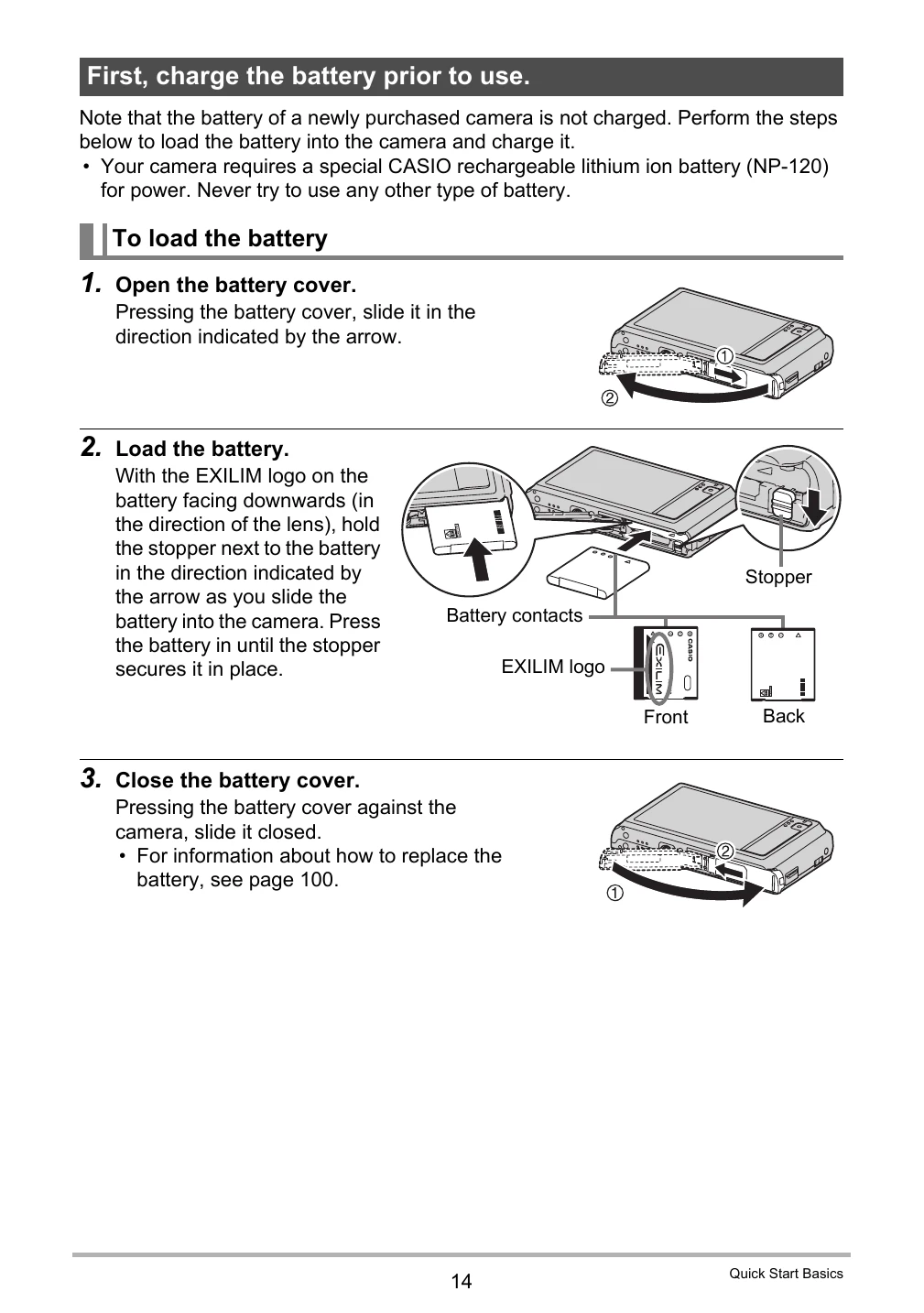
| Power does not turn on. | 1) Battery not loaded correctly (page 14). 2) Battery dead; charge (page 15). Battery may need replacement if it dies soon after charging. 3) Camera's protection function activated due to high temperature; turn off and cool down. |
| The camera suddenly powers down. | 1) Auto Power Off activated (page 89); turn back on. 2) Battery dead; charge (page 15). 3) Camera protection function activated due to high temperature; turn off and cool down. |
| Power will not turn off. Nothing happens when a button is pressed. | Remove and reload the battery. |
| Image is not recorded when the shutter button is pressed. | 1) Camera in PLAY mode; touch [REC] (page 24) to enter REC mode. 2) Flash charging; wait for it to finish (page 33). 3) "Memory Full" message; transfer images, delete unneeded ones, or use a new memory card. |
| Auto Focus does not focus properly. | 1) Dirty lens; clean it. 2) Subject not centered in focus frame; compose image carefully. 3) Subject incompatible with Auto Focus (page 31); use manual focus (page 43). 4) Camera movement during shooting; use Anti Shake or tripod. 5) Shutter button pressed fully without waiting for focus; half-press and allow focus time. |
| The subject is out of focus in the recorded image. | Ensure the subject is within the focus frame when composing. |
| The flash does not fire. | 1) Flash Off mode selected; change mode (page 33). 2) Battery dead; charge (page 15). 3) BEST SHOT scene with Flash Off selected; change mode or scene (pages 33, 39). |
| The red (Flash Off) icon is displayed on the monitor screen and the flash does not fire. | Flash unit malfunctioning; contact CASIO service center or retailer. Camera can still be used for non-flash shots. |
| Camera powers down during Self-timer countdown. | Battery may be dead; charge (page 15). |
| The monitor screen image is out of focus. | 1) Manual Focus used without focusing; focus image (page 44). 2) "Macro" used for scenery/portraits; use Auto Focus for these shots (page 43). 3) Auto Focus or Infinity used for close-ups; use Macro (page 43). |
| There is a vertical line in the monitor screen image. | Brightly lit subject causing CCD "vertical smear" phenomenon. Not recorded in snapshots, but recorded in movies. No malfunction. |
| There is digital noise in images. | 1) Increased sensitivity in dark conditions; illuminate subject. 2) Shooting in dark with Flash Off; turn on flash (page 33) or use lights. 3) High ISO or Lighting feature used; illuminate subject. |
| A recorded image was not saved. | 1) Power turned off before save completed; charge battery if indicator shows 🖯 (page 19). 2) Memory card removed before save completed; do not remove card until save is finished. |
| Though available lighting is bright, the faces of people in the image are dark. | Insufficient light; change flash mode to Flash On (page 33) or adjust EV shift to + (page 48). |
| Night shots come out bad. | Use BEST SHOT scenes: Night Scene or Night Scene Portrait (page 39). |
| Subjects are too dark when shooting images in a seashore or ski area. | Sunlight reflection causing underexposure; change flash mode to Flash On (page 33) or adjust EV shift to + (page 48). |
| Digital zoom (including HD zoom) does not work. The zoom bar indicates zoom only up to a zoom factor of 5.0. | Date stamping may be on; turn off date stamping (page 86). |
| The image is out of focus during movie recording. | 1) Subject outside focus range; shoot within range. 2) Dirty lens; clean (page 96). |
| Playback: The color of the playback image is different from what appears on the monitor screen when shooting. | Sunlight or light shining into the lens; position camera to avoid direct sunlight. |
| Playback: Images are not displayed. | Camera cannot display non-DCF images from other digital cameras. |
| Playback: Images cannot be edited (with resizing, trimming, rotation). | Movies and snapshots recorded with another camera cannot be edited. |
| File Deletion: A file cannot be deleted. | File may be protected; unprotect file (page 59). |
| Other: The wrong date and time are displayed, or the wrong date and time are being stored along with image data. | Date and time setting is off; set correct date and time (page 87). |
| Other: The messages on the display are in the wrong language. | Wrong display language selected; change language setting (page 88). |
| Other: Images cannot be transferred over a USB connection. | 1) USB cable not securely connected; check connections. 2) Camera not turned on; turn it on. 3) Connecting via USB hub may cause recognition issues; connect directly to computer's USB port. |
| Language selection screen appears when the camera is turned on. | 1) Initial settings not configured, or battery was dead; check setup (pages 19, 20). 2) Camera memory data problem; perform reset (page 91), then reconfigure settings. If screen doesn't reappear, memory management data restored. If it reappears, contact retailer or CASIO service. |
| The time and date settings configured the first time after purchasing the camera are reset to their factory defaults when remove the camera's battery. | Load battery, reconfigure settings (page 20). Do not remove battery for 24 hours after initial setup. If settings reset after battery removal (even after 24 hours), setting memory may be defective; contact retailer or CASIO service. |
| Buttons are not responsive right after the power has been turned on. | Delay with large capacity memory cards; wait for buttons to become responsive. |
| The camera records images I didn't shoot or the camera shoots an image whenever I touch the monitor screen. | Touch Shutter (page 42) is turned on; avoid touching screen except for operations or turn Touch Shutter off (page 42). |