Brand: CASIO
Category: Digital Camera
Document Type:
Language: EN
Brand: CASIO
Category: Digital Camera
Document Type:
Language: EN
Uploaded: Aug. 9, 2025, 11:38 p.m.
Warranty information is not explicitly provided in the extracted pages.
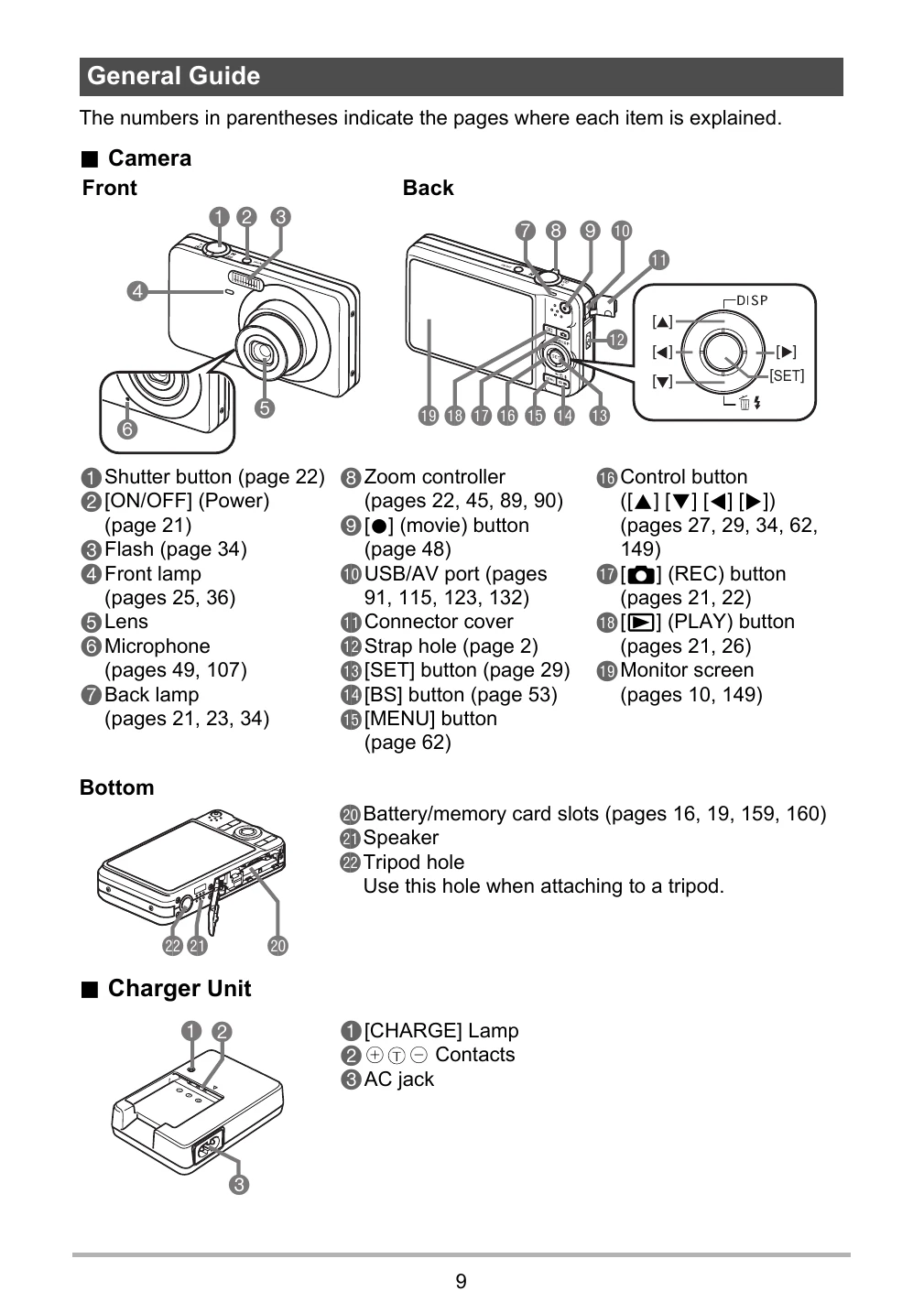
Charging the Battery: 1. Insert battery into charger, then plug into wall outlet. The CHARGE lamp indicates status. A full charge takes about 90 minutes.
Loading the Battery: 1. Open battery cover. 2. Insert battery with EXILIM logo facing down until it clicks.
Turning On/Off: Press [ON/OFF] (Power) to turn the camera on. Press [ON/OFF] again to turn it off.
Shooting a Snapshot: 1. Press [O] (REC) to turn on the camera. 2. Point at the subject and zoom if needed. 3. Press the shutter button to take the picture.
| Problem | Possible Cause | Solution |
|---|---|---|
| Camera does not turn on. | Battery is not charged or is dead. | Charge the battery or replace it. |
| Cannot record images. | Memory card is full or not inserted. | Insert a memory card or delete images. |
| Images are blurry. | Subject moved, camera moved, or incorrect focus. | Hold camera steady, use tripod, or check focus settings. |