Search
Manual for EX-Z3
Brand:
CASIO
Category:
Digital Camera
Document Type:
Language:
EN
Uploaded:
Aug. 9, 2025, 11:44 p.m.
Download Manual
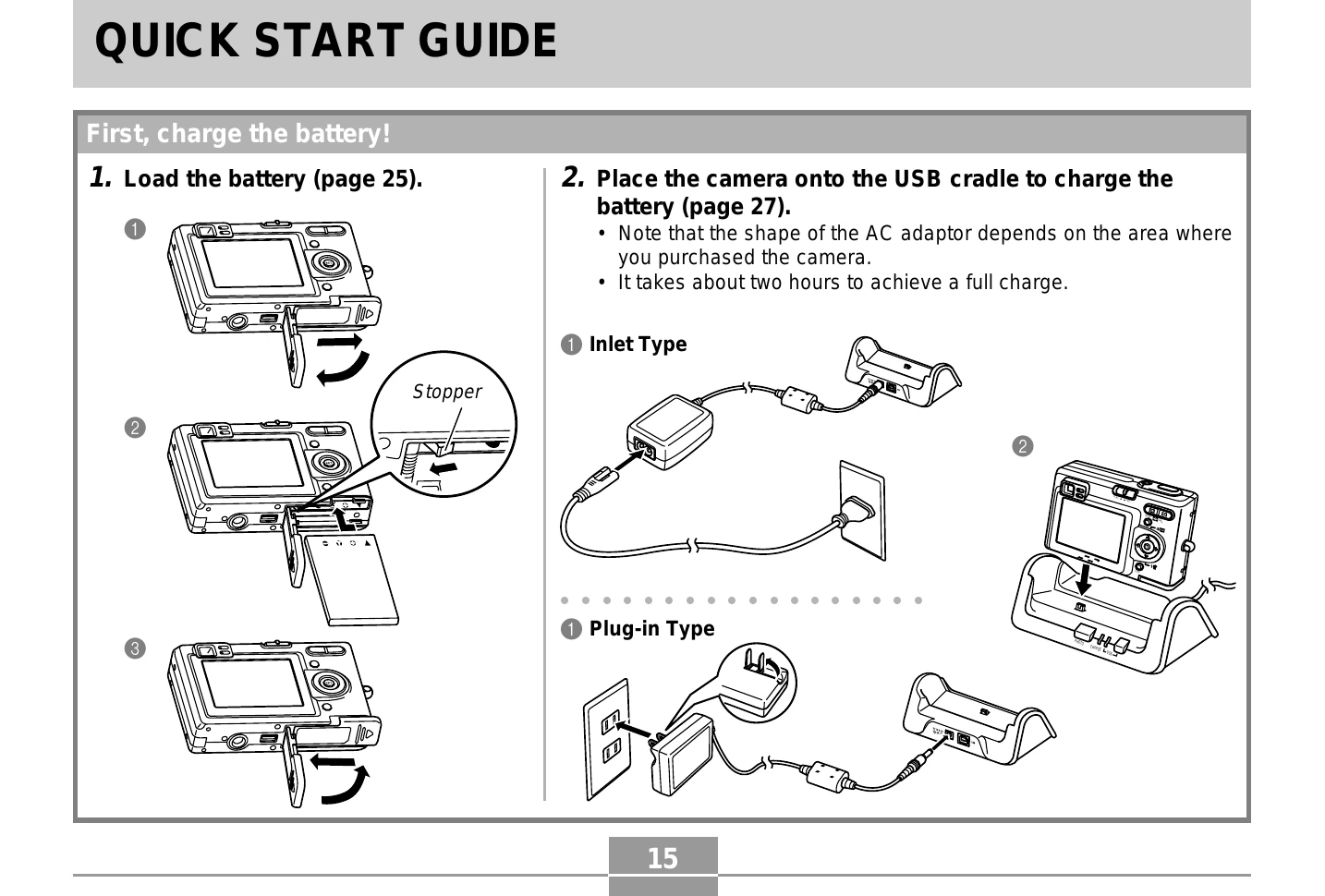
First, charge the battery!
Load the battery.
Place the camera onto the USB cradle to charge the battery.
To configure display language and clock settings
Press the power button.
Select the desired language.
Register the language setting.
Select the geographical area and press SET.
Select the city and press SET.
Select the summer time (DST) setting and press SET.
Select the date format and press SET.
Set the date and time.
Register clock settings and exit.
To record an image
Press the power button.
Align the mode selector with "REC".
Point the camera at the subject, compose the image, and press the shutter release button half way.
When focus is achieved, the focus frame turns green and the operation lamp lights.
Hold the camera still and gently press the shutter release button.
To view a recorded image
Press the power button.
Align the mode selector with "PLAY".
Use the arrow buttons to scroll through images.
To delete an image
Press the power button.
Align the mode selector with "PLAY".
Press the appropriate button to access delete options.
Display the image to delete.
Select "Delete" and press SET.
Privacy Policy