Brand: CASIO
Category: Digital Camera
Document Type:
Language: EN
Brand: CASIO
Category: Digital Camera
Document Type:
Language: EN
Uploaded: Aug. 9, 2025, 11:39 p.m.
| Problem | Possible Cause and Recommended Action |
|---|---|
| Power does not turn on. | 1)Battery not charged. Charge battery. 2)Battery may be dead. Charge battery or contact service center. |
| The camera suddenly powers down. | 1)Designed to auto-off after 5 mins. Turn power on. 2)Battery may be dead. Charge battery. 3)Protection function activated due to high temperature. Turn off and wait. |
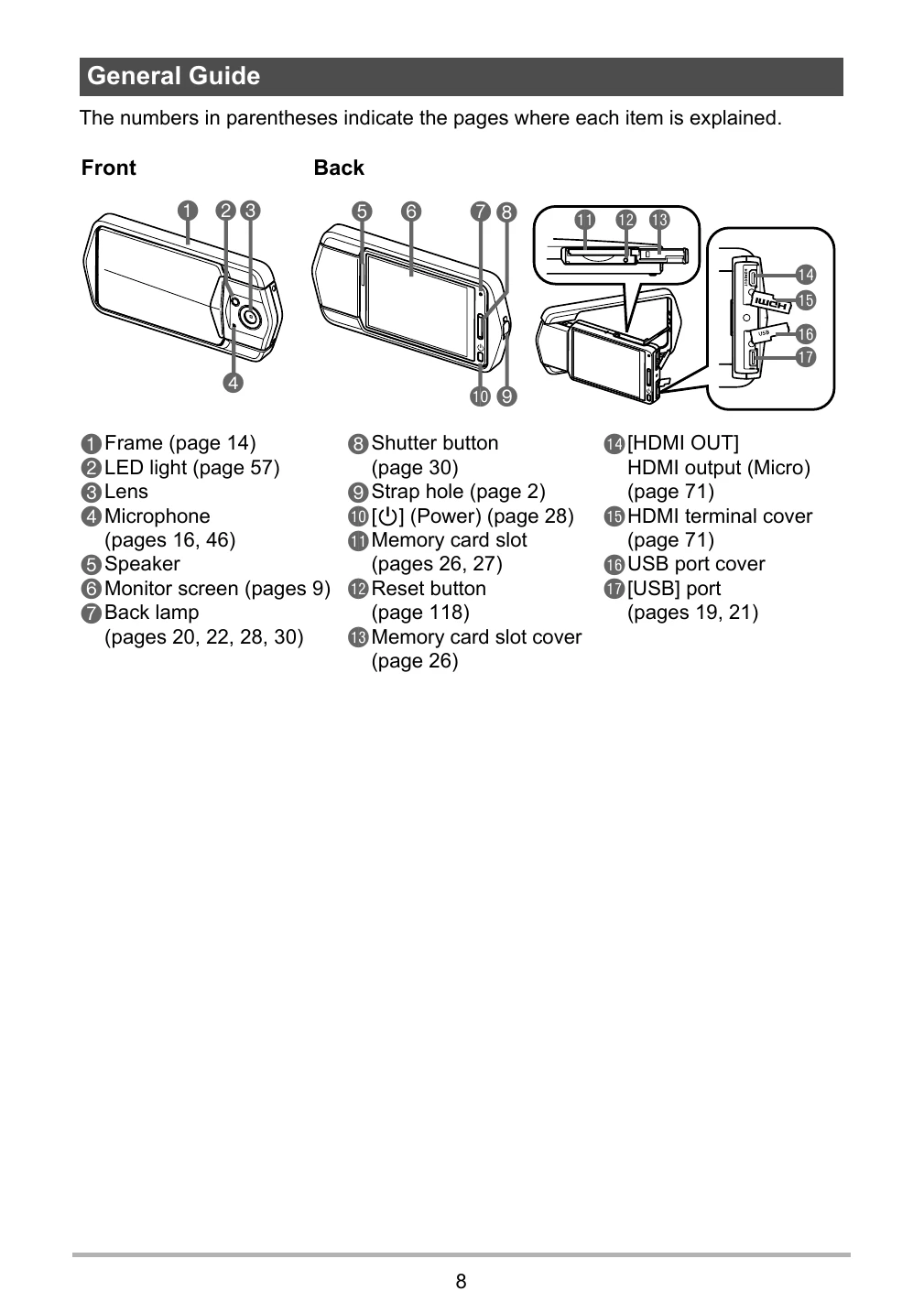
| Power will not turn off. Nothing happens when a button is pressed. | Use a thin object to press the reset button near the memory card slot to turn off and then on again. |
| Image is not recorded when the shutter button is pressed. | 1) Camera in PLAY mode. Touch REC icon. 2) Memory Full. Transfer/delete images or use a different memory card. |
| Auto Focus does not focus properly. | 1)Lens dirty. Clean lens. 2)Subject not in center of focus frame. 3)Camera movement during shooting. Use anti-shake or stabilize camera. 4)Shutter button pressed fully without AF. Half-press to focus first. |
| The subject is out of focus in the recorded image. | Ensure subject is within the focus frame when composing. |
| The LED light does not light. | 1) Battery dead. Charge battery. 2) LED operation disabled for BEST SHOT/HDR Art. Select different mode. |
| Camera powers down during Self-timer countdown. | Battery may be dead. Charge battery. |
| The monitor screen image is out of focus. | 1) Using "Macro" for scenery/portraits. Use Auto Focus for scenery/portraits. 2) Using Auto Focus/Infinity Focus for close-ups. Use "Macro" for close-ups. |
| There is digital noise in images. | 1)Sensitivity increased for dark subjects. Illuminate subject. 2)High ISO sensitivity increases noise. Lower ISO. |
| A recorded image was not saved. | 1)Power turned off before save complete. Charge battery. 2)Memory card removed before save complete. Do not remove card until save is finished. |
| Though available lighting is bright, the faces of people in the image are dark. | Not enough light. Adjust EV shift to the + side. |
| Night shots come out bad. | Use "High Speed Night Scene" BEST SHOT scene. |
| Subjects are too dark when shooting images in a seashore or ski area. | Reflected light causes underexposure. Adjust EV shift to the + side. |
| The image is out of focus during movie recording. | 1)Subject outside focus range. Shoot within range. 2)Lens dirty. Clean lens. 3)During High Speed Movie, focus is fixed. Half-press shutter for AF before starting recording. |
| The color of the playback image is different from what appears on the monitor screen when shooting. | Sunlight or light shining directly into the lens. Position camera to avoid direct sunlight. |
| Images are not displayed. | Cannot display non-DCF images from other cameras. Cannot edit Panorama, other camera, or extracted subject images. |
| Images cannot be rotated. | N/A |
| A file cannot be deleted. | File may be protected. Unprotect the file. |
| The wrong date and time are displayed, or the wrong date and time are being stored along with image data. | Date and time setting is off. Set correct date and time. |
| The messages on the display are in the wrong language. | Wrong display language selected. Change setting. |
| Images cannot be transferred over a USB connection. | 1)USB cable not secure. Check connections. 2)Camera not turned on. Turn on. 3)Connecting via USB hub may cause recognition issues. Connect directly to computer's USB port. |
| Language selection screen appears when the camera is turned on. | 1)Initial settings not configured or battery was dead. Check setup. 2)Camera memory data issue. Perform reset operation to initialize. If screen reappears, contact service. |
| There are various indicators and values on the monitor screen. | Monitor screen shows shooting information. Touch tab and "DISP" to select information. |
| Buttons are not responsive right after the power has been turned on. | Delay possible with large capacity memory cards. |