Manual for EX-S3

Manual for EX-S3

Brand: CASIO

Category: Digital Camera

Document Type:

Language: EN
Uploaded: Aug. 9, 2025, 11:40 p.m.

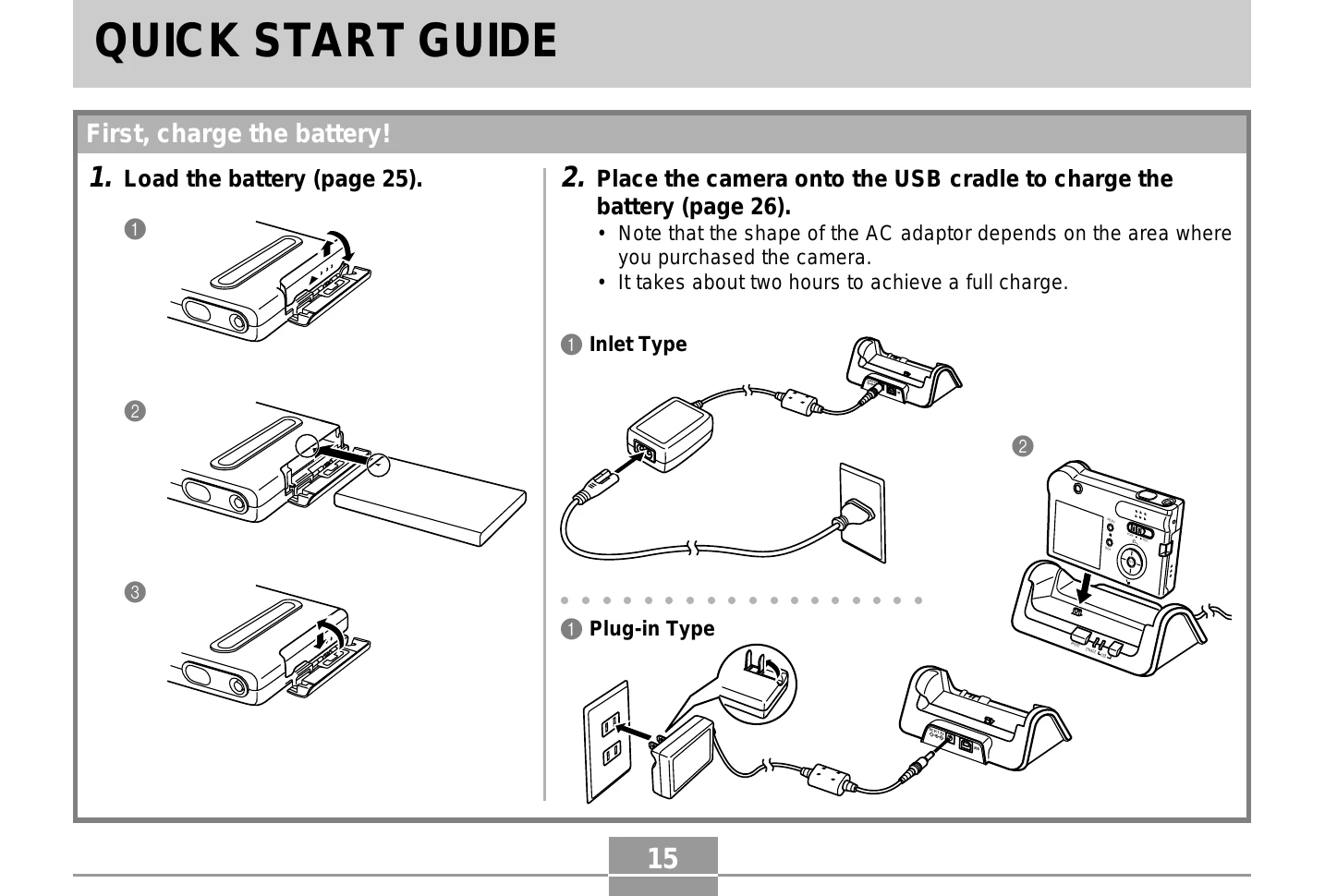
  • Charging the Battery: Load the battery into the camera and place the camera onto the USB cradle. Connect the AC adapter to the cradle and a power outlet. Charging takes approximately two hours.
  • Configuring Settings: Turn on the camera. Navigate through the menus to set the display language, home city, date format, and date/time.
  • Recording an Image: Turn on the camera, set the mode selector to "REC". Compose the image on the monitor screen or viewfinder, ensuring your fingers do not block the lens. Gently press the shutter release button.
  • Viewing an Image: Turn on the camera, set the mode selector to "PLAY". Use the left and right arrow buttons to scroll through recorded images.
  • Deleting an Image: In "PLAY" mode, select the image to delete. Press the down arrow button, navigate to "Delete" using the up/down arrows, and press "SET".

Troubleshooting and error codes

Header 1 Header 2 Header 3 Header 4
Value 1A Value 2A Value 3A Value 4A
Value 1B Value 2B Value 3B Value 4B
Value 1C Value 2C Value 3C Value 4C
Privacy Policy