Brand: CASIO
Category: Digital Camera
Document Type:
Language: EN
Brand: CASIO
Category: Digital Camera
Document Type:
Language: EN
Uploaded: Aug. 9, 2025, 11:39 p.m.
Unpacking: Check contents against the list provided. Contact retailer if anything is missing.
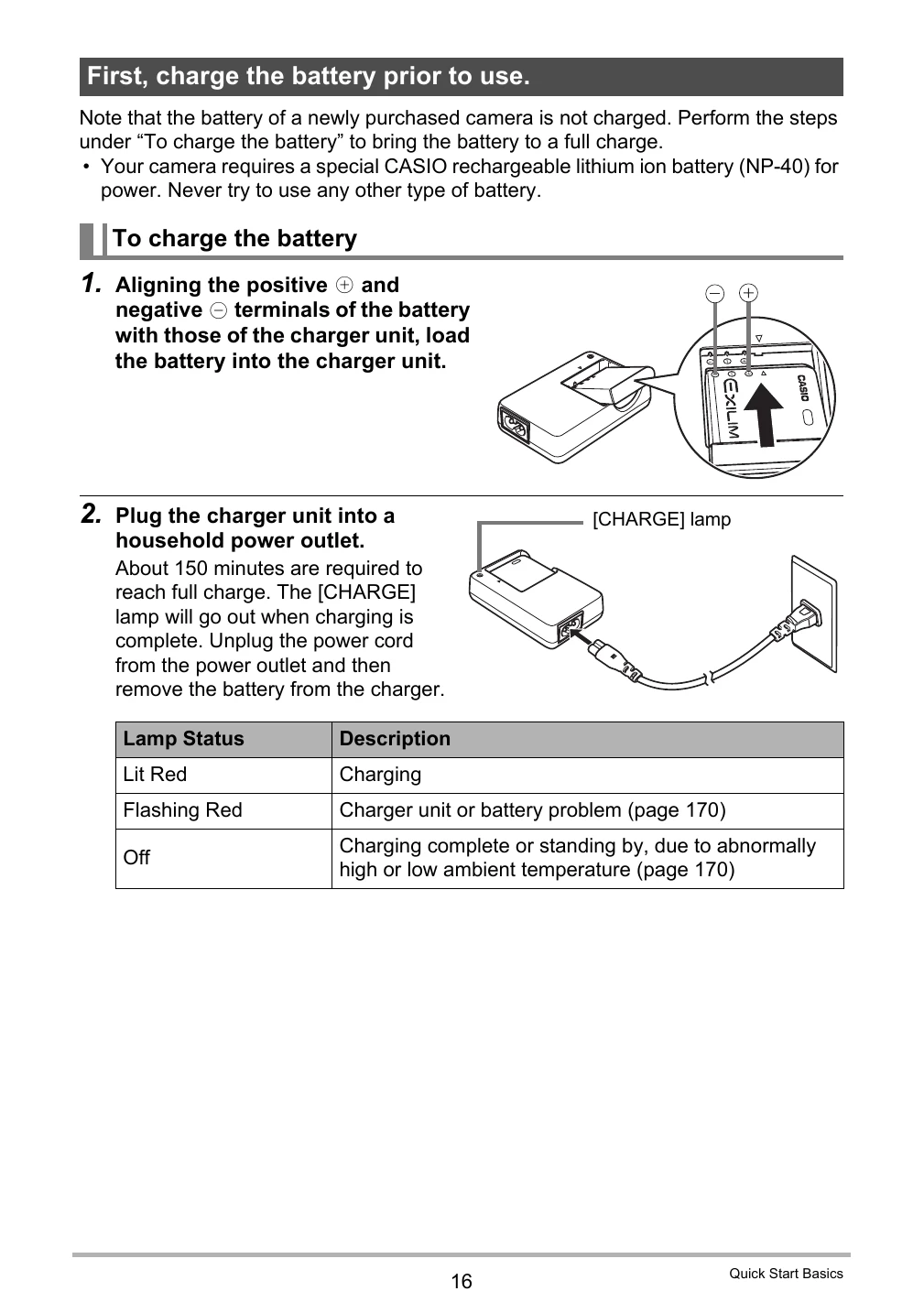
Charging the Battery: Load the NP-40 battery into the charger unit, then plug into a power outlet. Charging takes about 150 minutes.
Loading the Battery: Open the battery cover, slide the battery in with the EXILIM logo facing up until it clicks.
Preparing a Memory Card: Format a new SD or SDHC memory card before first use in the camera.
Turning On/Off: Press the [ON/OFF] button to power the camera on or off.
Shooting Snapshots: Half-press the shutter button to focus, then fully press to take the picture.
Viewing Images: Press the [PLAY] button to review taken photos and movies.
| Problem | Possible Cause and Recommended Action |
|---|---|
| The time and date settings configured the first time after purchasing the camera are reset to their factory defaults when I remove the camera's battery. | Load the camera's battery and reconfigure the time and date settings (page 19). Do not remove the battery from the camera for at least 24 hours after configuring time and date settings. After that, the settings will not be reset if you remove the battery. • If the time and date are reset to their factory default settings when you remove the battery after it has been loaded for more than 24 hours, it could mean that the camera's setting memory is defective. Contact your retailer or a CASIO authorized service center. |
| ALERT | The camera's protection function may have activated because camera temperature is too high. Turn off the camera and wait until it cools down before trying to use it again. |
| Battery is low. | Battery power is low. |
| Camera not in standby. Re-frame the image. |
The camera could not go into auto record standby for some reason during a Move Out CS or Move In CS operation. Compose the image again with the boundary aligned correctly (page 78). |
| Cannot find the file. | The image you specified with the slideshow “Images” setting cannot be found. Change the “Images” setting (page 111) and try again. |
| Cannot register any more files. | You are attempting to save a user BEST SHOT scene in the "SCENE" folder when the folder already contains 999 user scenes. |
| Card ERROR | There is something wrong with the memory card. Turn off the camera, remove the memory card and then reload it into the camera. If this message re-appears when you turn the camera back on, format the memory card (page 160). • IMPORTANT! Formatting a memory card deletes all its files. Before formatting, try transferring recoverable files to a computer or some other storage device. |
| Check connections! | You are attempting to connect the camera to a printer while the camera's USB settings are not compatible with the USB system of the printer (page 124). |
| Files could not be saved because battery is low. | Battery power is low, so an image file could not be saved. |
| Folder cannot be created. | You are trying to record a file while there are already 9999 files stored in the 999th folder. If you want to record more, delete files you no longer need (page 29). |
| Images are being transferred. Stop transfer and turn off power? | You are attempting to turn off power while image data is being transferred using the Eye-Fi card (page 147). |
| LENS ERROR | This message appears and the camera turns off whenever the lens performs some unexpected operation. If the same message appears after you turn power back on, contact a CASIO authorized service center or your original retailer. |
| LENS ERROR 2 | The Anti Shake unit of the camera may be malfunctioning. If the same message appears after you turn power back on, contact your retailer or a CASIO service center. |
| Load paper! | The printer ran out of paper while printing. |
| Memory Full | Memory is full with images you recorded and/or files saved by editing operations. When shooting with Prerecord CS, this message indicates that there is not enough memory capacity to record all of the pre-recorded images. Delete files you no longer need (page 29). |
| Printing Error | An error occurred while printing. • The printer is turned off. • The printer generated an error, etc. |
| Record Error | Image compression could not be performed for some reason during image data storage. Shoot the image again. |
| SYSTEM ERROR | Your camera system is corrupted. Contact your retailer or an authorized CASIO authorized service center. |
| The card is locked. | The LOCK switch of the SD or SDHC memory card loaded in the camera is in the locked position. You cannot store images to or delete images from a memory card that is locked. |
| There are no files. | There are no files in built-in memory or on the memory card. |
| There are no printing images. Set up DPOF. | There are currently no files specified for printing. Configure the required DPOF settings (page 127). |
| There is no image to register. | The setup you are trying to save is for an image that cannot be saved as a user BEST SHOT scene. |
| This card is not formatted. | The memory card loaded in the camera is not formatted. Format the memory card (page 160). |
| This file cannot be played. | The file you are trying to access is corrupted or is a type that cannot be displayed by this camera. |
| This function cannot be used. | • You attempted to copy images from built-in memory to a memory card while there is no memory card loaded in the camera (page 122). • You attempted to divide up a CS group while a file that is not a CS group is displayed (page 106). |