Quick Start Guide for HF M56

Quick Start Guide for HF M56

Brand: CANON

Category: Camera

Document Type: Quick Start Guide

Language: EN
Uploaded: Aug. 10, 2025, 12:31 a.m.

Warranty Information

This warranty covers defects in materials and workmanship for 12 months from the date of purchase.

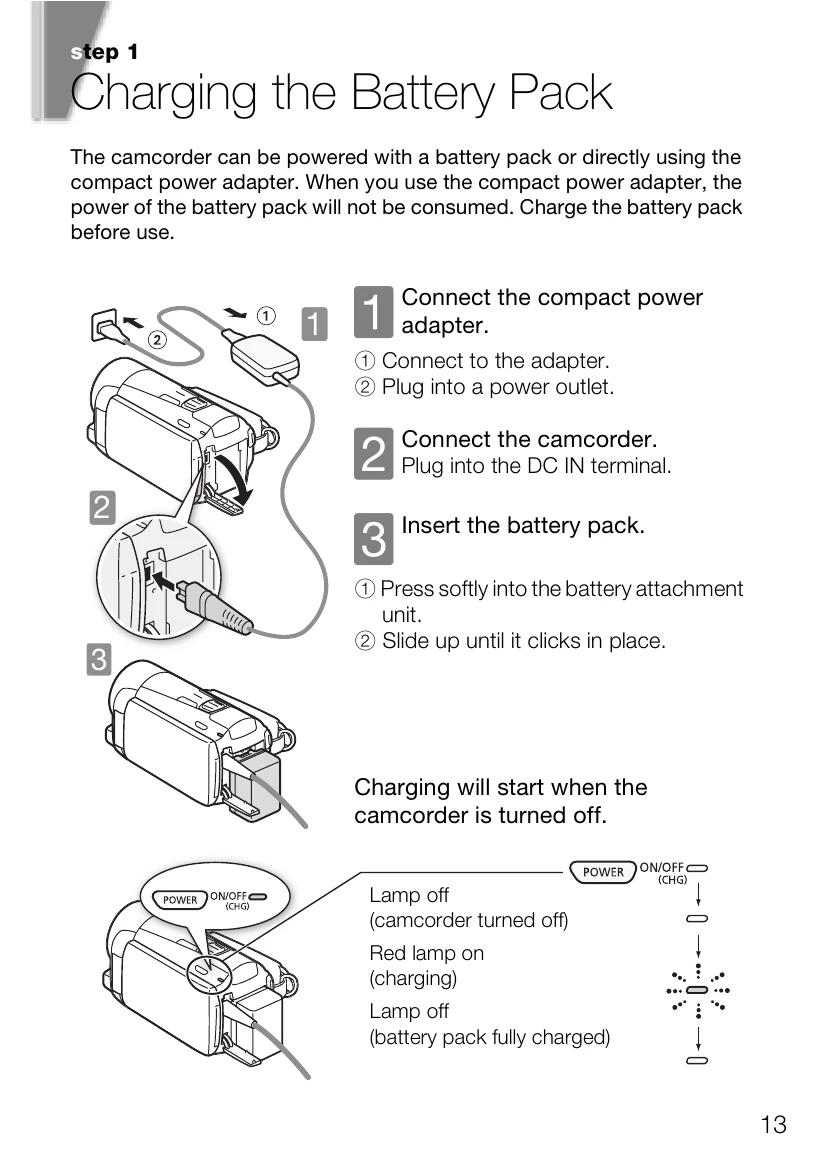
  • Charging the Battery Pack: Connect the camcorder to the power adapter and plug into an outlet. Insert the battery pack into the camcorder until it clicks. Charging starts when the camcorder is turned off.
  • Basic Preparations: Fasten the grip belt for comfortable handling. Open and adjust the LCD panel angle. Become familiar with the touch screen operations. Set the camera mode (AUTO, M, or ) and recording standard (AVCHD or MP4).
  • Setting the Date/Time and Language: Press POWER to turn on. Change date/time by touching fields and using the arrow buttons. Select preferred date/time format. Select the desired language for menus and displays.
  • Using a Memory Card: Turn off the camcorder. Open the memory card slot cover. Insert the memory card straight into the slot and close the cover.
  • Selecting the Quality of Video: Press HOME, navigate to Other Settings > Recording Mode, and choose AVCHD (MXP, FXP, LP) or MP4 (4 Mbps) based on desired quality and recording time.

Troubleshooting and error codes

The camcorder does not turn on. The battery pack is not charged. Charge the battery pack.
The battery pack is not inserted correctly. Insert the battery pack correctly.
The recording is interrupted. The memory card is full. Replace the memory card or delete files.
The battery pack is empty. Replace or recharge the battery pack.
The screen is black. The LCD panel is closed. Open the LCD panel.
The camcorder is not turned on. Turn on the camcorder.
Privacy Policy