Brand: Canon
Category: Camera
Document Type: Manual
Language: EN
Brand: Canon
Category: Camera
Document Type: Manual
Language: EN
Uploaded: Aug. 10, 2025, 12:28 a.m.
None
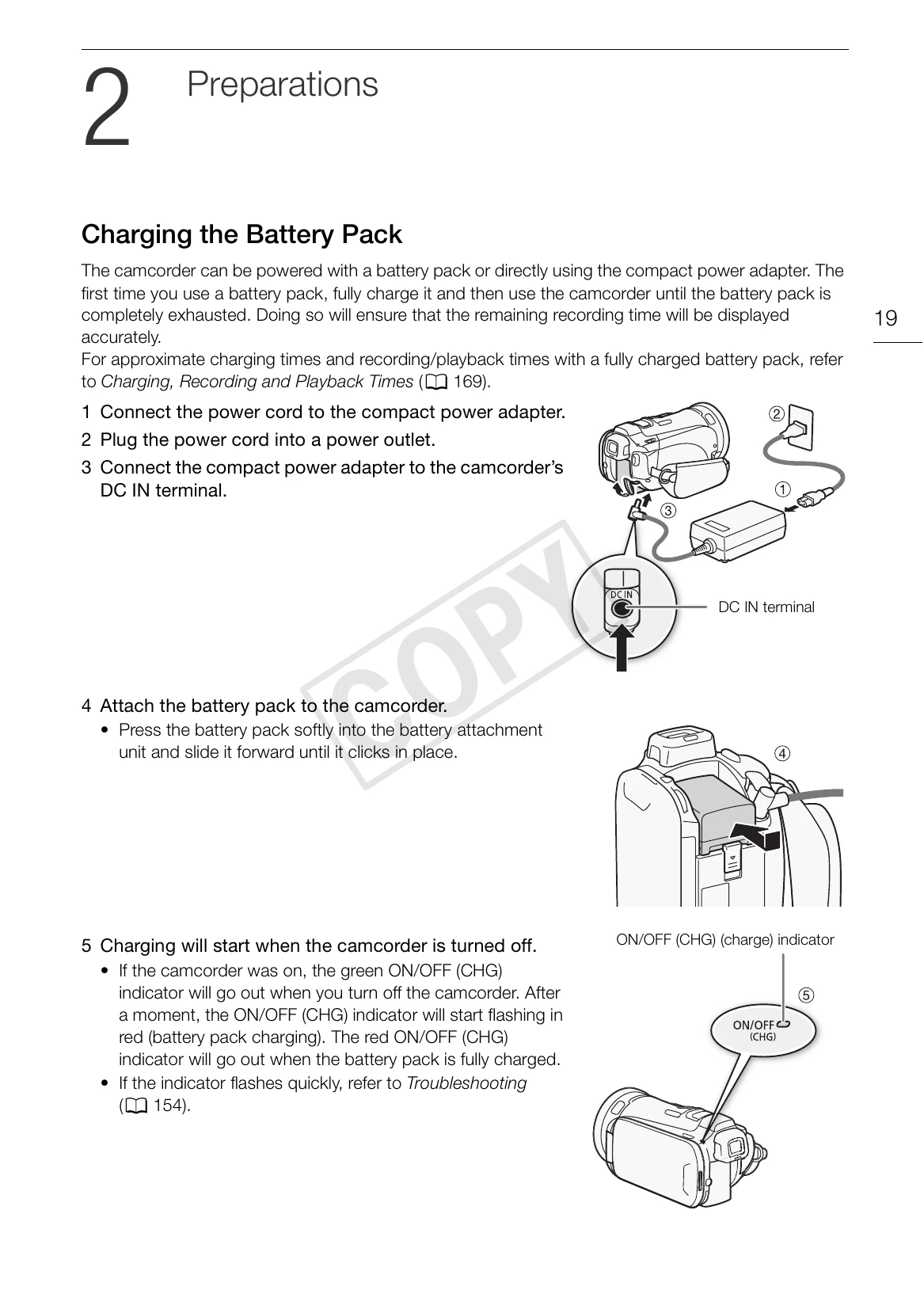
Charging the Battery Pack: Connect the compact power adapter to the camcorder's DC IN terminal and a power outlet. Attach the battery pack by pressing it softly and sliding it forward until it clicks. Charging starts when the camcorder is off, indicated by a flashing red ON/OFF (CHG) indicator.
Preparing the Camcorder: Attach the lens hood by aligning the groove and turning it clockwise. Use the viewfinder by pulling it out and pressing POWER. Adjust the viewfinder using the dioptric adjustment lever. Rotate the LCD panel 90 degrees downward or 180 degrees toward the lens for different viewing angles. Adjust LCD brightness by holding DISP. for over 2 seconds.