Manual for BLACK300

Manual for BLACK300

Brand: Braun

Category: Trail Camera

Document Type:

Language: EN
Uploaded: Aug. 9, 2025, 11:46 p.m.

Warranty Information

The camera has a 6-month standby time.

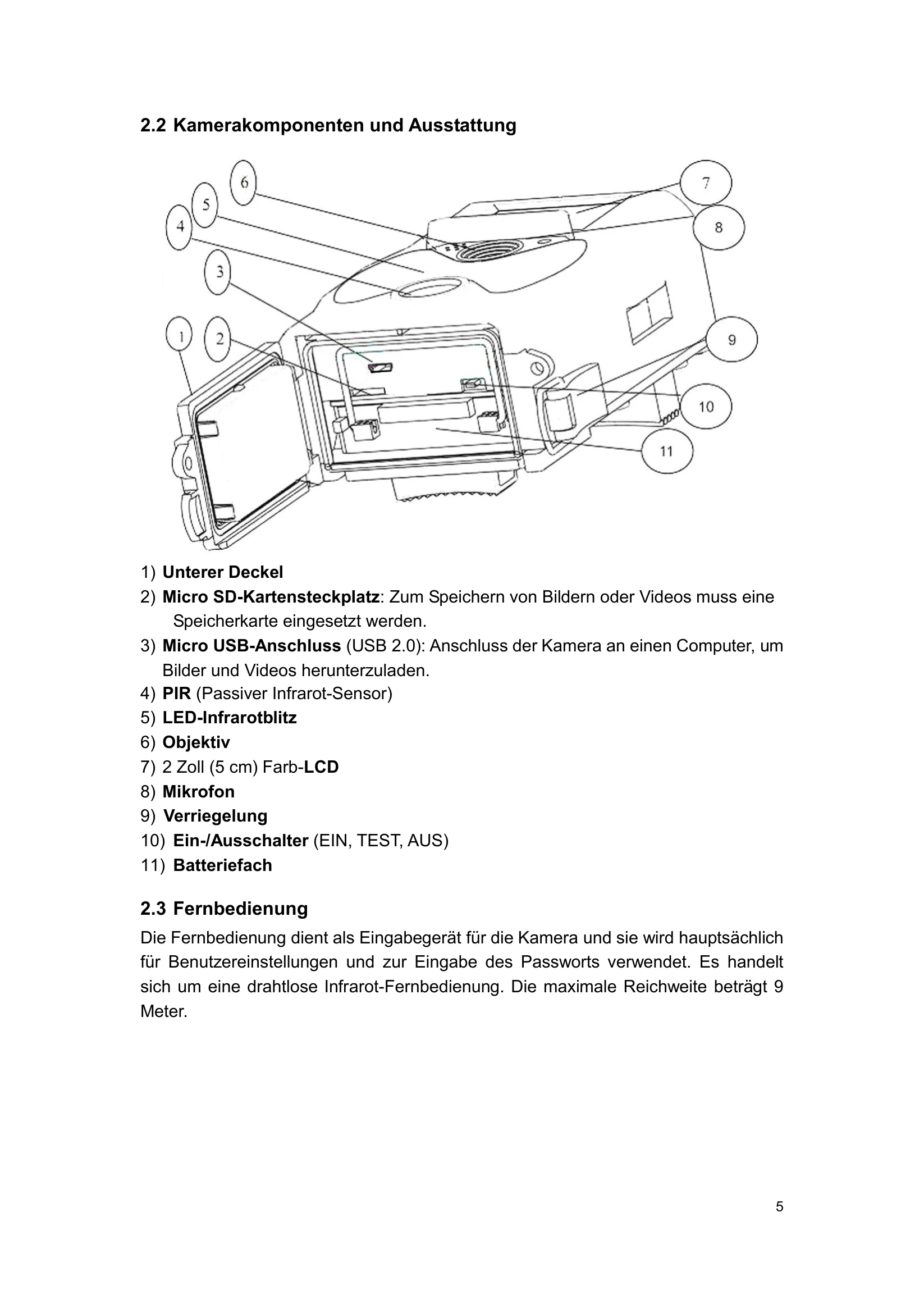
Powering the Camera: Insert eight AA batteries. Ensure the power switch is OFF. Slide the battery compartment into place. Recommended batteries are high-performance alkaline, rechargeable alkaline, or Ni-MH.
Inserting Micro SD Card: Insert the micro SD card with the labeled side down into the card slot. It only fits in one direction.
Turning On: Switch the power to ON for the live mode. A red motion indicator LED will blink for 15 seconds. This is a waiting period before automatic recording. The camera will automatically record based on default or previous settings.
TEST Mode: Switch to TEST for settings, manual capture, and preview.

Troubleshooting and error codes

Problem Solution
Camera not turning on Check batteries; ensure they are inserted correctly and have sufficient charge.
No images/videos captured Ensure a micro SD card is inserted and not full. Check camera settings.
Poor image quality Clean the lens. Check settings for resolution and ISO. Ensure adequate lighting.
SD card error Format the SD card using the camera or a computer. Ensure the card is compatible.
Privacy Policy