Brand: Braun
Category: Camera
Document Type:
Language: EN
Brand: Braun
Category: Camera
Document Type:
Language: EN
Uploaded: Aug. 9, 2025, 11:46 p.m.
None
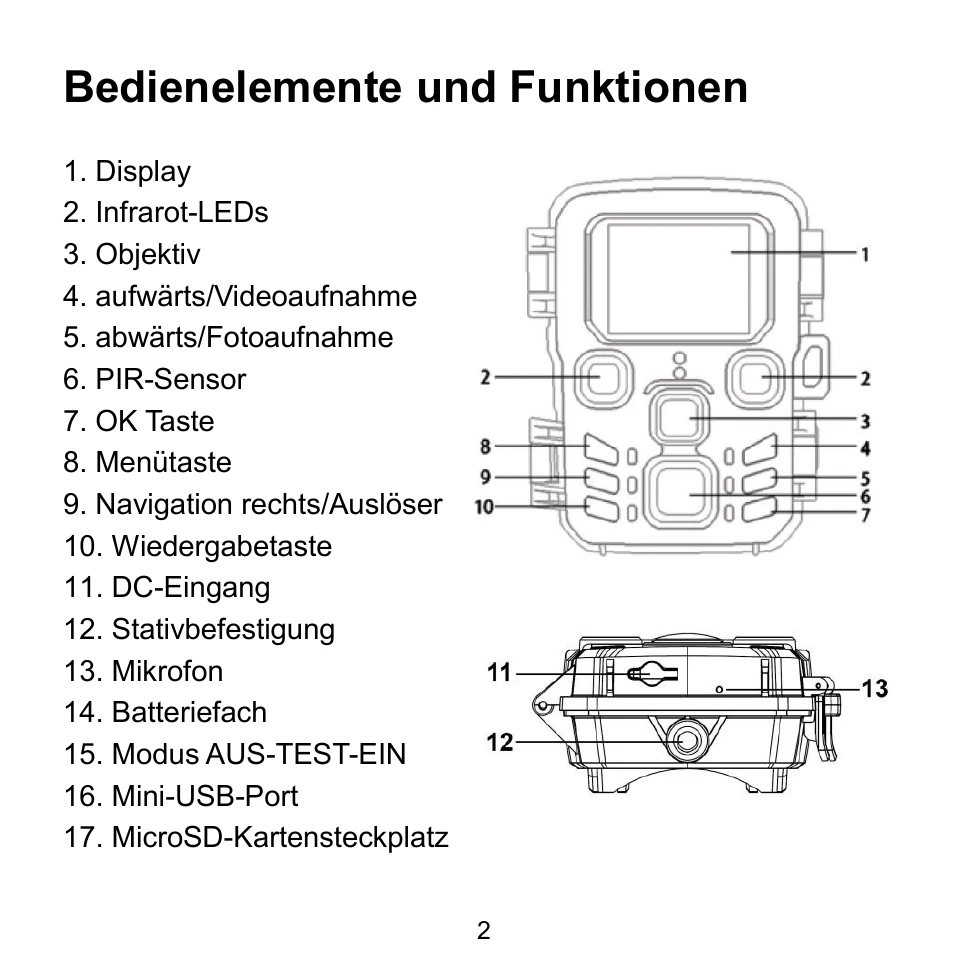
Powering the Camera: Insert 4 AA batteries. Ensure correct polarity. The camera can also be powered via an optional adapter (6V/1.5A).
Inserting a Memory Card: Prepare a microSD card (Class 10 or higher recommended, up to 256GB). Insert it gently, noting the camera's markings. Wait for the card to reach ambient temperature before first use.
Turning On/Off: Switch the mode dial to "Test/On" to turn on, and to "Off" to turn off.
System Settings: Switch to "Test" mode. Use the Menu button to access settings, and navigation buttons to browse and select options. Press OK to confirm.