Brand: BOSCH
Category: Oven
Document Type: Manual
Language: EN
Brand: BOSCH
Category: Oven
Document Type: Manual
Language: EN
Uploaded: April 20, 2026, 7:59 p.m.
The limited warranty applies to the Bosch appliance sold for normal household use within the USA or Canada.
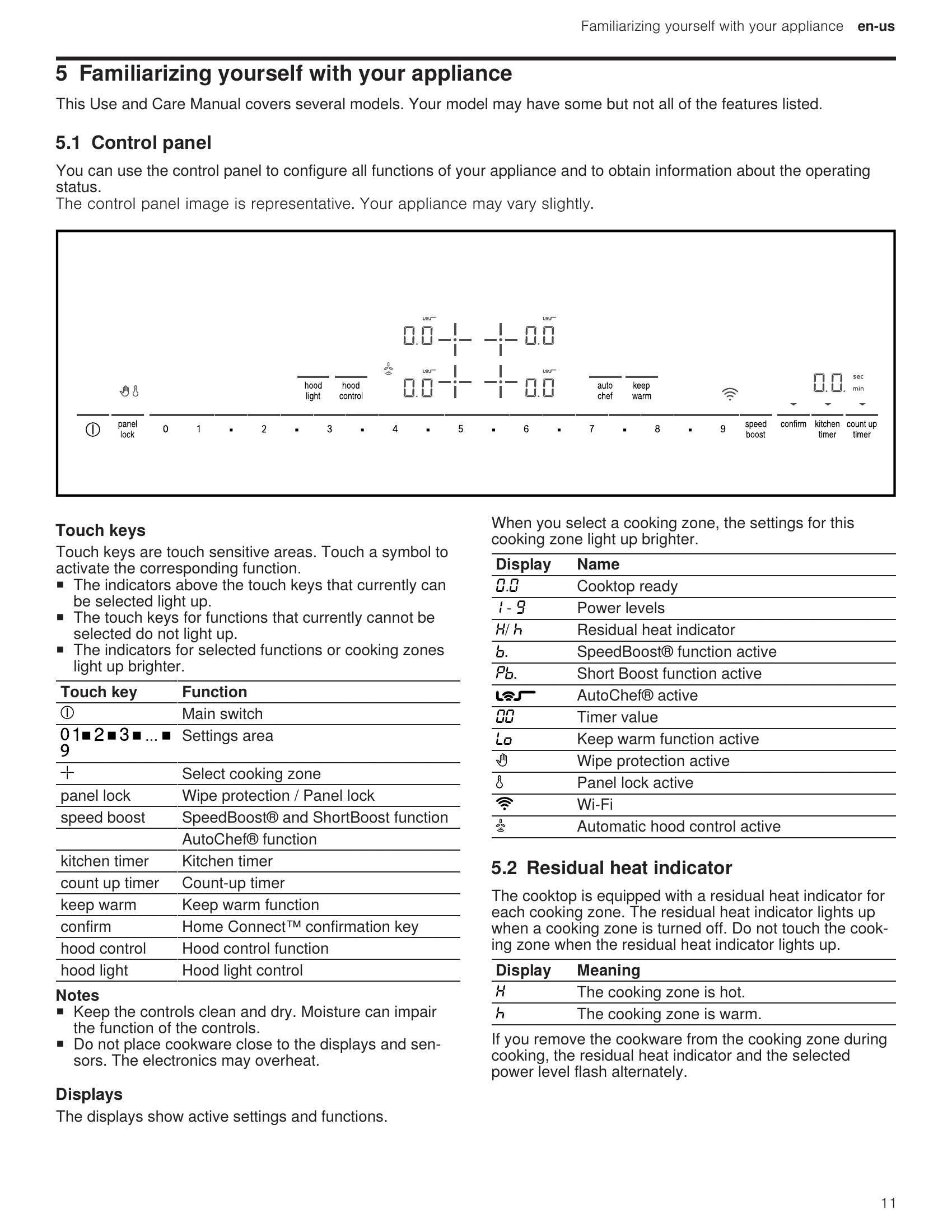
Press the power button. The displays will light up, showing "0.0" for cooking zones. If Home Connect™™ is not set up, a light will flash for a few seconds.
Press and hold the power button until all indicators go out. The cooktop will also turn off automatically if no cooking zone is active for 20 seconds.
Select a cooking zone by pressing its symbol. Then, use the settings area to select a power level from 1 (lowest) to 9 (highest). Intermediate levels like 1.5 or 3.5 can be selected.
Select the cooking zone and then select "0" in the settings area. The residual heat indicator will light up after approximately 10 seconds.
Refer to the cooking charts for recommended power levels and cooking times for various dishes. Use power level 8 or 9 for boiling water or heating pans.
Press the kitchen timer button, set the desired time, and press the button again to confirm. It will beep when time is up.
Press the count-up timer button to start timing from zero. It runs independently and does not switch off cooking zones.
Temporarily increases the output of a selected cooking zone for faster heating. Can only be used on one zone per segment at a time.
Heats cookware faster than power level 9. Use with suitable, pre-heated cookware. Turns off automatically after 30 seconds.
Suitable for melting chocolate or butter and keeping food warm. Press the "keep warm" button to activate. "Lo" will light up.
A sensor controls the pan temperature for frying. It saves energy and prevents overheating. Requires specific sensor frying pans or careful use of conventional pans.
| Issue | Cause and troubleshooting |
|---|---|
| None | The power supply has been disconnected. Check if lights in your kitchen or other appliances are working. The appliance has not been connected as shown in the circuit diagram. Disconnect and reconnect the appliance, ensuring correct connection. |
| All displays flash | There is an electronics fault. If the fault cannot be eliminated, call Customer Service. |
| _ is flashing in the cooking zone displays. | The control panel is wet or objects are lying on it. Dry the panel or remove objects. There is an electronics fault. Briefly cover the panel to acknowledge. |
| F2 / E7015 | The electronics have overheated. The corresponding cooking zone has switched off. Wait for cooling, then touch a control element. |
| F4 / E7015 | The electronics have overheated. All cooking zones have switched off. Wait for cooling, then touch a control element. |
| F5 and the power level flash alternately. A signal tone sounds. | Hot cookware is near the control panel, risking overheating. Remove cookware from the control panel. |
| F5 and audible signal | Hot cookware is near the control panel. The cooking zone has switched off to protect electronics. Remove cookware, wait, then touch a control element. |
| F1 / F6 | The cooking zone has overheated and switched off to protect the work surface. Wait for cooling, then switch the zone back on. |
| FB + H/h and cooking zones not heating | The cooking zone has been operating continuously. Automatic time limitation triggered. Touch any control element to reset and continue cooking. |
| 0400 | The supply voltage is incorrect. Contact your electrical utility provider. |
| E7010 is displayed. | Cooktop unable to connect to home network or hood. Switch off and on again. If persists, call Customer Service with the exact error message. |
| E9000 / E9010 | The supply voltage is incorrect. Contact your electrical utility provider. |
| de and cooking zones do not heat up | Demo mode is activated. Disconnect power for 30 seconds, then reconnect. Touch any field within 3 minutes. |