Brand: BOSCH
Category: Microwave
Document Type: Manual
Language: EN
Brand: BOSCH
Category: Microwave
Document Type: Manual
Language: EN
Uploaded: Nov. 21, 2025, 9:18 p.m.
Please refer to the enclosed customer service list for contact details and warranty information.
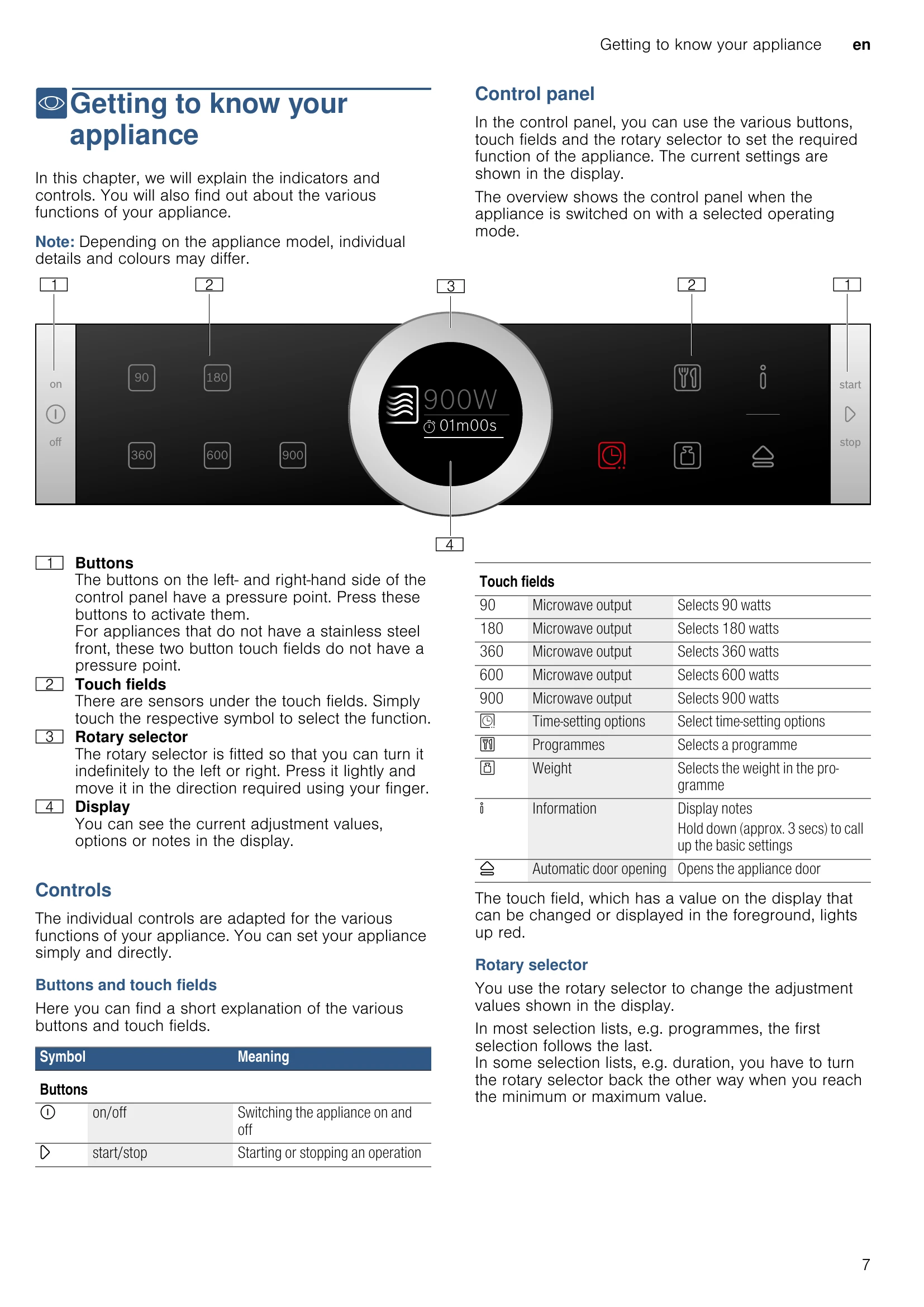
Switching the appliance on and off: Press the on/off button to switch the appliance on. All touch fields light up red. The Bosch logo appears in the display, followed by the maximum microwave output. The appliance is ready to use. To switch off, press the on/off button. Any functions that may be running are cancelled. The time appears on the display.
Starting operation: Press the start/stop button to start each operation. After the operation starts, your settings are shown in the display. The display ring also shows the cooking time counting down.
Pausing operation: You can pause and restart the operation by pressing the start/stop button. Opening the appliance door also pauses the operation. Press the on/off button to delete all settings.
Selecting operating mode: After the appliance is switched on, the default operating mode is displayed. To select a different mode, touch the appropriate field, turn the rotary selector to change the selection, change other settings if necessary, and then press the start/stop button.
| Fault | Possible cause | Remedy/information |
|---|---|---|
| The appliance does not work or the display is not working | The plug is not plugged into the mains | Connect the appliance to the electricity supply |
| Power cut | Check whether other kitchen appliances are working | |
| The circuit breaker is faulty | Check in the fuse box to make sure that the fuse for the appliance is OK | |
| The appliance cannot be started | Faulty operation | Switch off the circuit-breaker for the appliance in the fuse box and switch it back on after approx. 60 seconds |
| Appliance does not heat up. The symbol for demo mode is shown in the display. | The appliance door is not fully closed | Close the appliance door |
| The appliance is in demo mode | Deactivate demo mode in the basic settings. To do this, briefly disconnect the appliance from the mains (switch off the household fuse or the circuit breaker in the fuse box). Then deactivate demo mode in the basic settings within 3 minutes. | |
| The rotary selector has fallen out of the support in the control panel. | The rotary selector has been accidentally disengaged. | The rotary selector can be removed. Simply place the rotary selector back in its support in the control panel and push it in so that it engages and can be turned as usual. |
| The rotary selector can no longer be turned easily. | There is dirt under the rotary selector. | The rotary selector can be removed. To disengage the rotary selector, simply remove it from the support. Alternatively, press on the outer edge of the rotary selector so that it tips and can be picked up easily. Carefully clean the rotary selector and its support on the appliance using a cloth and soapy water. Dry with a soft cloth. Do not use any sharp or abrasive materials. Do not soak or clean in the dishwasher. Do not remove the rotary selector too often so that the support remains stable. |
| The interior lighting is not working | The interior lighting is faulty | Call the after-sales service |
| Error message "Exxx"* | If an error message is displayed, switch the appliance off and on again; if the message disappears, it was a one-off problem. If the fault occurs again or the error message is still displayed, please contact the after-sales service and provide the fault code. |