Brand: BlackBerry
Category: Mobile Phone
Document Type:
Language: EN
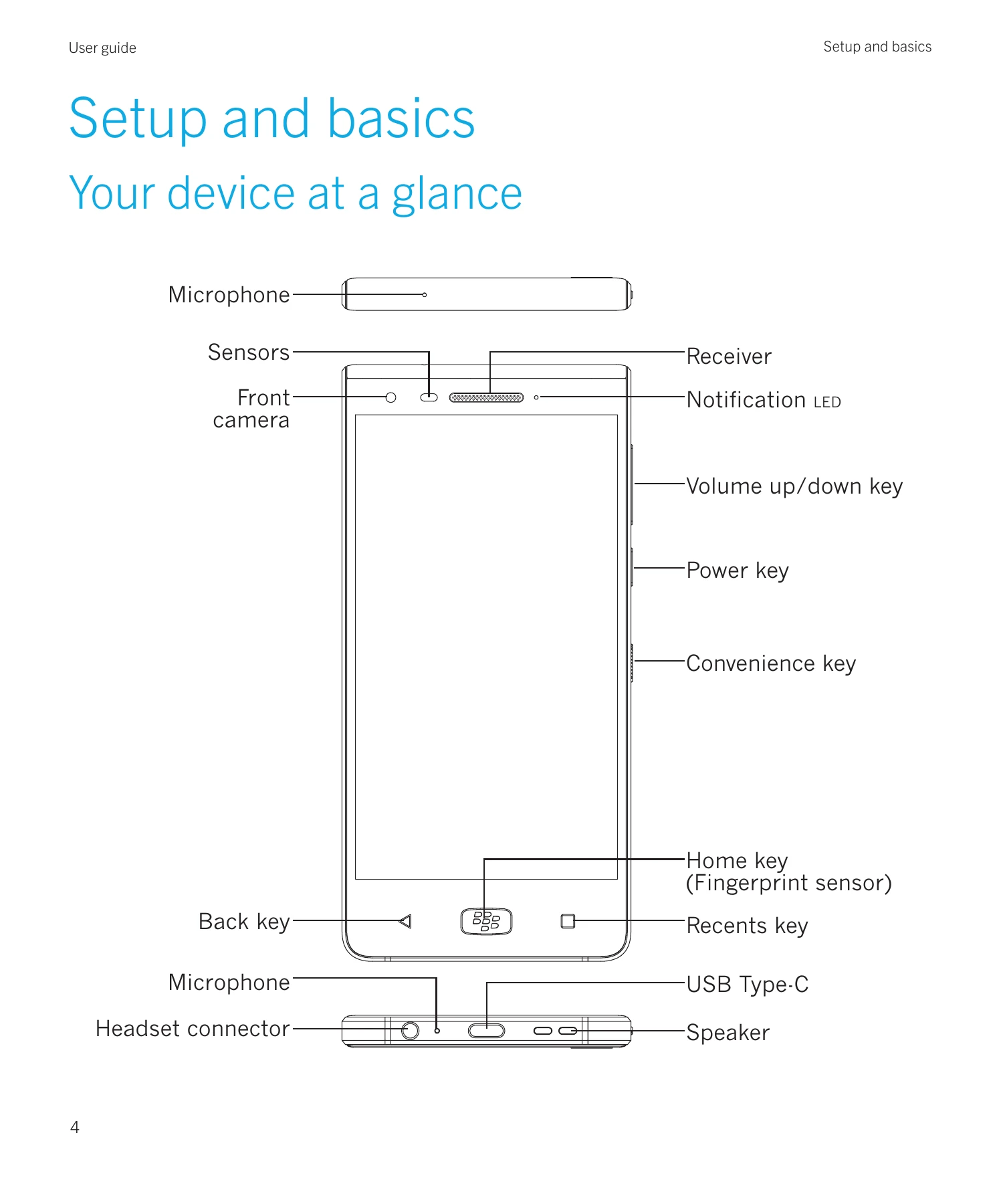
Brand: BlackBerry
Category: Mobile Phone
Document Type:
Language: EN
Uploaded: Aug. 10, 2025, 12:07 a.m.
Warranty information is not detailed in this section of the manual.
| Troubleshooting | Possible Solutions |
|---|---|
| Troubleshooting: How to properly care for my phone for water resistance |
|
| Troubleshooting: The sound quality of the calls is poor | Make sure that the microphone, receiver or speaker is clean and dry, if the device has been immersed in water. |
| Troubleshooting: Locks, passwords, and protecting your data |
I forgot my password, PIN, or pattern For security reasons, the only way that you can reset your screen lock without knowing the password, PIN, or pattern is to delete all of your device data and set up the device again. You can typically do this by entering your password, PIN, or pattern incorrectly ten times. Or, if you have a remote device management app installed on your device, such as the Android™™ Device Manager, you can log in to the website and delete your device data. |
| Smart Lock doesn't unlock my device as expected |
|