Brand: beko
Category: Oven
Document Type: Manual
Language: EN
Brand: beko
Category: Oven
Document Type: Manual
Language: EN
Uploaded: April 20, 2026, 8:14 p.m.
Refer to enclosed documents for warranty details and contact authorized service for repairs.
Initial Setup: Before first use, remove any stickers from the timer screen. Clean the appliance thoroughly with a damp cloth and mild detergent. Perform an initial heating cycle to burn off any residues, running the oven empty for 30 minutes.
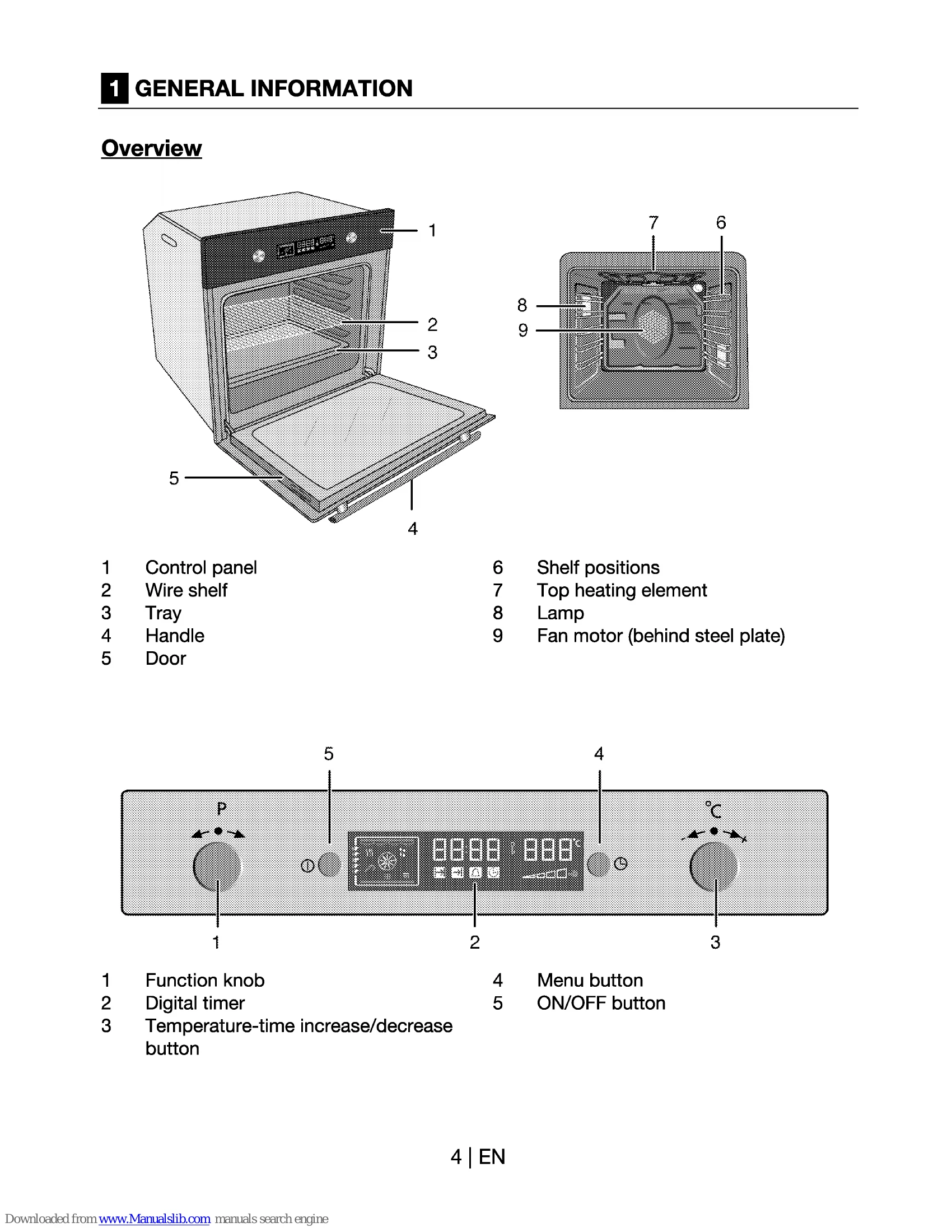
Setting the Time: Use the 'Temperature-time increase/decrease' button (2) to adjust the current time after initial power-on.
Turning On/Off: Press and hold the ON/OFF button (14) to turn the oven on or off.
Selecting Functions: Use the 'Program selection knob' (1) to choose the desired cooking mode. The function display (3) will show the selected mode.
Setting Temperature & Time: Use the 'Temperature-time increase/decrease' button (2) to set the desired temperature and cooking time. The oven will automatically heat up and turn off when the time is complete.
Safety First: Always use oven gloves when handling hot dishes. Ensure proper ventilation during initial heating.
| Malfunction/problem | Possible cause | Advice/remedy |
|---|---|---|
| The appliance does not work. | The mains fuse is defective or has tripped. | Check fuses in the fuse box. If necessary, replace or reset them. |
| Appliance's plug can not be connected to the grounded socket. | Check the plug connection. | |
| Timer buttons do not work. | Keylock may be enabled. Please disable it(See; How to use the program lock, page 22). | |
| Oven light does not work | Oven lamp is defective. | Replace oven lamp. |
| No current. | Check fuses in the fuse box. If necessary, replace or reset them. | |
| Oven does not heat. | Function knob and/thermostat knob are not set. | Set function knob and thermostat knob. |
| If the appliance has a timer, the timer may not be set. | Set the time. | |
| No power. | Check mains supply and fuse box. |