Installation Guide for H5SL

Installation Guide for H5SL

Brand: Avigilon

Category: Surveillance Camera

Document Type: Installation Guide

Language: EN
Uploaded: Nov. 21, 2025, 6:56 p.m.

Manual Publish Date: 2019-08-29

Warranty Information

Warranty service and technical support can be obtained by contacting Avigilon Technical Support.

Overview

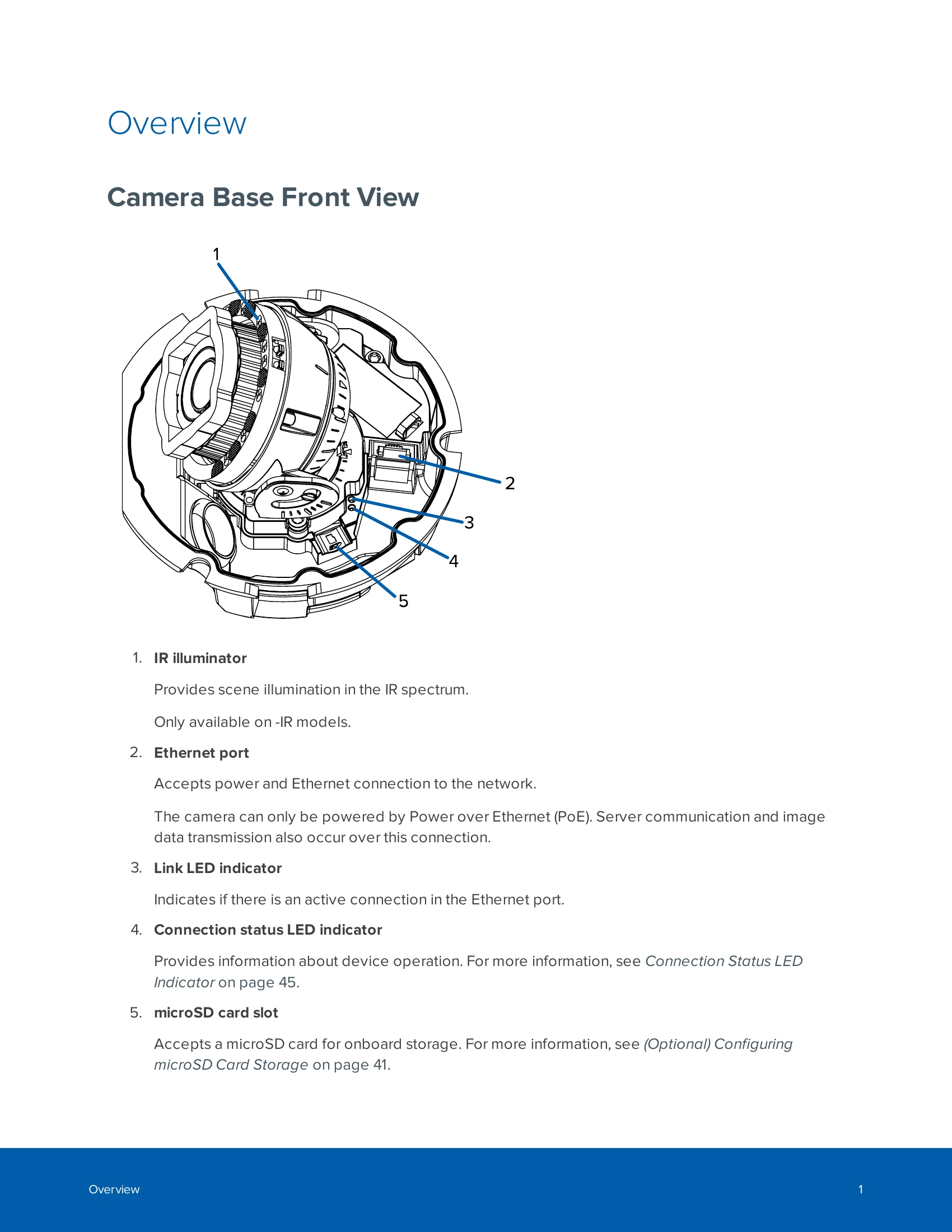
Camera Base Front View

  1. IR illuminator: Provides scene illumination in the IR spectrum. Available on -IR models.
  2. Ethernet port: Accepts power and Ethernet connection for network, PoE, server communication, and image data transmission.
  3. Link LED indicator: Shows active Ethernet connection.
  4. Connection status LED indicator: Provides device operation status.
  5. microSD card slot: Accepts microSD card for onboard storage.

Camera Base Rear View

  1. Azimuth control: Controls image angle.
  2. I/O connector block: For external input/output and audio devices.
  3. Micro USB port: For Avigilon USB Wi-Fi Adapter.
  4. Tilt lock thumb screw: Locks image tilt adjustment.
  5. Serial number tag: Device information label.
  6. I/O Cable Management Clip: Secures I/O cable.

Camera Base Bottom View

  1. Cable entry hole: For camera operation cables.
  2. Lanyard anchor: Attaches safety lanyard.
  3. Vent: Allows moisture vapor escape and pressure equalization (H5SL-DO models only).

Troubleshooting and error codes

Connection State Connection Status LED Indicator Description
Obtaining IP Address One short flash every second Attempting to obtain an IP address.
Discoverable Two short flashes every second Obtained an IP address but not connected to the Network Video Management software.
Upgrading Firmware Two short flashes and one long flash every second Updating the firmware.
Connected On Connected to the Network Video Management software or an ACCâ„¢ Server.
Privacy Policy