Brand: ASUS
Category: Mobile Phone
Document Type:
Language: EN
Brand: ASUS
Category: Mobile Phone
Document Type:
Language: EN
Uploaded: Aug. 10, 2025, 12:13 a.m.
Getting Started: To begin, insert your SIM card and battery. Ensure the phone is off before insertion. Replace the battery cover securely.
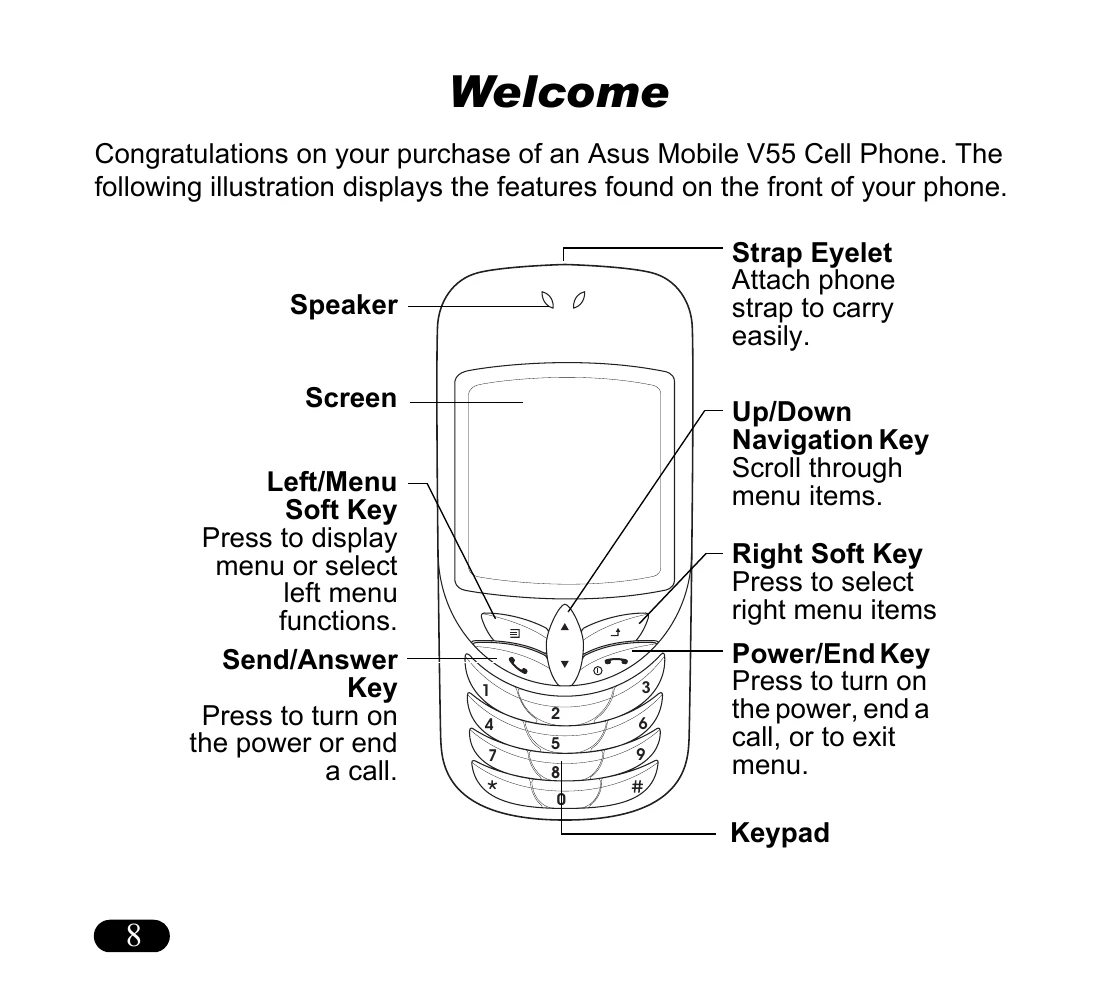
Turning On/Off: Press and hold the Power/End key until the screen lights up to turn the phone on. If prompted for a PIN, enter it and press OK. To turn off, press and hold the Power/End key until the phone shuts down.
Making Calls: Dial the number using the keypad. Press the Send/Answer key to connect. Press the Power/End key to disconnect.
Answering Calls: Press the Send/Answer key to answer an incoming call. Press the Power/End key to end the call.
Standby Mode: When the phone is on but not in use, it enters standby mode, displaying icons for network signal and status.