Brand: Argus
Category: Camera
Document Type:
Language: EN
Brand: Argus
Category: Camera
Document Type:
Language: EN
Uploaded: Aug. 9, 2025, 11:34 p.m.
The Argus Autronic I camera is guaranteed to operate properly for one year from the date of original purchase.
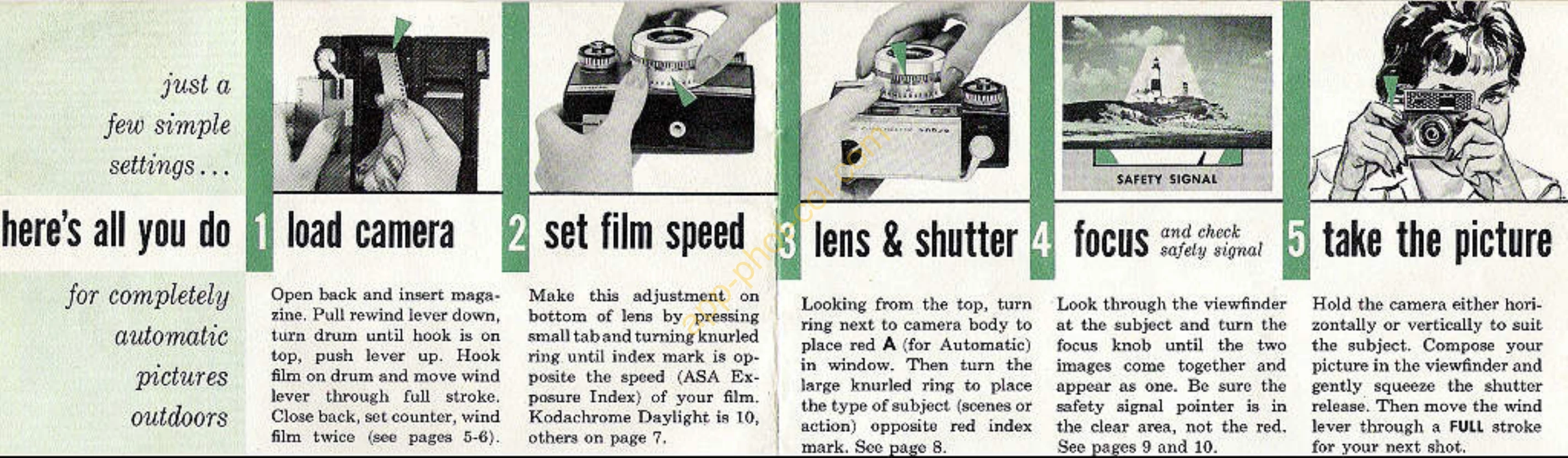
Loading the Camera: Open the back, insert the 35mm film, pull down the rewind lever, turn the drum until the hook is on top, push the lever up, hook the film leader, and wind. Close the back, set the counter, and wind the film twice.
Setting Film Speed: Press the tab on the bottom of the lens and turn the film speed ring to match your film's ASA Exposure Index.
Setting Exposure Controls: Turn the ring next to the camera body to 'A' for Automatic. Adjust the knurled ring to set the subject type (scenes/action).
Focusing: Look through the viewfinder and turn the focus knob until the two images align. Ensure the safety signal is in the clear area.
Taking the Picture: Compose your shot in the viewfinder, gently squeeze the shutter release, and wind the film lever for the next shot.
| PROBLEM | SOLUTION |
|---|---|
| Camera fails to operate | Return prepaid to Customer Service Department, Argus, Inc., Ann Arbor, Michigan, or authorized service location. Include date and place of purchase and a description of the difficulty. |
| Insufficient or too much light | Check the safety signal pointer in the viewfinder. If it's in the red, adjust the shutter setting ring until the needle is in the clear. |