Brand: AQUOS
Category: Mobile Phone
Document Type: Manual
Language: EN
Brand: AQUOS
Category: Mobile Phone
Document Type: Manual
Language: EN
Uploaded: Nov. 21, 2025, 6:30 p.m.
Manual Publish Date: 2017-08-01
Refer to the manual for warranty information regarding the handset and ROBOQUL.
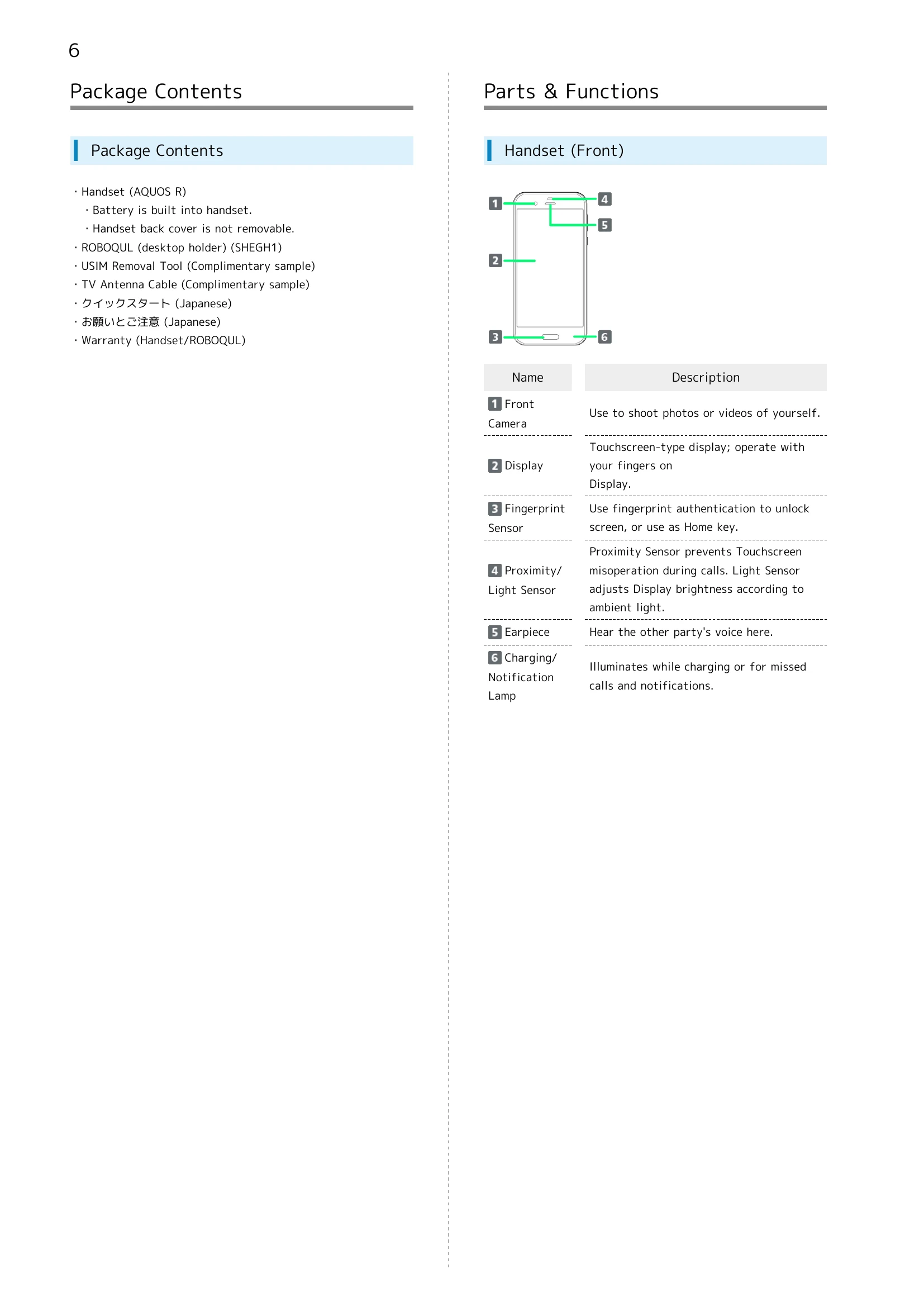
The handset has the following parts:
Insert and remove the USIM card following the provided instructions. Be cautious about handling and cleaning the gold chip.
Charge the handset using the included ROBOQUL or a separately-sold AC Adaptor. The Charging/Notification Lamp indicates charging status.
Operate the handset using your fingers on the touchscreen. Supported gestures include Tap, Touch & Hold, Drag, Flick, and Pinch/Spread.
Power On: Long press the Power key until the SHARP logo appears.
Power Off: Long press the Power key, then select 'Power off' from the menu.
When powering on for the first time, an initial settings wizard guides you through optional Wi-Fi, Google account setup, and other settings.
| Item | Description |
|---|---|
| Cannot use Bluetooth® | Handset may be in Airplane mode. If in Airplane mode, Bluetooth® function is disabled. Bluetooth® function can be enabled again after placing handset in Airplane mode. |