Brand: ALCATEL
Category: Mobile Phone
Document Type:
Language: EN
Brand: ALCATEL
Category: Mobile Phone
Document Type:
Language: EN
Uploaded: Aug. 10, 2025, 12:02 a.m.
Your phone is warranted against any defect or malfunctioning for twelve (12) months from the date of purchase.
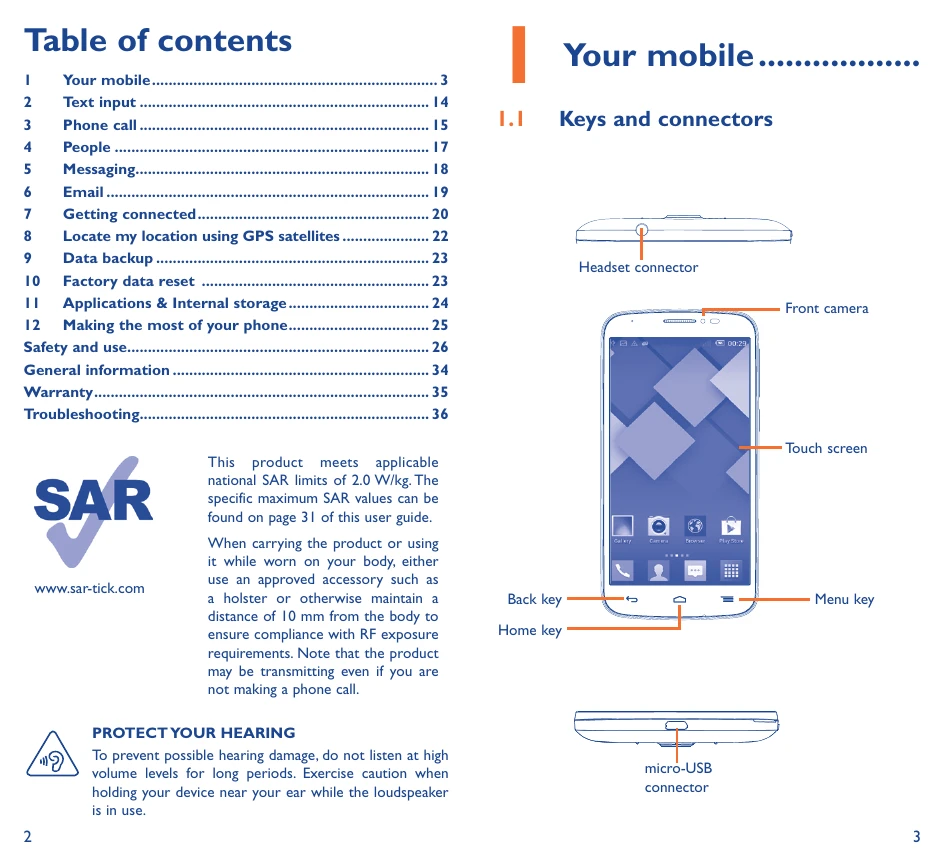
Headset connector
\nFront camera
\nTouch screen
\nMenu key
\nBack key
\nHome key
\nmicro-USB connector
\n\nYou must insert your SIM card to make phone calls. Please power off your phone before inserting or removing the SIM card.
\n\nYou can bring all the items (applications, shortcuts, folders and widgets) you love or use most frequently to your Home screen for quick access. Slide the Home screen horizontally left and right to get a complete view of the home screen. Touch the Home key to switch to Home screen.
\n\n| Trouble | Solution |
|---|---|
| My phone cannot be switched on or is frozen | • Charge for at least 20 minutes, then try to switch on again. • Press and hold the Volume down key to enter Safe Mode. • Reset the phone using the Power key and the Volume up key. |
| My phone has not responded for several minutes | Restart your phone by pressing and holding the Power key. |
| My phone turns off by itself | • Check that your screen is locked when you are not using your phone. • Check the Power key is not mis-contacted due to unlocked screen. • Check the battery charge level. |
| My phone cannot charge properly | • Make sure that your battery is not completely discharged. • Make sure charging is carried out under normal conditions (0°C to +40°C). • When abroad, check that the voltage input is compatible. |
| My phone cannot connect to a network or “No service" is displayed | • Try connecting in another location. • Verify the network coverage with your operator. • Check with your operator that your SIM card is valid. • Try selecting the available network(s) manually. • Try connecting at a later time if the network is overloaded. |