Brand: Agfa
Category: Camera
Document Type:
Language: EN
Brand: Agfa
Category: Camera
Document Type:
Language: EN
Uploaded: Aug. 9, 2025, 11:36 p.m.
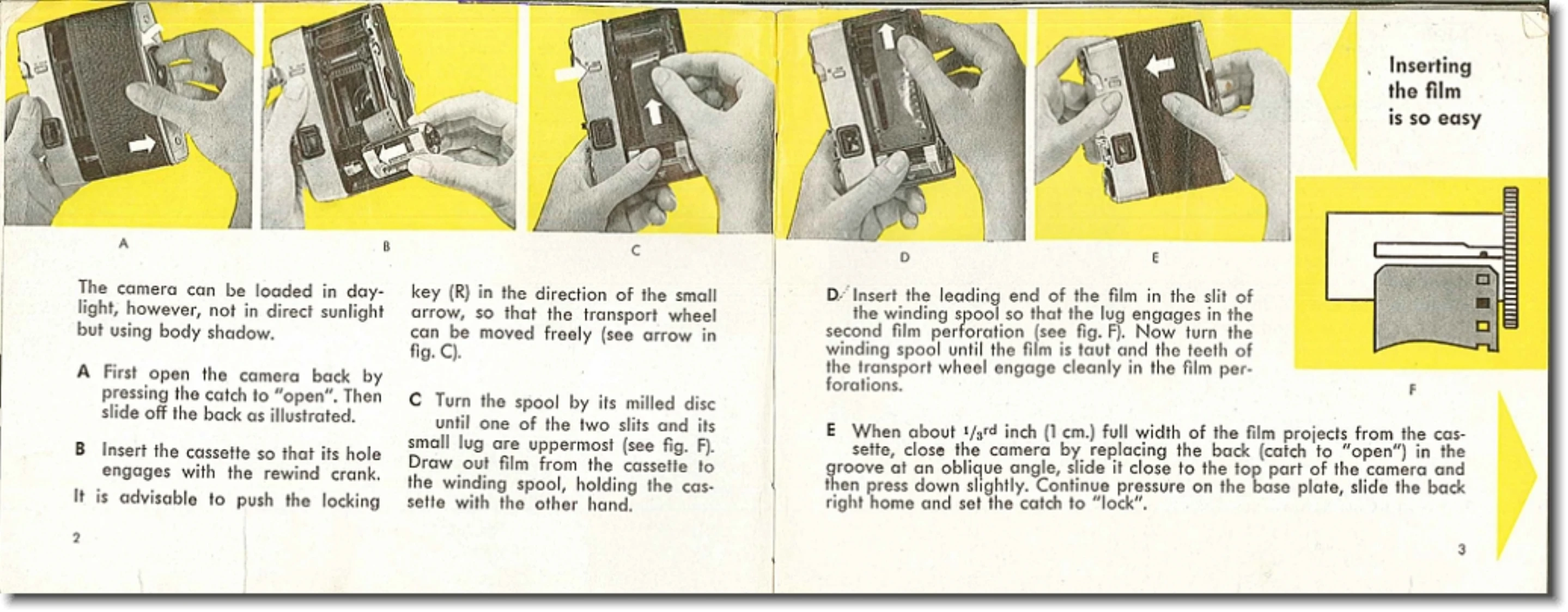
Loading the camera: Open the back, insert cassette, attach rewind crank, draw out film to winding spool, engage perforations, and close back.
Film transport: Swing the rapid transport lever forward and let it return. Press down the magic release lever as far as possible.
Setting film speed: Turn the milled disc with a coin to align the triangle with the correct DIN or ASA number.
Focusing: Set the black index mark on the lens to one of the three symbols representing distance (Close-ups, Groups, Landscapes).
Taking a picture: Hold the camera steady, line up the subject, press the release lever to the pressure point. A green signal indicates a perfect picture; press the lever fully. A red signal means not enough light.
| Header 1 | Header 2 | Header 3 | Header 4 |
|---|---|---|---|
| Row 1 Data 1 | Row 1 Data 2 | Row 1 Data 3 | Row 1 Data 4 |
| Row 2 Data 1 | Row 2 Data 2 | Row 2 Data 3 | Row 2 Data 4 |
| Row 3 Data 1 | Row 3 Data 2 | Row 3 Data 3 | Row 3 Data 4 |