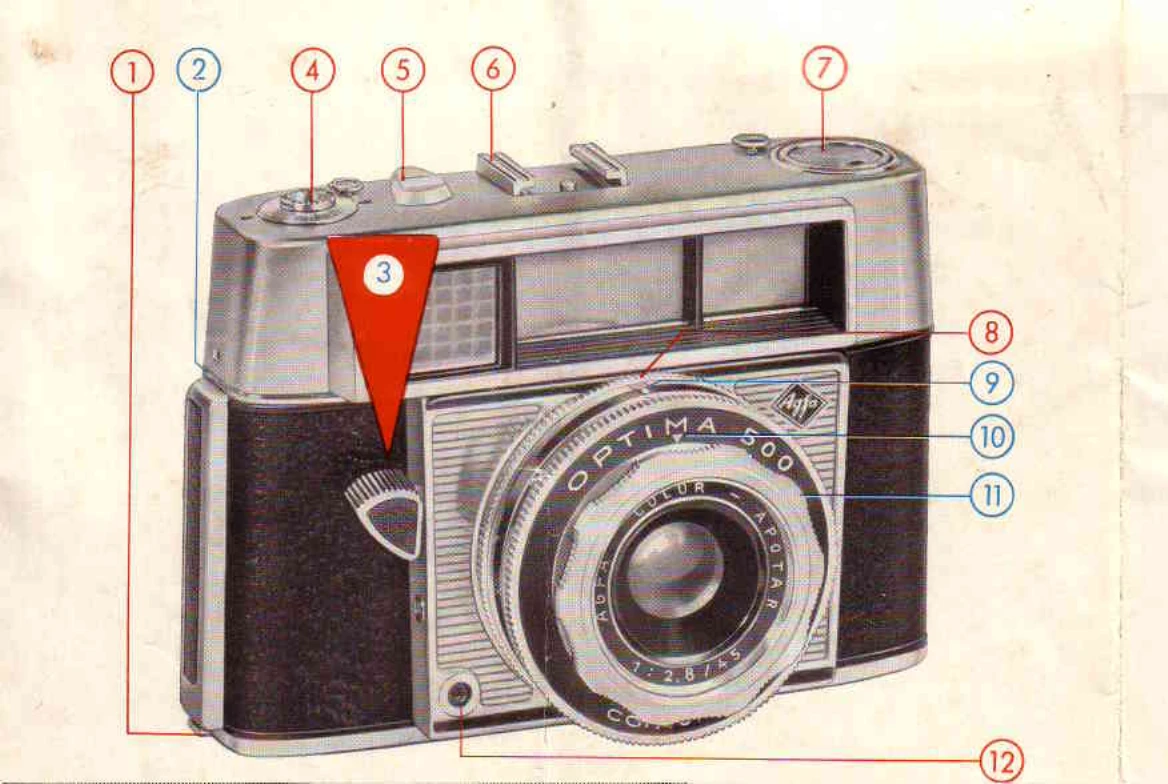
1. Rapid transport lever: Swing forward to advance film to the next exposure. The film counter shows remaining exposures.
2. Focusing: Set one of the three symbols on the lens mount to the white mark according to subject distance (Close-ups: 5-7.5 ft, Groups: 7.5-15 ft, Distant views: 15 ft-infinity). Intermediate settings are possible.
3. Holding the camera: Hold steady with both hands, brace arms against body. Place index finger on the magic release button.
4. Viewfinder: A luminous frame shows the picture area. For close-ups, two lines indicate the upper edge of the picture.
5. Taking a photo: Sight subject. When the green signal (All clear) appears in the viewfinder, press the magic release button to the pressure point, then fully down to expose.
6. Red signal: Indicates low light. Use time exposures or flash.
7. Automatic Operation: The camera automatically sets shutter speed and aperture for correct exposure when the magic release button is pressed, provided the DIN/ASA setting is correct.
8. Film Speed Setting: Push arresting knob and turn disk with a coin to align the film's DIN or ASA speed with the setting mark.
9. Manual Operation (Without Automatic Mechanism): Set the automatic mechanism ring to the time (B) or flash symbol. For time exposures, turn ring to "B" and hold the release button down. For flash, turn to flash symbol. Adjust aperture using the rear milled ring.
10. Flash Technique: Connect flash cable to contact (12). For electronic flashguns, calculate aperture using the guide number. For flashbulbs, check "X" synchronization column for aperture.
11. Against the Light/Deep Shadows: Reduce DIN/ASA setting by about 3 DIN or equivalent.
12. Rewinding Film: After film is finished, release rewind knob, press base button, and turn rewind knob to rewind film into cassette. Open camera back and remove cassette.