Brand: Agfa
Category: Camera
Document Type:
Language: EN
Brand: Agfa
Category: Camera
Document Type:
Language: EN
Uploaded: Aug. 9, 2025, 11:36 p.m.
This product comes with a 1-year limited warranty.
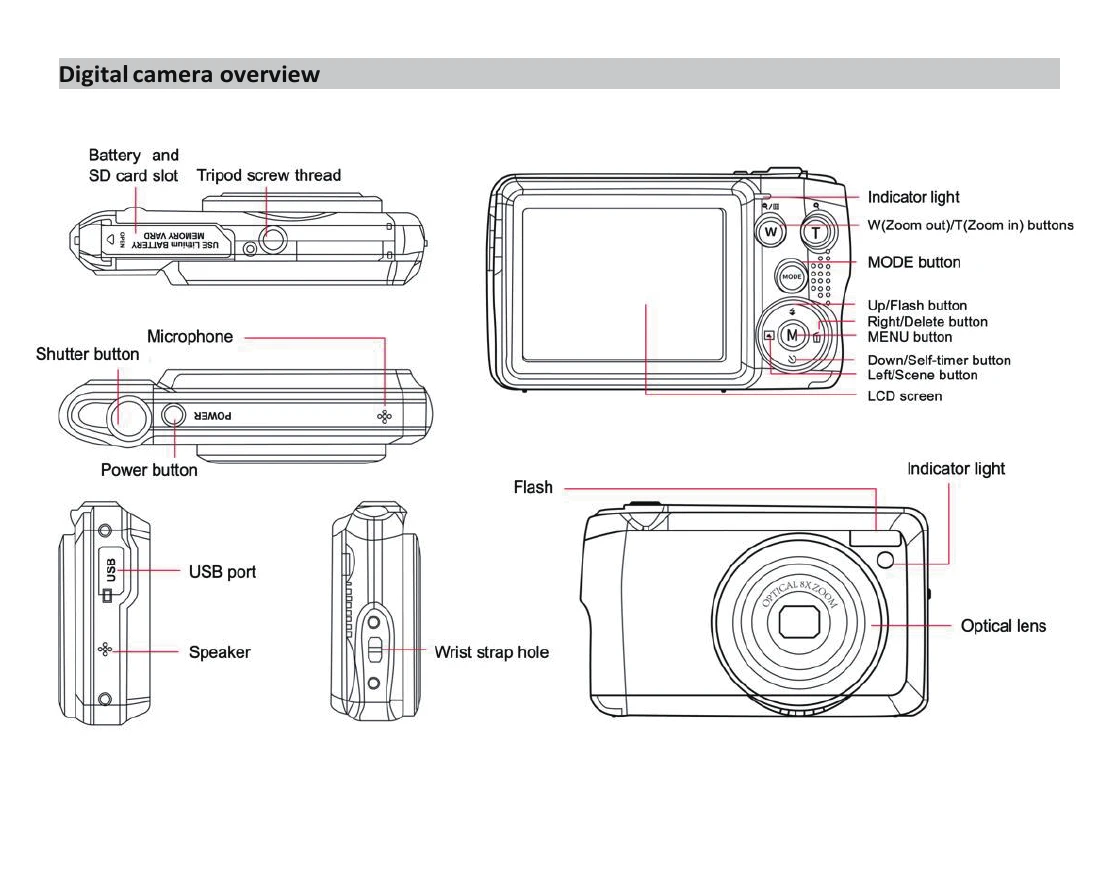
Power on: Press the Power button on the top of the camera. The LCD screen will light up, and the auto-focus zoom lens will open, indicating the camera is ready.
Power off: Press the Power button once while the camera is on. If the battery is low, a red icon will appear, and the camera will turn off automatically.
The camera supports three modes:
Press the MODE button to cycle through the modes. The current mode is indicated by an icon on the top left of the LCD screen.
| Problem | Solution |
|---|---|
| Camera not recognized by computer | Ensure photos were taken. Connect via USB cable or use memory card reader. Verify computer meets minimum system requirements. |
| Lost photos | Ensure sufficient space on SD card. Regularly transfer files to computer for backup. Keep camera powered and avoid interruptions during use. |
| Mac compatibility | Works as a removable disk on Mac OSX (10.5.x or higher). |